
A modern C++ runtime for building fast and reliable applications.
Website · Documentation · Registry · Engineering Notes
Vix.cpp brings the work around native C++ applications into one coherent workflow. It provides a runtime, a command-line interface, SDK profiles, package management, diagnostics, testing, packaging, and production-oriented tooling without changing the language or hiding the native toolchain.
A Vix project remains an ordinary C++ project. It is compiled by a C++ compiler, can interoperate with CMake and existing build systems, and produces native executables and libraries. Vix exists to make the path from source code to a working application more direct, repeatable, and understandable.
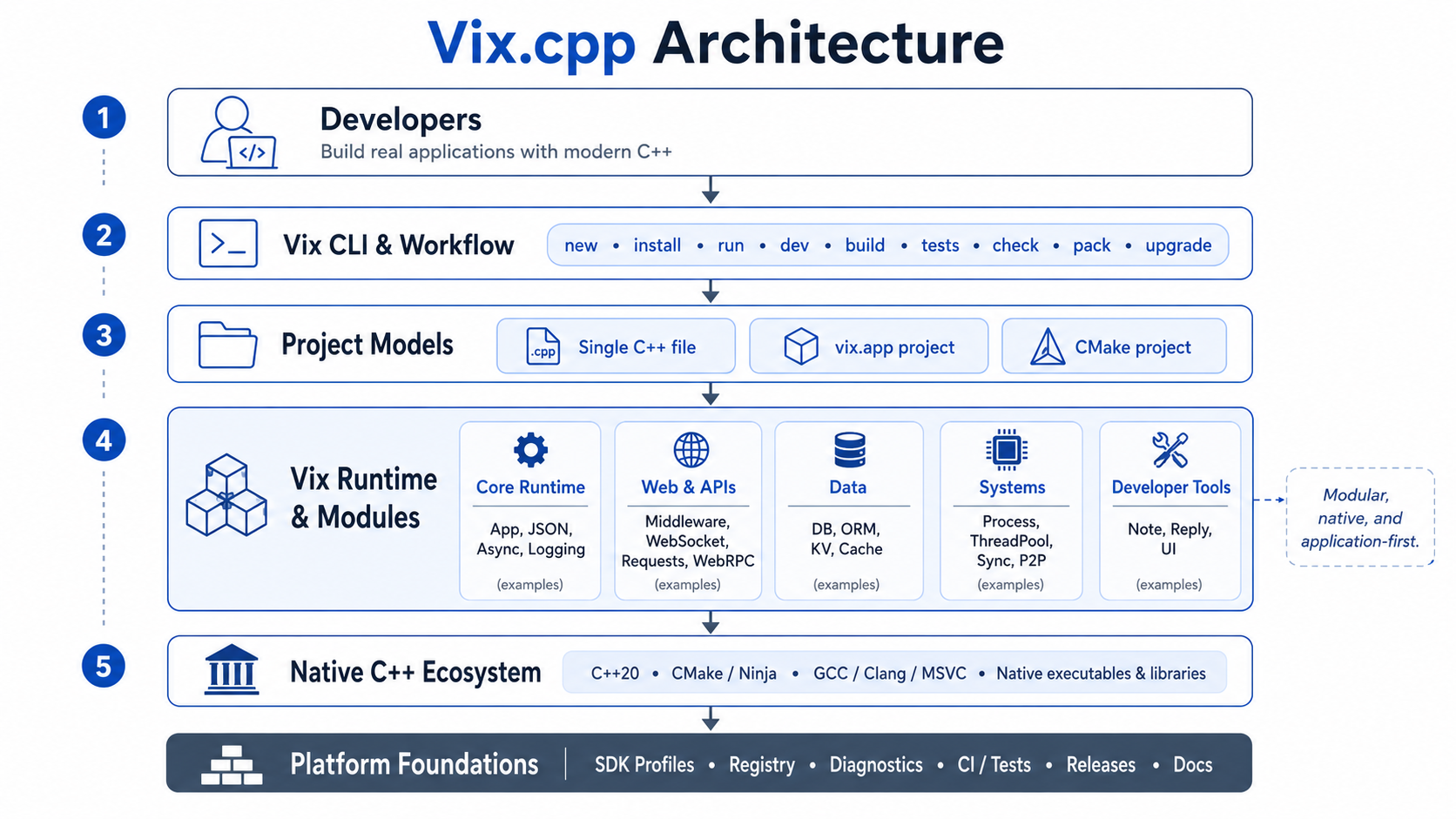
C++ already provides mature compilers, native performance, a large ecosystem, and decades of production use. The difficult part is often everything that must be assembled around the language before a project feels like a complete application.
Even a small project quickly accumulates decisions about directory layout, build configuration, dependency resolution, test execution, development mode, diagnostics, packaging, deployment, CI, and reproducibility across machines. Each tool can solve part of that problem, but the developer is still responsible for turning those separate parts into a consistent workflow.
Vix exists to provide that workflow. It gives C++ projects a common way to be created, run, built, tested, checked, packaged, upgraded, and prepared for production while keeping the underlying compiler, build files, dependencies, and native outputs visible.
Vix is installed in two stages. The install script bootstraps the CLI, then the CLI installs the SDK profile required by the project.
curl -fsSL https://vixcpp.com/install.sh | bashirm https://vixcpp.com/install.ps1 | iexConfirm the installation:
vix --versionThen inspect the available SDK profiles and install the one that matches the application you are building:
vix upgrade --sdk list
vix upgrade --sdk info web
vix upgrade --sdk web
The installation guide covers platform requirements, PATH configuration, SDK profiles, upgrades, and troubleshooting.
The Vix CLI is the main entry point into the platform. It understands Vix projects, standalone C++ files, application manifests, SDK profiles, registry dependencies, build state, diagnostics, tests, and production workflows.
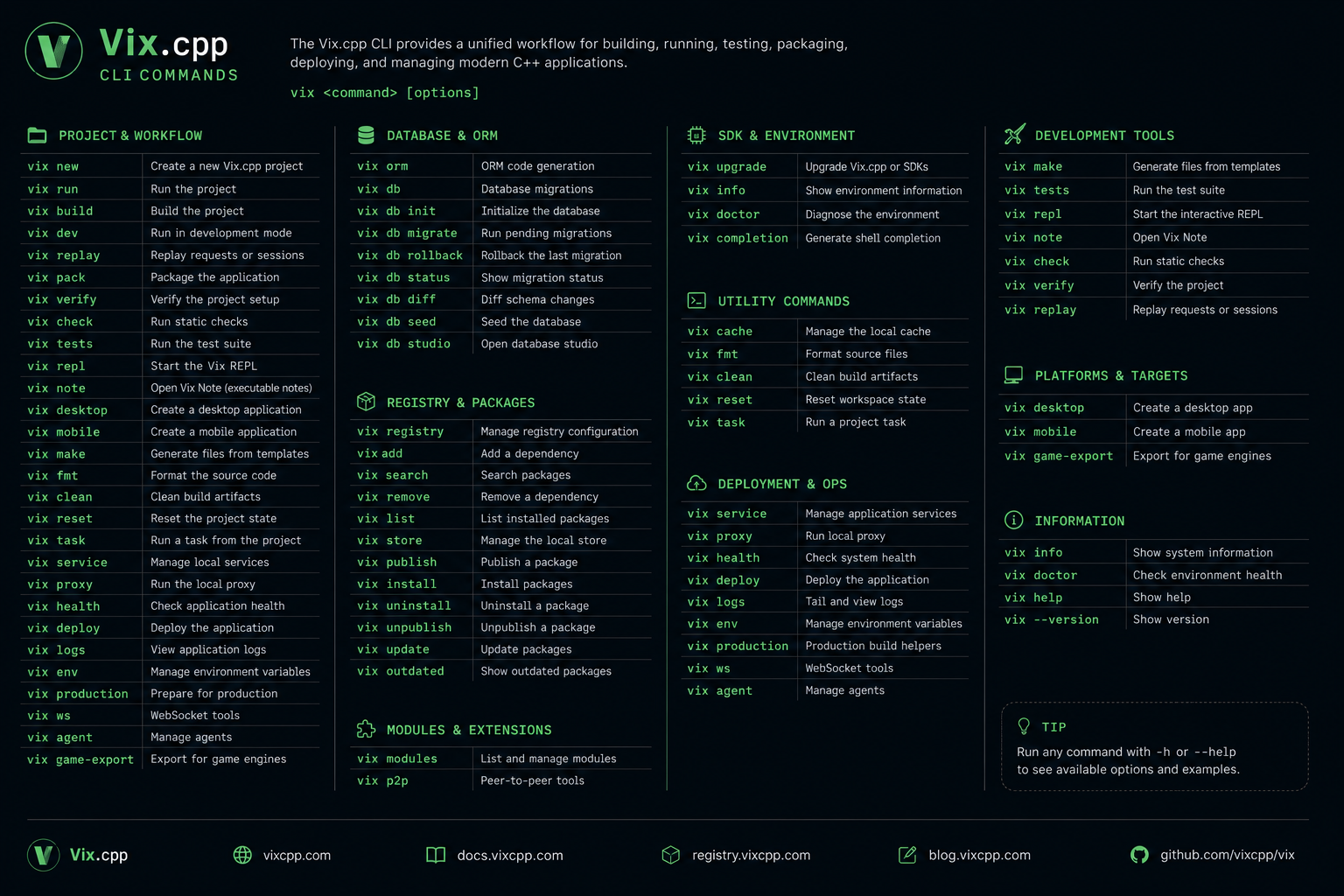
The command surface follows the lifecycle of an application. The same tool can create a project, run it during development, build native outputs, execute tests, inspect problems, manage packages, prepare releases, and update the installed SDK.
vix --help
vix help <command>
The README intentionally does not reproduce the complete command reference. Detailed command behavior, options, examples, and project formats are maintained in the official documentation.
Vix is not a successor to C++, a new language syntax, or a separate compiler model. It does not turn C++ into an interpreted environment, and it does not place applications inside a closed runtime.
It is also not a replacement for CMake. Existing CMake projects can keep their current structure and use Vix around it. New applications that do not need custom CMake logic can begin with a simpler Vix application manifest and still produce normal native build outputs.
This distinction is central to the project. Vix improves the application workflow around C++; it does not remove the tools, formats, or knowledge that make a C++ project portable and maintainable.
Vix is not only a CLI wrapped around a compiler. It ships runtime modules that cover the infrastructure real native applications usually have to assemble by hand: HTTP routing, middleware, async execution, WebSocket support, configuration, environment files, filesystems, processes, databases, serialization, caching, validation, logging, testing, packaging, and diagnostics.
The important part is that these modules are designed to compose as one platform. A backend can use the HTTP runtime, middleware, database layer, validation, logging, environment loading, and tests without each piece introducing a different project model or error style. Existing CMake projects can adopt the modules directly. New Vix applications can use the app-first workflow.
For generated applications, vix.app is the readable source of truth at the project root. It describes the native target, C++ standard, source files, include directories, linked Vix modules, registry dependencies, compile options, resources, output directory, and enabled application modules. Vix reads that manifest, generates an internal CMake project under .vix/generated/app/, and still builds through the normal native toolchain. The generated files are inspectable when debugging, but the project remains driven by the manifest.
name = "api"
type = "backend"
standard = "c++20"

sources = [
  "src/main.cpp",
  "src/app/AppBootstrap.cpp",
  "src/presentation/routes/RouteRegistry.cpp",
]

include_dirs = [
  "include",
  "src",
]

packages = [
  "vix",
]

links = [
  "vix::vix",
]

[module.auth]
enabled = true
path = "modules/auth"
kind = "backend"
depends = []For an existing folder, vix init creates a minimal vix.app from the current project:
vix initA Git dependency can then be added directly from its repository:
vix install https://github.com/fmtlib/fmtVix detects the latest stable version and the public CMake target, then records them in vix.app:
name = "fmt-test"
type = "executable"
standard = "c++20"
sources = ["main.cpp"]

[dependencies.fmt]
git = "https://github.com/fmtlib/fmt"
tag = "12.2.0"
target = "fmt::fmt"
The exact commit is preserved in vix.lock, and the dependency is prepared automatically when the project is built or run:
vix run main.cppFor a temporary test without modifying vix.app:
vix run main.cpp --dep https://github.com/fmtlib/fmtApplication modules let a large Vix application remain a single native process while keeping features such as auth, projects, billing, logs, or deployments behind explicit public and private boundaries.
vix modules init
vix modules add auth
vix modules add realtime --websocket
vix modules check
vix build
Each module owns its public headers, private implementation, tests, dependencies, metadata, route prefix, and CMake target. Enabled modules are declared in vix.app, and Vix generates the registration and linking code required by the application.
WebSocket modules can be created with dedicated workflows:
vix modules add notifications --websocket --workflow attached
vix modules add gateway --websocket --workflow standalone
vix modules add bridge --websocket --workflow bridge
vix modules add client --websocket --workflow client
vix modules check validates module structure, explicit dependencies, enabled state, dependency cycles, duplicate route ownership, and public headers that expose private implementation paths.
See the module documentation, vix.app guide, and application modules guide for the complete reference.
SDK profiles define coherent development environments for different kinds of Vix applications. They allow the CLI, runtime modules, build configuration, and supporting tools to be installed and upgraded together instead of being assembled manually on every machine.
The Vix Registry provides reusable C++ packages that can be added to applications through the Vix dependency workflow. Registry packages remain native C++ dependencies and integrate with normal project builds.
Together, SDK profiles and the registry make it easier to reproduce the same project environment locally, in CI, and across a team without turning the project into a closed ecosystem.
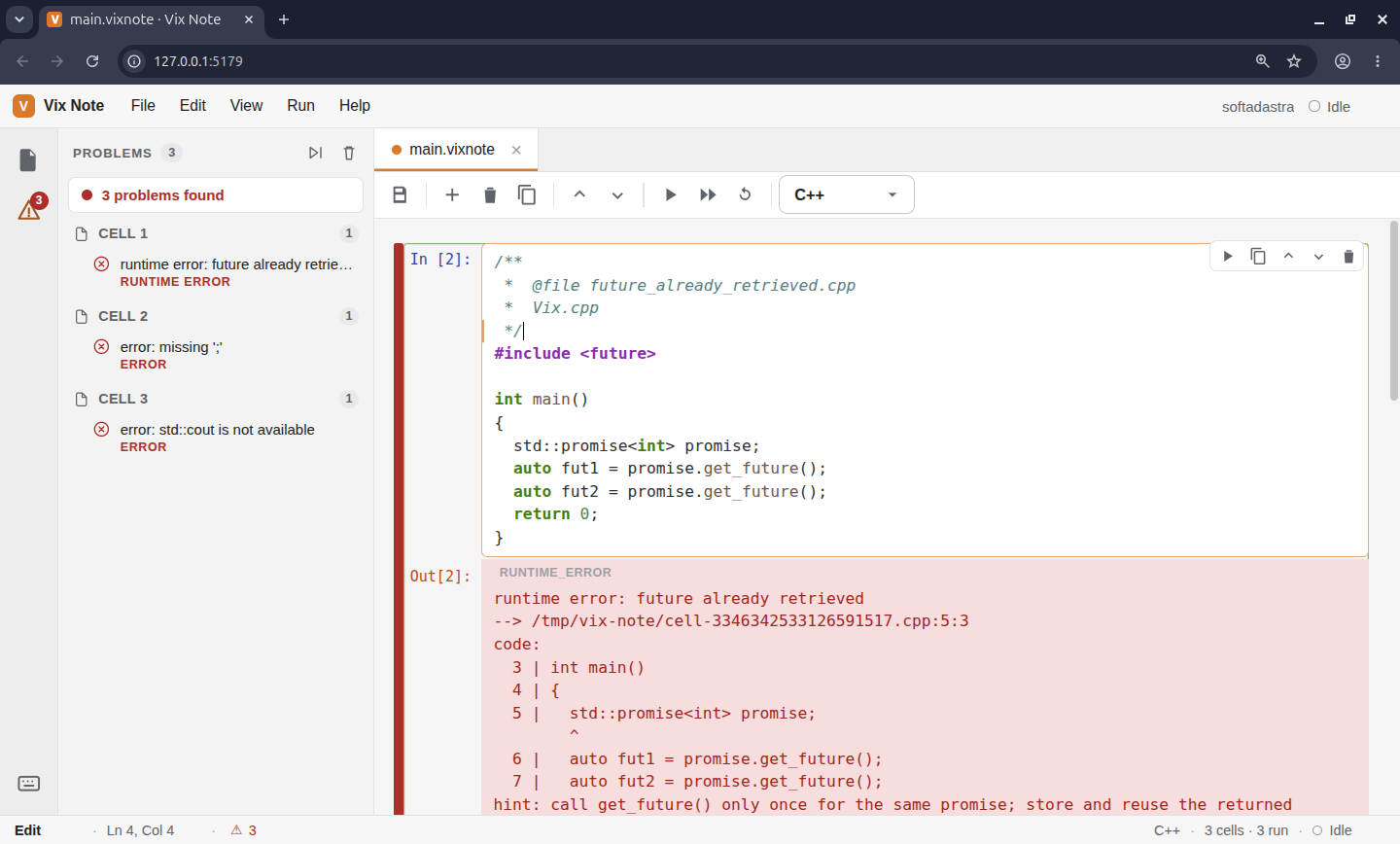
Vix Note provides a visual space for executable C++ notes, examples, experiments, and diagnostics. It uses the normal Vix workflow underneath, so code explored in a note remains connected to the same runtime and toolchain used by a project.
vix noteSoftadastra Cloud is the product layer built around Vix. It gives C++ projects a controlled cloud workspace for the parts of development that need to be shared: workspaces, private packages, package versions, lockfiles, build reports, permissions, access tokens, public profiles, and team activity.
Vix keeps the project local. The compiler, source files, build outputs, and native workflow stay on the developer machine or inside the team’s own CI environment. Softadastra Cloud adds the shared state around that workflow, so a project can move from one developer to a team without losing visibility into what was published, which lockfile was used, which build failed, and who has access.
vix login
vix cloud init
vix cloud status
vix cloud lockfile upload
vix build --report
vix publish --cloud
This connection matters because Vix is not designed only from small examples. It is exercised through a real product workflow where the CLI, manifests, package archives, lockfiles, build reports, permissions, and project metadata have to work together.
Softadastra Cloud keeps native C++ projects understandable after they leave a single machine. Developers can see what exists, what changed, what was published, what failed, and which parts of the project are private or public, while the local-first nature of Vix remains intact.
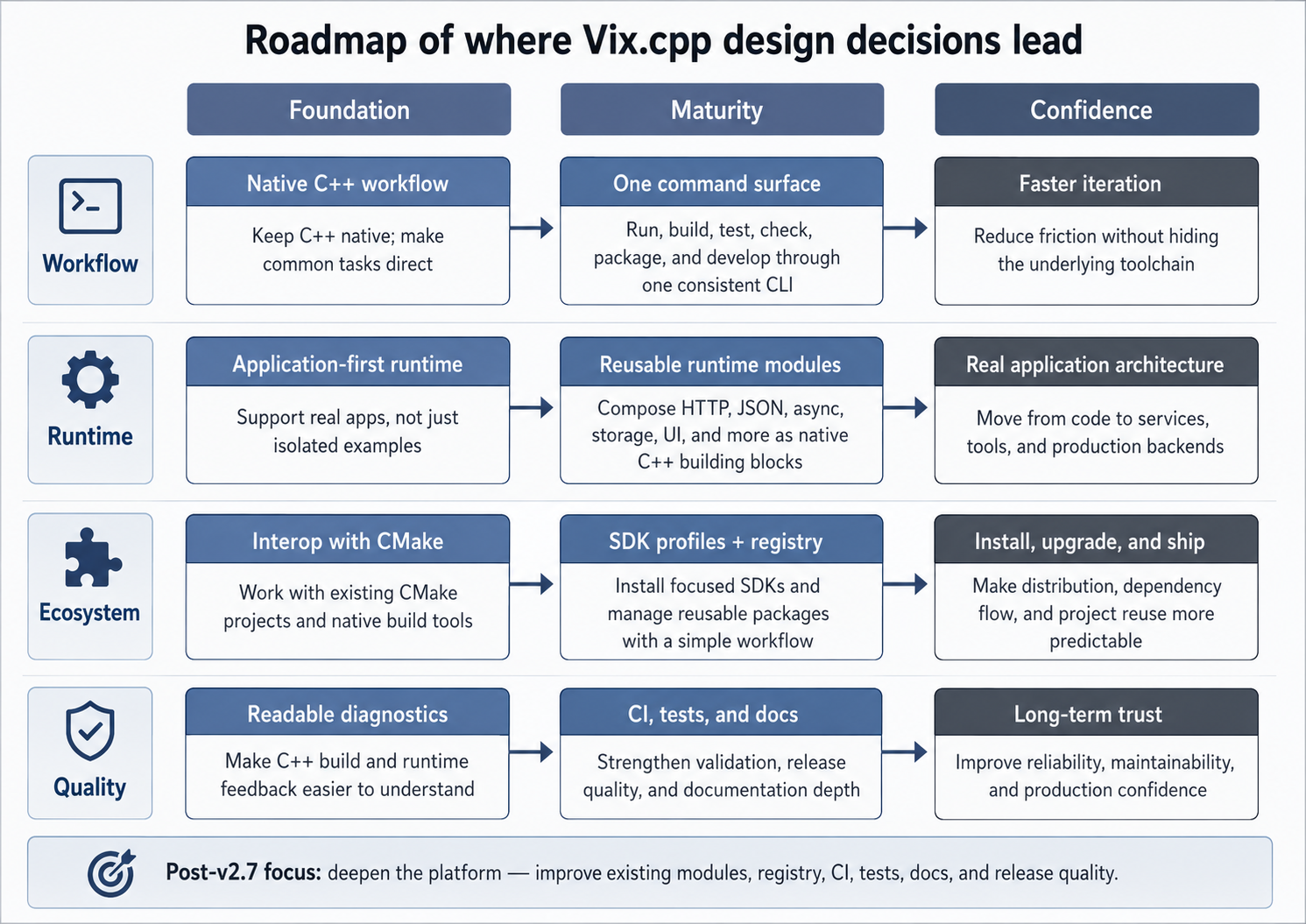
Vix.cpp v2.7 marks an important foundation point for the project. The next phase is centered on improving what already exists rather than continuously expanding the platform with new modules.
The work now focuses on module quality, registry reliability, SDK installation, diagnostics, tests, CI coverage, release quality, examples, documentation, and validation through real applications. This direction is about maturity: fewer unnecessary additions, more depth, better maintenance, and stronger confidence in the complete workflow.
New capabilities can still be added, but they should solve a practical application problem, improve an existing workflow, or strengthen a part of the platform that developers already depend on.
Vix.cpp remains the native foundation. Higher-level libraries and runtimes can grow around it without making the core platform lose focus.
Rix is the optional userland library layer for Vix applications. It provides application-level packages and a unified facade above the core Vix runtime.
Cnerium is a reliability-first backend layer for Vix. It provides a place for backend structure and production-oriented patterns to evolve without turning the core runtime into a large opinionated framework.
Kordex is a JavaScript runtime for reliable local-first applications built on Vix.cpp. It demonstrates how the native platform can support higher-level runtimes while preserving a C++ foundation.
This repository contains the Vix CLI, runtime, modules, SDK profiles, registry integration, tests, examples, release infrastructure, and documentation source. Users normally begin with the packaged CLI and the official documentation; contributors work directly from this repository.
To build Vix.cpp from source, clone the repository with its submodules and follow the build and test instructions in the developer documentation. The documented workflow covers supported platforms, build options, SDK profiles, module tests, and release checks.
Contributions should improve the clarity, reliability, and maintainability of the existing platform. Fixes, tests, diagnostics, documentation, registry improvements, CI work, and careful refinements to current modules are especially valuable.
For substantial changes, begin with an issue or discussion so the design can be considered in the context of the whole platform.
See CONTRIBUTING.md, SECURITY.md, CODE_OF_CONDUCT.md, and CHANGELOG.md for project policies and release history.
Vix.cpp is maintained by Softadastra, a company building tools that simplify modern C++ development.
- Vix.cpp documentation: guides, commands, SDK profiles, modules, examples, and internals.
- Vix Registry: reusable packages for Vix applications.
- Rix: optional userland libraries for Vix projects.
- Engineering Notes: design decisions, releases, benchmarks, and technical articles.
- Softadastra: the company maintaining Vix.cpp.
Vix.cpp is available under the MIT License. See LICENSE for details.