Dev environment for developing with NeoVim — from inside the container itself.
Para a versão em português vá para: LEIAME.md
This is a personal project to keep my main development tools versioned and portable — both for professional use and development-oriented fun projects (usually on a separate container).
The images are published on Docker Hub as thomazmoura/dev-environment.
Project switching with tmux + fzf and fuzzy finding files inside the container:
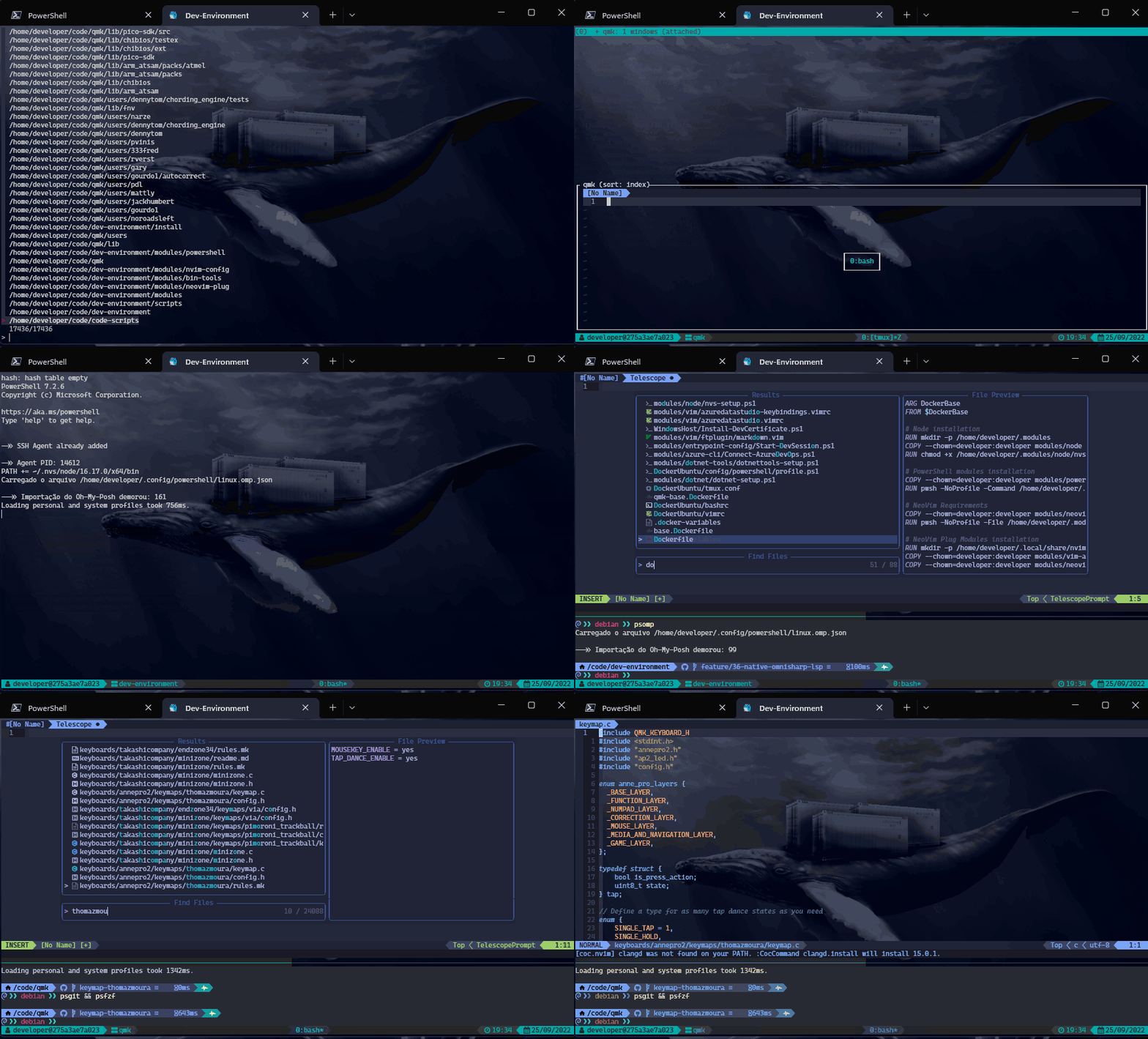
My main intentions with this repo are:
- Keep my main tools versioned and easily accessible, so I can download them anywhere;
- Reduce the need of locally installing (or running) things as admin/root (root-related setup happens at build time; containers run as the non-privileged
developeruser); - Be a central reference to anyone who would like to check a particular tool or setting I use (basically a dotfiles repo that you can run);
- Have a working pipeline where I can update my settings and have them reproduced anywhere I might use them (with automated CI builds on every push);
dev-environment/
├── modules/              # Shared module system (heart of the project)
├── LinuxDevEnv/          # Scripts for setting up a physical Linux/Ubuntu host
├── LinuxHost/            # Scripts for configuring Docker on a Linux host
├── DockerUbuntu/         # Dotfiles baked into the Docker image at build time
├── .devcontainer/        # VS Code / GitHub Codespaces dev container definitions
├── .github/workflows/    # CI/CD: builds and pushes Docker images on push
├── base.Dockerfile       # Stage 1: Debian + PowerShell + .NET + NeoVim + debugger
├── Dockerfile            # Stage 2: base + Node + plugins + Azure CLI + tmux + LSP
└── qmk-base.Dockerfile   # Stage 3 (optional): base + QMK + Rust dependencies
The modules/ directory is the central hub shared by Docker builds and Linux host setups. On Docker builds each module is COPY-ed into the image; on a physical host host-setup.sh creates a symlink from ~/.modules to this directory so changes in the repo are reflected immediately.
| Module | Purpose |
|---|---|
azure-cli/ |
Azure CLI connection and DevOps scripts |
azure-cli-extensions/ |
Azure CLI extension installer |
bin-tools/ |
CLI utilities (yank/clip) made available system-wide |
debugging/ |
Installs netcoredbg (.NET debugger) |
dotnet/ |
.NET SDK installers for Ubuntu 22.04, 24.04 and Debian |
dotnet-tools/ |
.NET global tools setup (runs at session start) |
entrypoint-config/ |
Docker container startup script (Start-DevSession.ps1) |
git/ |
Installs delta (fancy git diff viewer) |
neovim-base/ |
NeoVim npm dependencies (e.g. the neovim npm package) and spell files |
neovim-install/ |
Downloads and installs NeoVim from GitHub releases |
neovim-lsp/ |
Roslyn Language Server, PowerShell Editor Services, Lua Language Server |
neovim-plug/ |
vim-plug plugin list (plug.vimrc) |
neovim-treesitter/ |
Tree-sitter CLI installer (grammars themselves are installed by nvim-treesitter) |
node/ |
Node Version Switcher (NVS) setup |
nvim-config/ |
NeoVim entry point (init.vim) |
powershell/ |
PowerShell module installers (Oh My Posh, etc.) |
powershell-config/ |
PowerShell profiles and Oh My Posh theme |
powershell-install/ |
Standalone PowerShell installer (used in Docker base) |
qmk/ |
QMK firmware build scripts |
rust/ |
Rust toolchain installer |
shell/ |
Bash config, git config, global gitignore, inputrc |
tmux/ |
tmux config and TPM (Tmux Plugin Manager) setup |
universal-ctags/ |
ctags installer |
vim/ |
All NeoVim Lua/vimrc configuration (plugins, keybindings, LSP settings) |
vim-autoload/ |
vim-plug autoload file (plug.vim) |
wsl2/ |
WSL2-specific bashrc, tmux config and Start-DevSession.ps1 |
Config is placed by creating symlinks at the well-known paths:
| Symlink target | Points to |
|---|---|
~/.local/share/nvim/site |
modules/vim/ |
~/.vim |
~/.local/share/nvim/site |
~/.config/nvim |
modules/nvim-config/ |
~/.config/powershell |
modules/powershell-config/ |
~/.shell |
modules/shell/ |
~/.modules |
modules/ (host) or copied directly (Docker) |
The build is split into stages to maximise layer caching:
base.Dockerfile — thomazmoura/dev-environment:base
Debian trixie + apt packages + PowerShell + .NET SDK + NeoVim + netcoredbg. Everything that needs root and changes infrequently.
Dockerfile — thomazmoura/dev-environment:latest
Layered on top of :base. Adds Node.js (via NVS), NeoVim plugins (vim-plug), Azure CLI, git delta, Tmux plugins, LSP servers, and all dotfile symlinks. Runs as the developer user. Container starts by executing modules/entrypoint-config/Start-DevSession.ps1.
qmk-base.Dockerfile — thomazmoura/dev-environment:qmk_base / :qmk
Same two-stage pattern but layered on :base instead of :latest. Adds QMK build dependencies (Python packages, ARM toolchain) and Rust.
LinuxDevEnv/ contains scripts for setting up a physical Ubuntu 24.04 machine so it mirrors the container environment without Docker.
host-setup.sh — the main entry point. Run it once on a fresh Ubuntu 24.04 install. It:
- Installs the Microsoft package repository and apt packages (bat, fd-find, ripgrep, powershell, tmux, etc.)
- Sets system environment variables (
TZ,LANG,TERM,DOTNET_WATCH_RESTART_ON_RUDE_EDIT…) - Installs
fzffrom GitHub releases (newer than the apt version) - Creates
fdas an alias forfdfind - Creates a symlink from
~/.modulesto this repo'smodules/directory - Runs all module scripts (dotnet, PowerShell modules, NeoVim, netcoredbg, Node/NVS, vim-plug, Azure CLI, delta, tmux TPM, LSP)
- Creates all config symlinks (
~/.vim,~/.config/nvim,~/.config/powershell,~/.shell, etc.) - Writes PowerShell environment variables to
~/.profile.ps1 - Creates a symlink to
win32yank.exeif running under WSL2
Additional scripts:
| Script | Purpose |
|---|---|
wezterm-setup.sh |
Installs WezTerm terminal emulator from the official apt repo |
ghostty-setup.sh |
Installs Ghostty terminal emulator from the community mkasberg/ghostty-ubuntu PPA |
flameshot-install.sh |
Installs Flameshot and maps it to the Print Screen key under GNOME/Wayland |
cedilla-wayland-setup.sh |
Fixes the ç dead-key compose sequence for Wayland apps (symlinks .XCompose) |
setup-login-timeout.sh |
Creates a systemd timer that powers off the machine 5 min after boot if no user is logged in |
Install-AspNetCert.ps1 |
Generates and installs the ASP.NET Core localhost HTTPS development certificate |
LinuxHost/ contains scripts for the Linux host when using Docker containers (installing Docker, configuring it, and setting up the host-side PowerShell environment).
.devcontainer/ provides two VS Code / GitHub Codespaces definitions:
thomaz-dev-environment/— extendsthomazmoura/dev-environment:latestand layers Claude Code (@anthropic-ai/claude-code) and Codex (@openai/codex) CLIs on top. Runs as thedeveloperuser. Theanthropic.claude-devVS Code extension is included.ubuntu-claude-codex/— a leaner Ubuntu 24.04 base with Node.js 20.x and the same AI CLIs pre-installed.
Both run claude --version && codex --version after creation to verify the CLIs. Provide ANTHROPIC_API_KEY (and OPENAI_API_KEY if using Codex) via environment variables or Codespaces secrets.
- Docker — the whole point: develop from inside a reproducible container.
- NeoVim — primary editor, configured as a full IDE with LSP, treesitter, telescope, harpoon, and more.
- TMUX — session and window management; TPM manages plugins.
- PowerShell — primary interactive shell (yes, on Linux).
- .NET / C# — main professional language; multiple LTS SDK versions installed.
- Node.js — managed via NVS; required for Angular and NeoVim Copilot integration.
- Angular — frontend framework; relevant plugins enabled.
- Azure CLI —
az devopscommands and custom automation scripts. - git delta — syntax-highlighted diff pager.
- fzf / ripgrep / fd / bat — fast fuzzy search and file navigation utilities.
Built on top of the main :base image for compiling QMK keyboard firmware and exploring Rust, without bloating the main image.
- C/C++ — QMK firmware compilation.
- Rust — study and experimentation container.
Scripts in LinuxDevEnv/ and LinuxHost/ let you apply the same configuration to a bare-metal Ubuntu machine or a WSL2 instance, sharing the same modules/ directory used by the Docker builds.
GitHub Actions (.github/workflows/main.yml) runs on every push:
mainbranch — builds and pushes:base,:latest,:qmk_base, and:qmkto Docker Hub.- Other branches — builds and pushes branch-namespaced tags (e.g.
base_my-branch,my-branch,qmk_base_my-branch,qmk_my-branch) for testing.
Docker layer caching (--cache-from) is used on all builds to keep CI fast.
Configure Docker Hub credentials in repository secrets (DOCKERHUB_USERNAME, DOCKERHUB_TOKEN). Copy .docker-variables to customize your environment (git identity, Azure DevOps org, ASP.NET cert paths, etc.).