





Much quality. Many standards. The Macro Core library exists to save time and development effort! Herein ye shall find a veritable host of MIT-licenced, production quality SAS macros. These are a mix of tools, utilities, functions and code generators that are useful in the context of Application Development on the SAS platform (eg https://datacontroller.io). Contributions are welcome.
You can download and compile them all in just two lines of SAS code:
filename mc url "https://raw.githubusercontent.com/sasjs/core/main/all.sas";
%inc mc;
Documentation: https://core.sasjs.io
- OS independent
- Works on all SAS Platforms
- No X command
- Prefixes:
mf_,mp_
- OS independent
- Works on all SAS Platforms
- No X command
- Prefixes:
mddl_(lib)_-> where lib can be "SAS" (in relation to a SAS component) or "DC" (in relation to a Data Controller component)
This library will not be used for storing data entries (such as formats or datalines). Where this becomes necessary in the future, a new repo will be created, in order to keep the NPM bundle size down (for the benefit of those looking to embed purely macros in their applications).
- Function and macro names are identical, except for special cases
- Prefixes:
mcf_
The fcmp macros are used to generate fcmp functions, and can be used with or without the proc fcmp wrapper.
Wait - this is a macro library - what is LUA doing here? Well, it is a little known fact that you CAN run LUA within a SAS Macro. It has to be written to a text file with a .lua extension, from where you can %include it. So, without using the proc lua wrapper.
To contribute, simply write your freeform LUA in the LUA folder. Then run the build.py, which will convert all files with a ".lua" extension into a macro wrapper with an ml_ prefix (embedding the necessary data step put statements). You can then use your module in any program by running:
/* compile the lua module */
%ml_yourmodule()

/* Execute.  Do not use the restart keyword! */
proc lua;
submit;
  print(yourStuff);
endsubmit;
run;- Prefixes:
ml_
Macros used in SAS EBI, which connect to the metadata server.
- OS independent
- Metadata aware
- No X command
- Prefixes:
mm_
- OS specific
- Metadata aware
- X command enabled
- Prefixes:
mmx_
These macros are used for building applications using @sasjs/server - an open source REST API for Desktop SAS.
- OS independent
- @sasjs/server aware
- No X command
- Prefixes:
ms_
Macros used for interfacing with SAS Viya.
- OS independent
- No X command
- Prefixes:
mv_,mvf_
Sometimes it is helpful to use a macro that can be used interchangeably regardless of the server type on which is is running (SASVIYA, SAS9, SASJS).
- OS independent
- No X command
- Prefixes:
mx_
First, download the repo to a location your SAS system can access. Then update your sasautos path to include the components you wish to have available, eg:
%let repoloc=/your/path/core;
options insert=(sasautos="&repoloc/base");
options insert=(sasautos="&repoloc/ddl");
options insert=(sasautos="&repoloc/fcmp");
options insert=(sasautos="&repoloc/lua");
options insert=(sasautos="&repoloc/meta");
options insert=(sasautos="&repoloc/metax");
options insert=(sasautos="&repoloc/server");
options insert=(sasautos="&repoloc/viya");
options insert=(sasautos="&repoloc/xplatform");
The above can be done directly in your sas program, via an autoexec, or an initialisation program.
Alternatively - for quick access - simply run the following! This file contains all the macros.
filename mc url "https://raw.githubusercontent.com/sasjs/core/main/all.sas";
%inc mc;This repo ships with agent skills (in .agents/skills) to help coding assistants write idiomatic SAS and follow the @sasjs/core standards. The canonical versions live in the sasjs/skills repo and cover SAS language, @sasjs/core, @sasjs/adapter, @sasjs/cli, the SASjs framework, and @sasjs/server.
To install or update them in your own project, run:
npx skills add sasjs/skills- filenames much match macro names
- filenames must be lowercase, without spaces
- macro names must be lowercase
- one macro per file
- prefixes:
- mcf_: macro compiled functions (proc fcmp)
- mddl_: macros containing DDL (Data Definition Language)
- mf_: macro functions (can be used in open code).
- mfv_: macro functions that work only in Viya
- ml_: macros that are used to compile LUA modules
- mm_: metadata macros (interface with the metadata server).
- mmx_: macros that use metadata and are XCMD enabled (working on both windows and unix)
- mp_: macro procedures (which generate sas code)
- ms_: macro procedures that will only work with @sasjs/server
- mv_: macro procedures that will only work in Viya
- mx_: macros that work on Viya, SAS 9 EBI and SASjs Server
- follow verb-noun convention
- unix style line endings (lf)
- individual lines should be no more than 80 characters long
- UTF-8
The Macro Core documentation is created using doxygen. A full list of attributes can be found here but the following are most relevant:
- file. This needs to be present in order to be recognised by doxygen.
- brief. This is a short (one sentence) description of the macro.
- details. A longer description, which can contain doxygen markdown.
- param. Name of each input param followed by a description.
- return. Explanation of what is returned by the macro.
- version. The EARLIEST SAS version in which this macro is known to work.
- author. Author name, contact details optional
All macros must be commented in the doxygen format, to enable the online documentation.
SAS code can contain one of two types of dependency - SAS Macros, and SAS Includes. When compiling projects using the SASjs CLI the doxygen header is scanned for @li items under the following headers:
  <h4> SAS Macros </h4>
  @li mf_nobs.sas
  @li mm_assignlib.sas

  <h4> SAS Includes </h4>
  @li somefile.ddl SOMEFREF
  @li someprogram.sas FREFTWO
The CLI can then extract all the dependencies and insert as precode (SAS Macros) or in a temp engine fileref (SAS Includes) when creating SAS Jobs and Services (and Tests).
When contributing to this library, it is therefore important to ensure that all dependencies are listed in the header in this format.
- Indentation = 2 spaces. No tabs!
- no trailing white space
- no invisible characters, other than spaces. If invisibles are needed, use hex literals.
- Macro variables should not have the trailing dot (
&varnot&var.) unless necessary to prevent incorrect resolution - The closing
%mendstatement must contain the macro name, eg%mend mymacro;(enforced by thehasMacroNameInMendlint rule). - All macros should be defined with brackets, even if no variables are needed - ie
%macro x();not%macro x; - Mandatory parameters should be positional, all optional parameters should be keyword (var=) style.
- All dataset references must be 2 level (eg
work.blah, notblah). This is to avoid contention when options DATASTMTCHK=ALLKEYWORDS is in effect, or the USER library is active. - Avoid naming collisions! All macro variables should be local scope. Use system generated work tables where possible - eg
data ; set sashelp.class; run; data &output; set &syslast; run; - Where global macro variables are absolutely necessary, they should make use of
&sasjs_prefix- see mp_init.sas - The use of
quit;forproc sqlis essential, to avoidWARNING: You cannot disconnect or terminate session XXXX until the procedure completes.when terminating CAS sessions in Viya. - Use sasjs lint!
- All macros should be compatible with SAS versions from support level B and above (so currently 9.3 and later). If an earlier version is not supported, then the macro should say as such in the header documentation, and exit gracefully.
- It's best to avoid special / non-ASCII characters for compatibility with the widest variety of SAS installations.
We are currently on major release v5. The following breaking changes were applied as part of the v5 release:
- mcf_xxx macros - the
insert_cmpliboption was removed (the option is now checked automatically with value inserted only if needed) - mcf_xxx macros - the
wrap=option now defaults to YES for convenience. Set this option explicitly to avoid issues. - mf_getuniquelibref.sas - the deprecated maxtries parameter was removed (no longer needed)
- mp_abort.sas - the redundant type= parameter was removed.
- mp_coretable.sas - removed, and replaced by the standalone macros in the
ddlfolder - mp_getddl.sas - renamed to mp_ds2ddl.sas (consistent with other ds2xxx macros). The default for SHOWLOG is now YES instead of NO.
- mp_testservice.sas - renamed to mp_execute.sas (as it doesn't actually test anything)
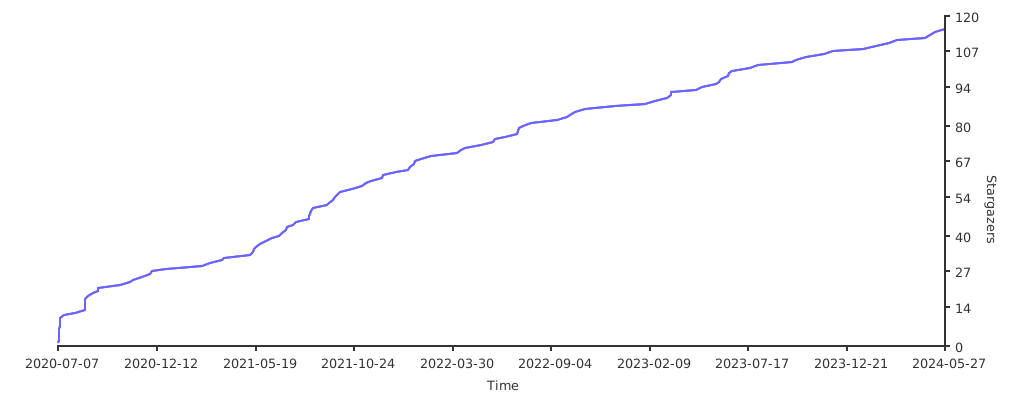
If you find this library useful, please leave a star and help us grow our star graph!
The following repositories are also worth checking out:
- chris-swenson/sasmacros
- Criptic/sas_snippets
- greg-wotton/sas-programs
- KatjaGlassConsulting/SMILE-SmartSASMacros
- paul-canals/toolbox
- rogerjdeangelis
- SASJedi/sas-macros
- scottbass/sas
- xieliaing/SAS
- yabwon/sas_packages

Thanks goes to these wonderful people (emoji key):


This project follows the all-contributors specification. Contributions of any kind welcome!