


PKShortVideo is an Objective-C video library for iOS chat interfaces. It provides short video recording, AVFoundation-based playback, and a legacy GPUImage/OpenGL ES playback path.
Historical development notes are available in the original development article.
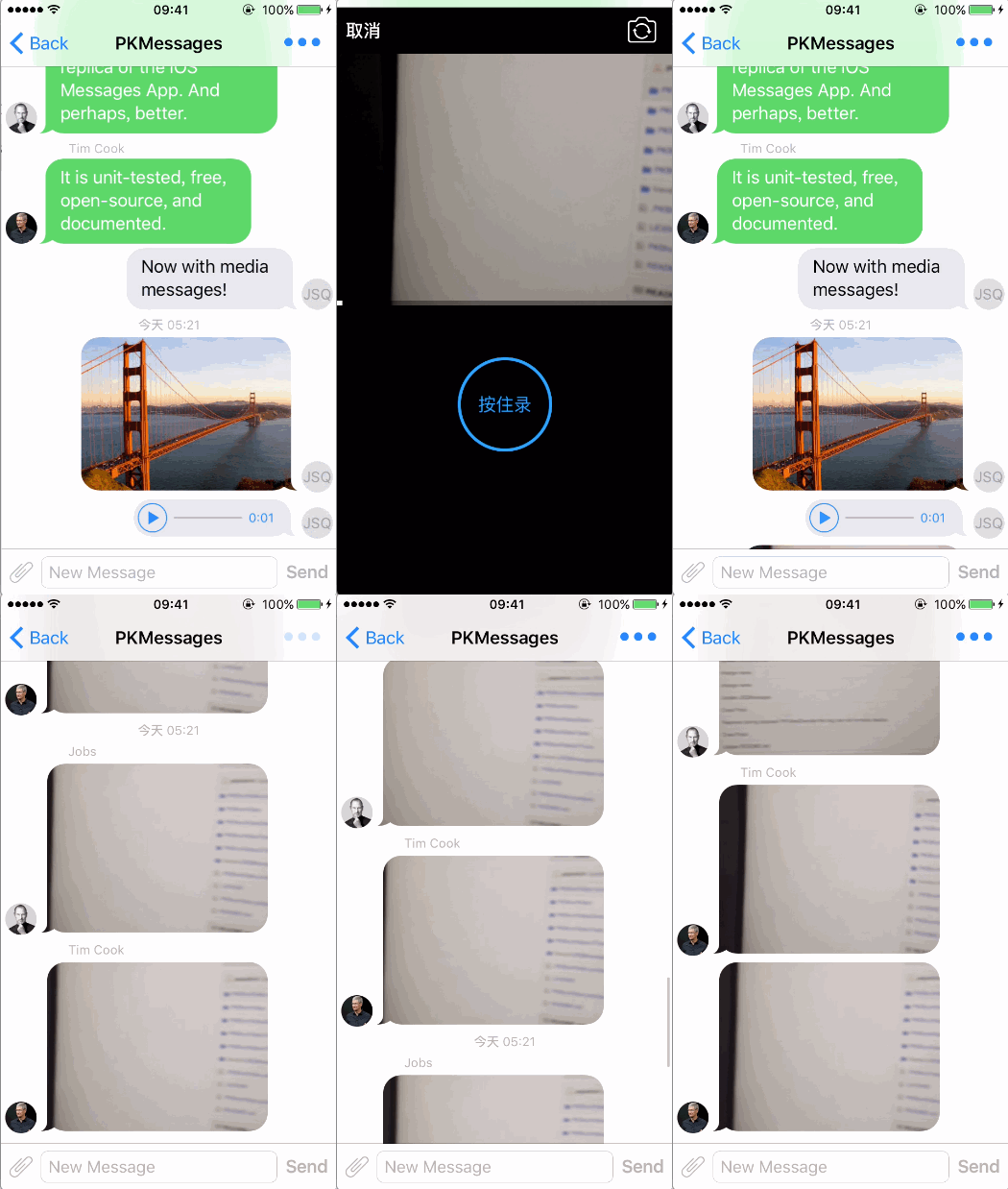
- Short video playback in a chat interface.
- Recommended AVPlayer playback through
PKPlayerView. - Legacy GPUImage/OpenGL ES playback through
PKChatMessagePlayerView. - Custom-resolution video recording through
PKShortVideoRecorder. - A ready-to-present recording interface through
PKRecordShortVideoViewController. - Camera switching, recording, playback, re-recording, and AVAssetWriter-based MP4 output.
- Minimum deployment target: iOS 12.0, as configured in the Xcode project and Podspec.
- Xcode 26.2 (validated locally).
- Objective-C and ARC.
The PKShortVideo scheme builds successfully with Xcode 26.2 using a generic iOS destination and code signing disabled. Device runtime behavior still requires validation on physical hardware.
Add the following to your Podfile:
pod 'PKShortVideo', '~> 0.9.7'Then run:
pod installOpen the generated .xcworkspace in Xcode after installation.
Import the public umbrella header:
#import "PKShortVideo.h"In Xcode, choose File > Add Package Dependencies, enter the repository URL, and select the PKShortVideo product. The package manifest supports iOS 12.0 and includes the library's bundled recording controls.
For a Package.swift dependency:
dependencies: [
    .package(url: "https://github.com/pepsikirk/PKShortVideo.git", from: "0.9.7")
]
Add the product to the target that uses the library:
.product(name: "PKShortVideo", package: "PKShortVideo")Swift code can import the module with import PKShortVideo. Objective-C clients using the Swift package can import #import <PKShortVideo/PKShortVideo.h>. The existing Xcode project and CocoaPods integration continue to use the original umbrella header.
Recording requires camera and microphone usage descriptions in the application Info.plist:
<key>NSCameraUsageDescription</key>
<string>Record short videos.</string>
<key>NSMicrophoneUsageDescription</key>
<string>Record audio for short videos.</string>
PKShortVideoRecorder requests camera and microphone access when startRunning is called. Camera access is required; if microphone access is denied or restricted, recording continues as a video-only file and no audio writer track is created. Custom UIs can inspect recorder.isAudioRecordingAvailable after the capture session starts.
Use PKRecordShortVideoViewController when the built-in recording UI is sufficient:
PKRecordShortVideoViewController *viewController =
    [[PKRecordShortVideoViewController alloc]
        initWithOutputFilePath:path
                    outputSize:CGSizeMake(320, 240)
                   themeColor:[UIColor colorWithRed:0.0
                                               green:153.0 / 255.0
                                                blue:1.0
                                               alpha:1.0]];
viewController.delegate = self;
[self presentViewController:viewController animated:YES completion:nil];
Implement the completion callback:
#pragma mark - PKRecordShortVideoDelegate
- (void)didFinishRecordingToOutputFilePath:(NSString *)outputFilePath {
    [self.demoData addShortVideoMediaMessageWithVideoPath:outputFilePath
                                                 playType:PKPlayTypeAVPlayer];
    [self finishSendingMessageAnimated:YES];
}Use PKShortVideoRecorder when the application needs to own the recording UI. The existing initializer retains automatic encoder settings; use a configuration object when a product needs a specific capture preset or encoder bit rate:
PKShortVideoRecorderConfiguration *configuration = [PKShortVideoRecorderConfiguration new];
configuration.videoBitRate = 1500000; // bits per second; 0 keeps the automatic default
configuration.audioBitRatePerChannel = 64000;
configuration.captureSessionPreset = AVCaptureSessionPreset1280x720;

self.recorder = [[PKShortVideoRecorder alloc]
    initWithOutputFilePath:self.outputFilePath
                outputSize:self.outputSize
    recordingConfiguration:configuration];
self.recorder.delegate = self;

AVCaptureVideoPreviewLayer *previewLayer = [self.recorder previewLayer];
previewLayer.videoGravity = AVLayerVideoGravityResizeAspectFill;
previewLayer.frame = self.view.bounds;
[self.view.layer insertSublayer:previewLayer atIndex:0];
Control the capture session and recording lifecycle:
[self.recorder startRunning];
[self.recorder startRecording];

if (self.recorder.isRecording) {
    // Disable duplicate start and camera-switch actions while recording.
}

[self.recorder stopRecording];
[self.recorder stopRunning];
outputSize continues to control the encoded dimensions. For H.264 safety, the recorder aligns those dimensions internally before creating the writer track. A positive videoBitRate or audioBitRatePerChannel overrides the automatic defaults; a zero value preserves the original behavior. If an optional captureSessionPreset is not supported by the active device, the recorder falls back to its output-size based preset selection.
The recorder also provides capability-safe exposure controls without exposing its internal AVCaptureDevice. Invoke them after the capture session has been prepared; the completion runs on the main queue and reports unsupported hardware or invalid values.
[self.recorder setContinuousAutoExposureWithCompletion:^(NSError *error) {
    if (error != nil) {
        NSLog(@"Automatic exposure was unavailable: %@", error);
    }
}];

CMTime duration = CMTimeMake(1, 120);
[self.recorder setCustomExposureWithDuration:duration ISO:100.0f completion:^(NSError *error) {
    if (error != nil) {
        NSLog(@"Custom exposure was unavailable: %@", error);
    }
}];
The recorder reports completion and failures through PKShortVideoRecorderDelegate:
- (void)recorder:(PKShortVideoRecorder *)recorder
didFinishRecordingToOutputFilePath:(NSString *)outputFilePath
            error:(NSError *)error {
    if (error != nil) {
        NSLog(@"Recording failed: %@", error);
        return;
    }

    NSLog(@"Recorded video: %@", outputFilePath);
}The repository demo uses JSQMessagesViewController to demonstrate media-message integration. A custom media item can wrap PKPlayerView:
#import "PKPlayerView.h"

self.playerView = [[PKPlayerView alloc]
    initWithFrame:mediaFrame
         videoPath:self.videoPath
      previewImage:self.image];

- (void)play {
    [self.playerView play];
}

- (void)pause {
    [self.playerView stop];
}
For collection-view based chat UIs, start playback when a video cell becomes visible and stop it when the cell leaves the screen:
- (void)collectionView:(UICollectionView *)collectionView
 willDisplayCell:(UICollectionViewCell *)cell
forItemAtIndexPath:(NSIndexPath *)indexPath {
    id media = self.demoData.messages[indexPath.item].media;
    if ([media respondsToSelector:@selector(play)]) {
        [media play];
    }
}

- (void)collectionView:(UICollectionView *)collectionView
didEndDisplayingCell:(UICollectionViewCell *)cell
forItemAtIndexPath:(NSIndexPath *)indexPath {
    id media = self.demoData.messages[indexPath.item].media;
    if ([media respondsToSelector:@selector(pause)]) {
        [media pause];
    }
}Use PKFullScreenPlayerViewController for full-screen AVPlayer playback:
PKFullScreenPlayerViewController *viewController =
    [[PKFullScreenPlayerViewController alloc]
        initWithVideoPath:item.videoPath
             previewImage:item.image];
[self presentViewController:viewController animated:NO completion:nil];PKPlayerView is the recommended playback implementation for new integrations. It uses AVPlayer and is the path validated by the current demo.
PKChatMessagePlayerView remains available for compatibility with the original GPUImage/OpenGL ES implementation. It is a legacy path retained for existing users; new integrations should prefer PKPlayerView.
The Xcode project contains two chat playback demos:
PKMessageViewController: legacy GPUImage/OpenGL ES playback.PKMessageViewController2: AVPlayer playback throughPKPlayerView.
Open PKShortVideo.xcodeproj in Xcode, select the PKShortVideo scheme, and run the demo on a physical iOS device for camera and microphone recording.
The project is actively maintained again. The current package version is 0.9.7, matching PKShortVideo.podspec, the 0.9.7 Git tag, and the CocoaPods Trunk release. The repository is being updated incrementally while preserving the original Objective-C public APIs and legacy playback path.
- Added
PKShortVideoRecorderConfigurationfor capture presets and video/audio encoder bit-rate overrides. - Added capability-safe automatic and custom exposure APIs to
PKShortVideoRecorder. - Kept the existing recorder initializer and automatic defaults unchanged for source compatibility.
- Fixed a recording crash when microphone permission is denied; recordings now fall back to video-only output.
- Improved capture-session startup and shutdown handling.
- Added GitHub Actions build, unit-test, UI-test, and Podspec validation checks.
- Updated the project for modern Xcode and iOS build settings.
- Improved camera capture, recording lifecycle, AVAssetWriter handling, and player lifecycle management.
- Updated the CocoaPods specification for the current deployment target.
- Added compatibility and warning cleanup for the Xcode 26 toolchain.
PKShortVideo is provided under the MIT license. See LICENSE for details.
- GitHub: @pepsikirk
- Email: pepsikirk@gmail.com