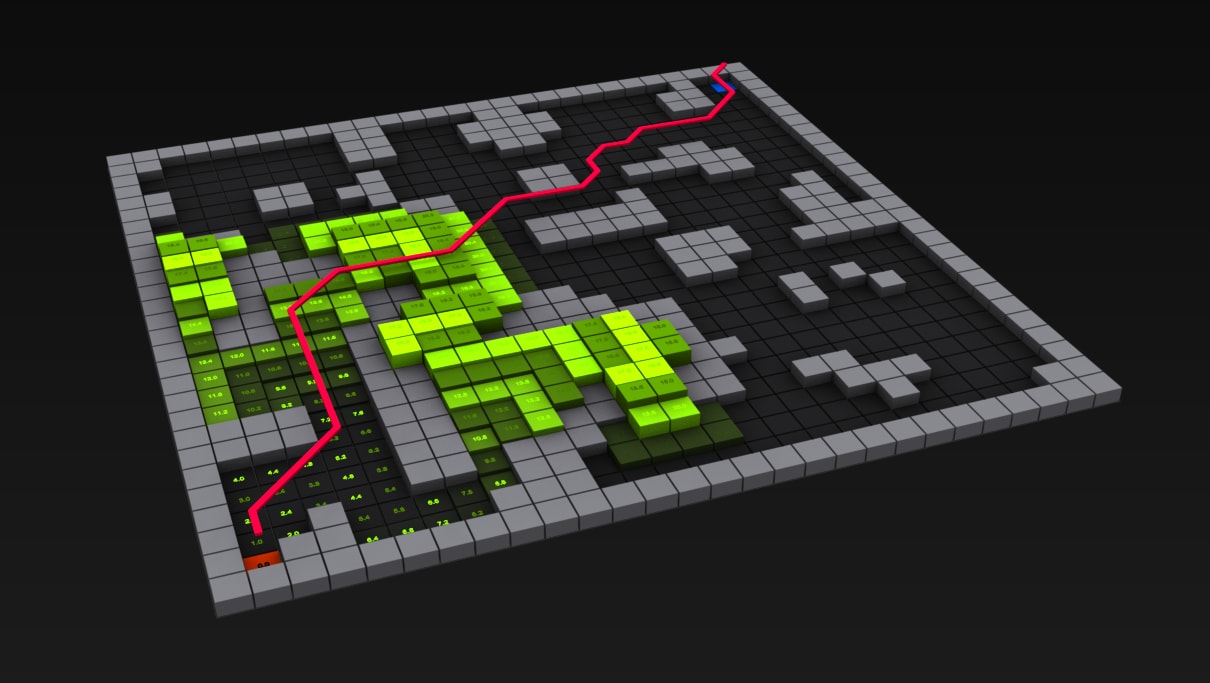
An interactive, zero-dependency web app that visualizes how two classic graph algorithms (Breadth-First Search and Dijkstra's) explore a grid and find the shortest path in real time.
I built it from scratch with plain JavaScript so the focus stays on the algorithms and the DOM, not on framework boilerplate.
▶ Live Demo · Blog post · Technical deep dive




Graph traversal and shortest-path algorithms power a lot of everyday technology: GPS navigation, network routing, game AI, and robotics. They're also a rite of passage for any software engineering student, and they're much easier to actually understand once you can watch them run.
This visualizer turns those abstract algorithms into something you can see. You draw a maze, pick an algorithm, and watch it fan out node by node until it finds (or fails to find) the destination. Then the shortest path draws itself back to the start.
- Two algorithms side by side. BFS for unweighted shortest paths and Dijkstra's for weighted ones, so you can compare how they explore the same maze.
- Live, animated exploration. Each visited node pulses as the frontier expands, which shows exactly how the algorithm works its way outward.
- Self-drawing shortest path. Once the target is reached, the optimal route animates back from end to start.
- Interactive maze editing. Click to place start and end nodes and toggle walls, or hit Reset for a fresh randomly generated maze.
- Adjustable grid. Resize anywhere from 5×5 up to 50×50 to see how performance scales.
- Performance timer. High-resolution
performance.now()timing so you can benchmark runs. - Graceful edge cases. Clear "No path found" feedback when walls seal off the target.
- Works on desktop and touch. Mouse clicks on desktop, tap and long-press on mobile.
| Action | Desktop | Mobile |
|---|---|---|
| Set start node | Left click | Tap (under 500 ms) |
| Set end node | Right click | Long press (500 ms or more) |
| Add or remove a wall | Click a cell | (desktop only) |
| Generate a new maze | Reset button | Reset button |
| Run the algorithm | Start button | Start button |
- Pick a start and end node.
- Optionally draw walls, or press Reset for a random maze.
- Choose BFS or Dijkstra's and set the grid size.
- Press Start and watch it work.
No build tools, no npm install, no configuration. It's just static files.
git clone https://github.com/<your-username>/pathfinding.git
cd pathfinding
Then either open index.html directly in your browser, or serve it locally:
# Python 3
python -m http.server 8000
# then visit http://localhost:8000| Layer | Choice | Why |
|---|---|---|
| Structure | HTML5 | Semantic, accessible markup |
| Styling | Tailwind CSS (CDN) | Utility-first styling with no build step |
| Logic | Vanilla JavaScript (ES6+) | async/await, DOM APIs, and the algorithms themselves, with no framework in the way |
Why no framework? The goal was to show the fundamentals (DOM manipulation, event handling, and asynchronous control flow) without hiding them behind React or Vue. You can clone it, open it, and point to what every line is doing.
The grid is a flat array of cell objects, each one holding its DOM element plus a bit of algorithm state (isWall, distance, visited). Keeping it flat means neighbor lookups are just a little index math instead of nested-loop bookkeeping:
function getNeighbors(index) {
  const neighbors = [];
  const row = Math.floor(index / gridSize);
  const col = index % gridSize;

  if (row > 0) neighbors.push(index - gridSize);            // North
  if (row < gridSize - 1) neighbors.push(index + gridSize); // South
  if (col > 0) neighbors.push(index - 1);                   // West
  if (col < gridSize - 1) neighbors.push(index + 1);        // East

  return neighbors.filter(i => !cells[i].isWall);
}- BFS explores level by level with a queue, which guarantees the shortest path on an unweighted grid in
O(V + E). - Dijkstra's always expands the closest known node using a priority queue (kept simple here by sorting an array each step).
- A small
await setTimeout(..., 10)between steps is what turns the search into a watchable animation.
Want the full breakdown (data model, complexity analysis, animation system, and design trade-offs)? See FEATURES.md.
Data structures (queues, priority queues), classic graph algorithms (BFS, Dijkstra's, path reconstruction), asynchronous JavaScript, DOM manipulation and event handling, responsive UI with disabled and loading states, and performance measurement.
- A* search with a Manhattan-distance heuristic
- A proper binary heap for Dijkstra's priority queue
- Weighted terrain and diagonal movement
- Maze-generation algorithms (recursive backtracking, Prim's)
- An animation speed slider
pathfinding/
├── index.html   # Layout, controls, and grid container
├── app.js       # All application logic (~360 lines)
├── README.md    # You are here
└── FEATURES.md  # In-depth technical documentation
- Live demo: libe.dev/pathfinding
- Blog post: Building a Pathfinding Visualizer: my path to graph algorithms
- Portfolio: libe.dev
Built by libe.dev