

Come and talk to us on Discord — bug reports, help getting it running, and what is being worked on.
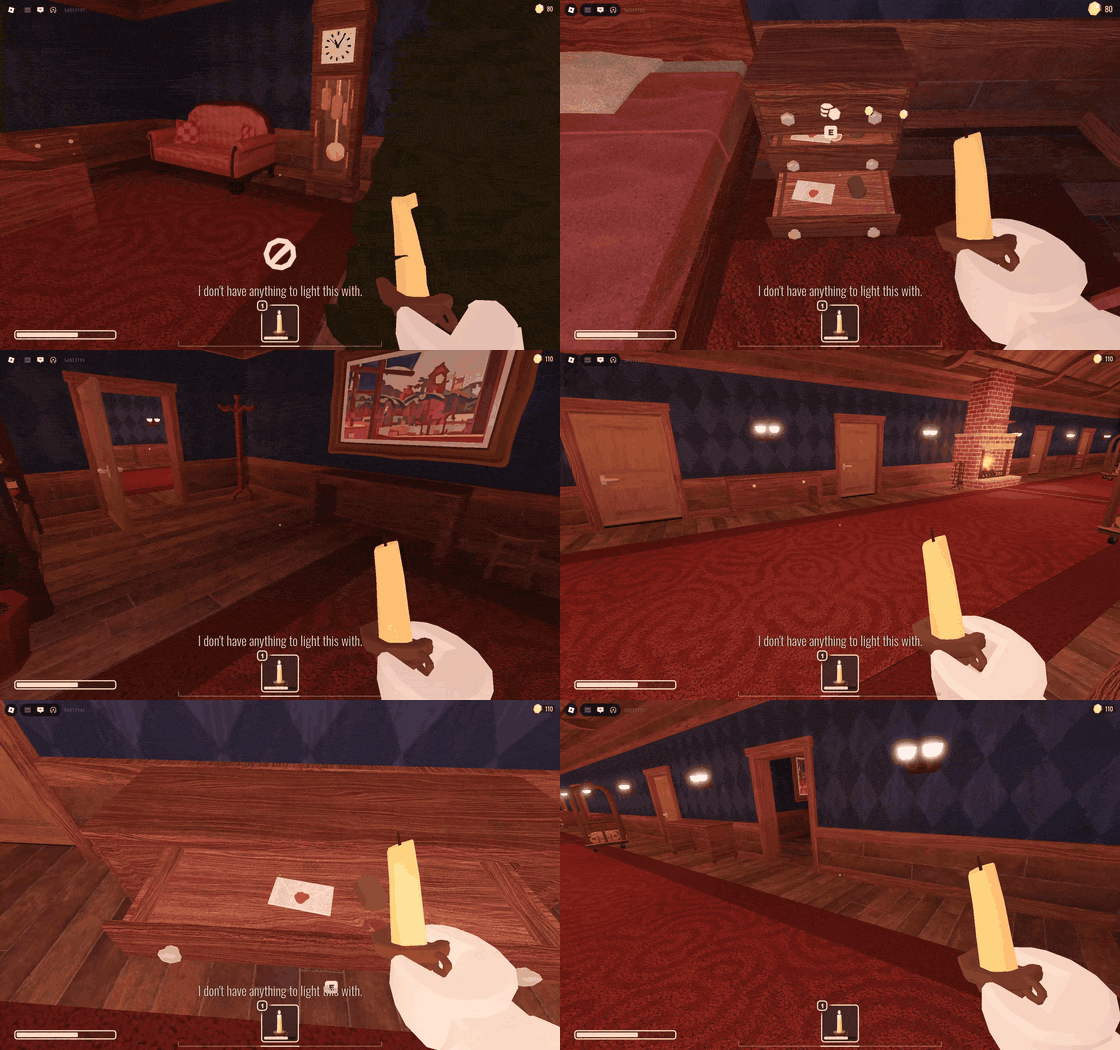
Roblox DOORS, unmodified, on Cordial — Fedora, GNOME, no Android device involved.
This clip at full size,
and more in docs/media — including an hour of Rivals cut down to its eliminations.
A hobby project, not a commercial one. Please don't DMCA it.
flatpak remote-add --if-not-exists cordial https://luohoa97.github.io/cordial/cordial.flatpakrepo
flatpak install cordial io.github.luohoa97.Cordial
flatpak run io.github.luohoa97.Cordial
Or take the AppImage from the releases
page, which installs nothing and
runs anywhere: chmod +x Cordial-x86_64.AppImage && ./Cordial-x86_64.AppImage.
§2 compares the two and says what is less proven about the
newer one.
You also need Roblox's Android build, which Cordial does not ship and never will. First run has one button — Download Roblox — and that is the whole procedure. Cordial fetches the build from APKPure, a third-party mirror, and refuses to install anything that is not signed by Roblox's own signing certificate, so a mirror that alters a byte is caught rather than trusted.
It waits for the press rather than starting on its own. This is a few hundred megabytes and somebody may be paying for it by the megabyte.
You never have to press it if a build is already on the machine:
- Already have Sober? Then there is nothing to press. Cordial finds the APK Sober downloaded and uses it where it lies — no copy, no modification, and Sober keeps working.
- Supply your own APK and point Cordial at it in Settings, or see §1. It gets the same signature check.
Two things worth knowing before you type that, rather than after: the remote
is not signed, so flatpak install proves the download matches the
repository's checksums and nothing about who built it — the full
explanation is below and you should read it. And Cordial is
early: sign-in, gameplay, mouse and keyboard, text entry and audio all work; the
status table says
exactly what does not.
Cordial loads Roblox's official Android x86-64 engine directly on Linux through a purpose-built runtime: the AOSP bionic linker, a bionic/glibc shim, a JNI VM in place of Android's, and a framework layer that answers the client's calls. No emulator, no container, no virtual machine. It talks to your GPU through Vulkan or GLES2 the way any native application does.
It is also, as far as we know, the first user-extensible Roblox client. Not extensible in the sense of replacing files or setting flags — other launchers do both — but in the sense that you can write code that runs as part of the client and adds functionality to it. Plugins are ordinary programs in their own processes, they get named capabilities rather than access, and Cordial's own default features are built as plugins so the API has to be good enough for them.
To be exact about the claim, since "first" invites correction: browser extensions extend Roblox's website; launcher mods replace assets; FastFlag managers change settings Roblox already reads. None of those load user-written code into the client. If a client that does already exists, we would genuinely like to know.
What this is not is a way to modify Roblox itself. There is no script execution, no hooking, and no memory access — absent from the API rather than disabled. Plugins extend Cordial.
- Join the Discord 💬
- Read the documentation 📖
- Start here — what works and what is blocking 🧭
- Install it 🔽
- How it actually works 🔬
- Why there is no script execution, ever 🔒
- Report a bug 🐛
- Contribute 🛠️
New here? Read the warning below first, then
docs/NEXT.md — it is written for someone picking the project
up cold and says plainly what is broken and what has already been ruled out.
This is NOT an official Roblox client. This project is in no way endorsed or sponsored by Roblox Corporation. Roblox is a trademark of Roblox Corporation.
It was built in two days by Claude Code —
Anthropic's Claude, model Opus 5 — with the architecture directed by a human
working alongside it. That is not a footnote. It is why the commit messages are
long, why docs/ records what was disproved as carefully as what worked, and why
nobody should assume a human reviewed every line. The engineering is real and
every finding was verified by running the thing rather than reasoning about it.
Roblox does not support third-party clients and operates automated systems that ban accounts for using them, up to permanent termination. Those systems have produced false positives against innocent players.
Roblox has not approved this project, and has not been asked to. There is no green light, no arrangement, and no reason to assume tolerance. Treat every claim below as our reasoning about risk, not as permission.
Cordial does not modify the Roblox client — it runs the official Android build, does not touch the engine's process, and any asset overlay you enable is non-destructive and off by default — but it necessarily presents a synthesised Android environment, and a heuristic detector does not owe you that distinction. Alternate accounts are not a shield; Roblox's Terms reserve the right to terminate those too.
Enforcement at this scale is automated and runs in waves, and accounts sharing an address get associated with each other. If you test, use a throwaway account on a different IP — see CONTRIBUTING.md.
If your account matters to you, do not use it here. If you use Cordial and get banned, that is on you, and the maintainers cannot get it reversed.
Cordial is a compatibility runtime, not a cheat tool, and we do not endorse or support using it to exploit Roblox or any experience running on it.
That is not only a position, it is a property of the build. Cordial has no script executor, no hooking, no memory access to the Roblox process and no API by which a plugin could request any of them — not disabled, absent, so there is no primitive in the binary to extract or re-enable in a fork. Plugins run in a separate process behind a capability broker and cannot read Cordial's memory, let alone Roblox's. The reasoning is in ADR-001 and ADR-003, and it is deliberately load- bearing: a restriction can be lifted in a fork, a capability that was never built cannot.
If you want an executor, this is the wrong project, and pull requests adding one will be declined.
- Reliable mouse capture on Wayland and X11. Right-drag and first-person camera control now constrain the desktop cursor to the gameplay window. On Wayland the constraint is attached to GTK/GDK's real pointer and to the toplevel surface, which fixes the cursor escaping on KWin while Roblox's internal pointer remained centred. Relative, unaccelerated motion and side mouse buttons are carried through the Android input bridge as well.
- Visible text entry. A native GTK overlay mirrors the focused Android text field, including caret movement, editing operations and Wayland IME preedit, so typed characters no longer remain invisible until focus is lost.
- Web-view bridge. Marketplace, Profile and Communities continue to use a
signed-in WebKitGTK view, and both Roblox bridge formats (
executeRobloxandRobloxWKHybrid.command) are forwarded to the engine. The Vulkan canvas is lowered while a dialog or text overlay is visible and restored on close. - Fullscreen on the gameplay window. F11 now targets the window containing the engine, hides the compact header bar and persists the choice per profile. The header uses the desktop's libadwaita/KDE theme colours instead of a transparent custom background.
- Lower Android-runtime overhead. Pointer positions use atomic pairs; ordinary Vulkan presents no longer contend on the screenshot mutex; looper accounting runs only when instrumentation is enabled; unchanged text avoids repeated cloning and GTK updates; and environment/configuration probes used by hot paths are cached for the process lifetime. These are runtime changes, not Roblox graphics options or FastFlags.
Loads libroblox.so natively |
✅ |
| Warm start | ✅ the engine is extracted once and reused; only a new Roblox build re-extracts |
App shell reaches APP_READY (Landing) |
✅ |
| Renders — Vulkan on both backends | ✅ |
| Networking / HTTPS | ✅ |
| Signing in | ✅ via Quick Sign-in, which is a code flow and needs no typing |
| Keyboard in an experience | ✅ WASD, space, the lot |
| Mouse: navigation, buttons, field focus | ✅ |
| Mouse: turning the camera | ✅ right-drag, and the delta is the compositor's unaccelerated one — using the accelerated pair made sensitivity depend on your desktop mouse settings and made the camera speed up through a fast sweep |
| Scroll wheel | ✅ |
| Frame rate | ✅ a flat 60 on MAILBOX, where FIFO gave a variable 35–50 |
| Feral GameMode | ✅ registered while the client runs |
| Typing into text fields | ✅ a GTK overlay draws focused Android fields live, including caret movement and Wayland IME preedit |
| Pointer capture in first person | ✅ the cursor stays in the window, reported from real play |
| Staying signed in across a restart | ✅ cookies and identity kept in the desktop keyring, not a file |
| Loading into an experience | ✅ world, avatar and UI render, signed in |
| Two accounts at once | ✅ two profiles, two instances, side by side — see below |
| Window — libadwaita header bar, engine as a subsurface | ✅ |
| Launching from the shell | ✅ finds a build, or explains how to get one |
| Choosing a profile | ✅ a chooser above the Launch button; creates one, and shows a profile another window holds as unavailable |
| Audio | ✅ sound in an experience, reported from real play; the OpenSL ES bridge into PipeWire was measured with a control before that |
| Web views (Marketplace, Profile, Communities…) | 🟡 they render in a real signed-in WebKitGTK window, with correct canvas stacking; both observed JavaScript bridge formats now reach the runtime, but more pages still need interactive coverage |
| Asset overlays (custom textures, sounds, fonts) | ✅ drop a file mirroring the APK's assets/ tree into ~/.config/cordial/overlay and it is served instead; nothing is modified, remove the file and the original returns |
| Fullscreen | ✅ F11 acts on the gameplay window, hides the compact themed header bar and persists per profile |
| The engine's content store | ✅ RbxStorage initialises and is read back — a real SQLite database, the engine's own files table, eight engine-created partitions, and cache hits rising across launches. Assets are no longer refetched every session |
| Clean shutdown | ✅ full pause/stop/destroy sequence, observed in the engine's own log |
| Plugins | 🟡 host, broker and per-profile grants now enforce every capability, not only flags.*/presence.* as before — notify, url.open, asset overlays, flags.write and cross-plugin events all reach a real effect; Settings can grant or revoke a capability, and install or remove a plugin from a local .tar.zst archive; still no in-app fetch from a remote index, so the marketplace half of the registry is unbuilt |
Frame rate measured with pointer motion driven for the whole run, because presents drop to exactly 1/s when nothing is happening and every earlier figure in this repository was that idle throttle integrated: a flat 60.0 on MAILBOX against a variable 35–50 on FIFO, four runs of 120 s.
What is left is polish and broader live coverage. Focused text fields now have a desktop overlay, and web views forward both bridge formats observed in Roblox pages. Those paths still need testing across more field types, input methods and web pages; a page-specific bridge command can still expose engine vocabulary Cordial has not observed yet.
Pointer capture and the content store were both on this list and are not any more.
The content store took fifty attempts and forty-six sections, and the answer
was a call made too late. The engine wants nativeSetCacheDirectory before
GameActivity.initializeNativeCode, not after it. That is the whole of it.
The paragraph that stood here described a different mechanism — init running
during the engine's ELF constructors and memoising a failure — and it was
wrong. So were several of the explanations before it. Nearly every scoring
method used along the way turned out to be measuring something else: a log
channel believed silent that is not, a marker that fires in working runs too,
and an ordering signature that could not have come out any other way. The
corrections are in docs/analysis/flag-init.md
§41 onwards, and they are more useful than the fix.
The store is verified rather than assumed: three runs producing a database against a control producing none, and hit counts rising on a second launch against the same profile.
The keyboard took a week and the answer was one number.
nativePassKeyEvent wants Linux evdev codes; it was being handed Android
keycodes. Exactly one key worked — D, because AKEYCODE_D and KEY_D are
both 32 — and Alt made the character jump, because AKEYCODE_ALT_LEFT is 57 and
so is KEY_SPACE. Four theories were measured and disproved first, every one of
them assuming a number was wrong somewhere. The numbers were fine; the
vocabulary was.
Two accounts at once, and it was not built as a feature. A profile is
storage and an instance is a window (ADR-012),
with an flock so one profile cannot be opened twice — which leaves nothing
stopping two different profiles running side by side, each with its own
session, settings and plugin grants. On Windows this traditionally needed a
second desktop session. Each instance is a whole engine, so budget around 1.5 GB
of memory apiece.
Install it expecting rough edges. It plays; it is not finished.
Cordial is early. You can sign in, load an experience and play it with a keyboard and mouse; pointer capture, live text entry and gameplay-window fullscreen are implemented, but web views and different input methods still need broader testing. The status table above says what works — read it before you install.
- x86-64 Linux
- A Wayland session. X11 still starts, through Flatpak's fallback socket, but ADR-011 makes Wayland the backend Cordial targets and says X11 is not developed further
- Roblox's official Android client, which you supply — Cordial ships no Roblox code, APK or assets and never will
From an installed APK you need the lib/x86_64/ objects and the base APK.
The shortest route to one is the Download Roblox button, which fetches and verifies a build without you leaving Cordial. That is new; it used to be "install Sober first", and that answer still works.
Sober downloads Roblox's Android build for its
own use, and Cordial still looks for it there —
~/.var/app/org.vinegarhq.Sober/data/sober/packages/x86_64/. Nothing is copied
and nothing is modified; Cordial reads the APK where it already is. If you have
Sober, Cordial finds its build and never asks you for one. You are free to keep
using Sober afterwards, or not.
If you have an APK of your own, Settings takes a path to it, and --apk takes
one on the command line. On a split build the engine is in
split_config.x86_64.apk rather than base.apk; Cordial checks the siblings
itself and says which it tried when it cannot find one.
Nothing else. The Flatpak carries the toolchain and the libraries with it; the list of build dependencies moved down to §3, where it belongs.
Two ways, and they suit different people. Building from source (§3) is for people changing Cordial, not for people running it.
Flatpak is the one to pick if you have no reason to prefer the other. It is sandboxed, it updates in place, and the manifest is the reference every other package here is built to match.
The AppImage is one file that runs on any distribution. No remote to add, no package manager, nothing installed system-wide -- download it, make it executable, run it. It is the right answer on a distribution whose packaging Cordial does not build for, or if you would rather not add a third-party Flatpak remote to your machine at all.
The AppImage is newer and less proven than the Flatpak, and the honest state of it is in §2.2. Read that before choosing it.
flatpak remote-add --if-not-exists cordial \
    https://luohoa97.github.io/cordial/cordial.flatpakrepo
flatpak install cordial io.github.luohoa97.Cordial
Then launch Cordial from your desktop's application list, or:
flatpak run io.github.luohoa97.Cordialflatpak update picks up new builds. Uninstall with
flatpak uninstall io.github.luohoa97.Cordial, and
flatpak uninstall --delete-data io.github.luohoa97.Cordial if you also want the
profiles, the sign-in and the extracted Roblox build gone.
Download Cordial-x86_64.AppImage from the releases
page, then:
chmod +x Cordial-x86_64.AppImage
./Cordial-x86_64.AppImage
That is the whole procedure. It carries GTK4, libadwaita and WebKitGTK with it,
so it does not care what your distribution ships. It installs nothing; delete
the file and Cordial is gone, though your profiles stay in ~/.local/share
until you remove them yourself.
It needs FUSE, which nearly every desktop has. If it refuses to start, run it
with --appimage-extract-and-run and it will unpack to a temporary directory
instead.
What is not yet established about it. The AppImage bundles WebKitGTK's
helper executables by hand, because linuxdeploy follows linked libraries and
WebKitGTK spawns WebKitWebProcess and WebKitNetworkProcess as separate
programs rather than linking them. That bundling is believed correct and has
not been confirmed on a machine other than the one that built it. If the
sign-in window comes up blank, that is the reason, and the Flatpak is
unaffected -- please report it rather than assuming Cordial is broken.
Updates are manual: the AppImage does not update itself, so download a newer one when a release appears. The Flatpak does update itself, which is the main practical reason to prefer it.
Before you extend that trust: the remote is not signed, and what that does and does not protect you from is worth your attention rather than your having skimmed past it on the way to a command to paste. It is immediately below rather than above the commands, because it deserves reading properly and not standing between you and trying the thing first. If you would rather not extend that trust at all, §3 builds the same package from source and is the whole of the alternative.
The remote is not signed. There is no GPG key on it, so flatpak install
verifies that the download matches the repository's own checksums and nothing
beyond that. What it does not do is prove who built it: anyone who can write to
the GitHub Pages site — including anyone who takes over the GitHub account, and
GitHub itself — can serve a different package under the same name and your
machine will install it without complaint. That is a weaker guarantee than
Flathub's and you should know which one you are getting. Signing is wired up in
.github/workflows/flatpak.yml and switches on
the day a maintainer adds a key — the precise procedure for that is written down
in docs/design/flatpak-remote-signing.md
so it does not have to be worked out under pressure. The commands above do not
change when it does, but a remote added while it was unsigned stays unverified,
so re-add it.
Cordial is not on Flathub, and on current policy it cannot be. Flathub's
generative-AI policy does not allow applications containing AI-generated or
AI-assisted code, documentation or content, and Cordial contains a great deal of
both — the git history records it in Co-Authored-By trailers rather than
hiding it. The policy allows exceptions for mature, well-maintained projects,
and that is the only route; it is not one to take by quietly deleting the
evidence. This remote is therefore the distribution channel, not a stopgap
until a better one arrives. Being a third-party client that fetches a
proprietary build at the user's request is not itself the obstacle — Sober's own
published manifest for org.vinegarhq.Sober grants --share=network and
downloads Roblox's Android build at runtime with no extra-data source and
nothing bundled, the same shape this project uses, and it has been live on
Flathub throughout. The AI policy is the whole of what stands in the way, not
what Cordial downloads or when.
Note
Measured end to end on 2026-08-05, flatpak 1.18.0, against the published
URL rather than a stand-in: remote-add accepted, remote-ls returning
app/io.github.luohoa97.Cordial/x86_64/master, install placing both
cordial-shell and cordial-run in /app/bin, and flatpak run bringing up
the launcher window and holding it. The appstream branch resolves and the
metainfo validates, so a software centre lists it too.
One known limitation of the Flatpak specifically. The updater asks NetworkManager on the system bus whether your connection is metered, the sandbox has no system bus, and the check fails closed — so a Flatpak install treats every connection as metered and will not download a Roblox build in the background unless you turn on Download on metered connections. Manual downloads are unaffected.
The workflow
is worth a glance before a fresh install: it publishes only on a green run, so
a red one on main means the remote is serving the previous build.
You do not need this to run Cordial — §2 is the install route, and it is measured to work. Build from source if you are changing Cordial, if you would rather not extend trust to an unsigned remote, or if you want a build with your own patches in it.
Building needs rather more than running does:
- Clang — AOSP bionic uses C11
_Atomicinside C++ headers and GCC rejects it - GTK4 (≥ 4.10) and libadwaita (≥ 1.4) development packages — the core shell
in
crates/cordial-shellisAdwApplicationWindow/AdwToolbarViewend to end (see ADR-002 and ADR-011), andgtk4-sys/libadwaita-syslink against them viapkg-configat build time. Fedora:dnf install gtk4-devel libadwaita-devel. Debian/Ubuntu:apt install libgtk-4-dev libadwaita-1-dev. Arch:pacman -S gtk4 libadwaita - PipeWire's development headers (
pipewire-devel/libpipewire-0.3-dev), optional — for OpenSL ES audio.native/CMakeLists.txtdetects them viapkg-configand compiles the real audio backend if found, or the previous link-only stub (no sound, but everything else works) if not. Either waylibpipewire-0.3.soitself isdlopen'd at run time, never linked, so a build made with the headers still runs — audio-less — on a machine that only has the runtime library, or neither.
To build the Flatpak yourself, which produces the same package the remote serves:
git clone https://github.com/luohoa97/cordial
cd cordial
packaging/build-flatpak.sh --install
That one needs no submodules: the manifest pins third_party/libjnivm and
third_party/mcpelauncher-linker by commit and fetches them itself, and it
pins every crate by the sha256 already in Cargo.lock
(packaging/cargo-sources.json). flatpak-builder downloads the lot up front;
the compile itself runs with the network unshared, so what comes out is
reproducible (issue #3). If you
change a dependency, run python3 packaging/cargo-sources.py in the same
commit as the Cargo.lock change or the Flatpak build will fail with
no matching package.
That is not what keeps Cordial off Flathub, and this file used to say it was.
The obstacle is Flathub's generative-AI policy, which Cordial's commit trailers
put it plainly on the wrong side of; docs/HANDOVER.md has the reasoning.
For development, skip Flatpak and build the binaries directly. This one does want the submodules:
git clone --recursive https://github.com/luohoa97/cordial
cd cordial
cargo build --releaseFrom the package, the shell is what starts — it finds a Roblox build, or explains how to get one, and launches the engine for you:
flatpak run io.github.luohoa97.CordialFrom a source build, the loader can be run on its own, which is what a debugging session wants and nobody else does:
cargo run --release --bin cordial-run -- \
  --lib-dir /path/to/lib/x86_64 --apk /path/to/base.apk \
  --host-libc --game-activity --run 30
A window opens, the engine comes up, and it renders Roblox's logged-out landing
page at about 27 fps. --run is how many seconds to stay up.
CORDIAL_MONITOR=<n> |
open on the nth monitor instead of the primary one |
CORDIAL_FULLSCREEN=1 |
cover that monitor |
CORDIAL_WINDOW_POS=<x>,<y> |
explicit position, overrides the above |
CORDIAL_RESOLUTION=<w>x<h> |
render resolution, default 1280x720 |
CORDIAL_DPI_SCALE=<f> |
UI density Roblox lays out against; 1.0 is a low-density phone |
CORDIAL_ANDROID_TRACE=1 |
log Android API calls |
CORDIAL_COUNT_GL=1 |
report graphics calls on exit |
CORDIAL_MONITOR=1 CORDIAL_FULLSCREEN=1 cargo run --release --bin cordial-run -- \
  --lib-dir /path/to/lib/x86_64 --apk /path/to/base.apk \
  --host-libc --game-activity --run 30
cordial-run --help lists the rest.
Roblox is configured by FastFlags, and Cordial lets you override any of them.
Create ~/.local/share/cordial/profiles/<profile>/flags.json (or point
CORDIAL_FLAGS at another file) with a flat object. Installed as a Flatpak the
sandbox moves ~/.local/share to ~/.var/app/io.github.luohoa97.Cordial/data, so the
same file is ~/.var/app/io.github.luohoa97.Cordial/data/cordial/profiles/<profile>/flags.json
— INFERRED from how Flatpak remaps XDG_DATA_HOME, not yet checked against an
installed package.
{
  "DFFlagRbxTransportUseRtcioRna": false,
  "FIntTaskSchedulerAutoThreadLimit": 8,
  "FStringDebugGraphicsPreferredBackend": "Vulkan"
}
Values may be written as booleans, numbers or strings — Roblox stores them all as strings and Cordial converts. The overrides are merged into the settings document the engine is given at startup, and the launch log reports how many were applied.
FFlag, FInt and FString are read once at startup, so changing them
needs a relaunch. Only the DFFlag/DFInt/DFString family is re-read while
the client is running. That distinction matters if you are building anything
that changes flags dynamically — a plugin loaded part-way through a session
cannot change a startup flag, whatever it writes.
Flags come from more than one place, and each source owns its own file:
<profile>/flags.json                             user    (always wins)
~/.local/share/cordial/plugins/<id>/flags.json   plugin
the client-settings document from Roblox         base
Your overrides live in the profile, so a flag you set while testing something on
one account is not silently still set on the account you play. A file left at
the old ~/.config/cordial/flags.json is moved into the first profile that goes
looking for one — see ADR-013.
A plugin never writes to your file. That keeps three things true: a plugin cannot silently overwrite a value you chose, removing a plugin removes its flags, and "why is this flag set to that?" has an answer. Conflicts are reported rather than resolved quietly:
flags: FIntTaskSchedulerAutoThreadLimit = 8 from user
       (overrides plugin:fps-tweaks=4, plugin:net-tuner=16)
Two plugins disagreeing is a real disagreement, so both are named. The later one wins so the outcome is deterministic, but nothing is hidden.
If the interface looks coarse, it is being laid out for a low-density phone.
Raise both — the render resolution is 720p by default and dpiScale is 1.0,
which is what Roblox treats as a cheap handset:
CORDIAL_MONITOR=1 CORDIAL_RESOLUTION=1920x1200 CORDIAL_DPI_SCALE=1.75 \
cargo run --release --bin cordial-run -- \
  --lib-dir /path/to/lib/x86_64 --apk /path/to/base.apk \
  --host-libc --game-activity --run 30
Roblox's graphics-quality FastFlags (DebugFRMQualityLevelOverride and the MSAA
overrides) were tested and change nothing here, because they govern 3D scene
rendering and the logged-out landing page is a 2D interface. Resolution and
density are the levers that apply to it.
Read the engine's own log first. Roblox writes it to
<files>/appData/logs/*.log and it names subsystems, stages, paths and
exceptions in its own words. It is the best diagnostic in the project and most
questions are answered by the newest file in that directory.
To check whether input is reaching the engine, run with
CORDIAL_ANDROID_TRACE=1 and look for onTouchEventNative(...) -> true.
Cordial ships a Discord Rich Presence plugin, in
plugins/discord-presence/. It is first-party in
the sense that it comes with the project and in no other sense: an ordinary
plugin.json, ordinary grants, the same isolation as anything you write
yourself — ADR-006 is
explicit that "built in" and "a plugin" are not opposites, and Cordial's own
features are built this way so the API has to be good enough for them. It
requests exactly three capabilities, lifecycle.read, presence.set and
log, and holds nothing else.
What it does is small. It subscribes to the client's lifecycle, publishes a
presence on launch and again on ready, and clears it on shutdown.
It never learns where Discord's socket is, and that is the point. The
plugin sends a payload — an application id, details, state, timestamps and
image keys — and Cordial does the rest: searching discord-ipc-0 through -9
and the nested path Discord's own Flatpak uses, performing the handshake, and
writing the frames. The payload is a closed struct that refuses any field
Discord does not define, so nothing a plugin invents crosses the wire, and
details and state are refused past Discord's own 128-character limit — the
author hears that from the call rather than from Discord quietly dropping the
whole activity. A plugin cannot read Discord's state and cannot send anything
else down the connection.
That is ADR-007 rather than a detail of this one plugin. A Flatpak permission is app-wide and permanent while a capability is per-plugin and revocable, so if installing a plugin could add a permission, uninstalling it could not take one away. Cordial holds the permission and performs the effect; the plugin sends a payload.
Plugins are discovered under ~/.local/share/cordial/plugins/, one directory
each, so installing this one is a copy — and the same XDG_DATA_HOME remap
described for flags.json above applies inside the Flatpak:
cp -r plugins/discord-presence ~/.local/share/cordial/plugins/Installing is not approving. Grants are default deny and belong to the profile,
so the plugin gets what you write in
~/.local/share/cordial/profiles/<profile>/plugin-grants.json and nothing else:
{ "discord-presence": ["lifecycle.read", "presence.set", "log"] }A plugin with no grants is reported at launch and not started, and a capability that was requested but withheld is named — so an author can tell "not allowed" from "broken". Settings has a Plugins page listing what is installed, what each one requests and what it has been granted; nothing on it writes that file for you.
Two of these the plugin's own source states plainly rather than hiding, and the third is not the plugin's fault.
The Discord application id is a placeholder. Until somebody registers an
application and replaces the constant in main.ts, the activity carries no
Cordial name or icon in Discord's UI.
The lifecycle push carries no payload, because which game or place is
running lives in cordial-runtime and this plugin was written without touching
it. So the text is generic — "Using Cordial", "In session" — rather than naming
the experience.
And nothing reaches Discord in an actual session yet. The broker, the
payload validation and Discord's framing are real, and are covered end to end by
crates/cordial-plugins/tests/discord_presence_plugin.rs, which discovers the
shipped plugin, spawns it as a real Deno process, drives real lifecycle pushes
through it and watches the frames land on a stand-in Unix socket. But the plugin
host the client runs, crates/cordial-runtime/src/plugin_host.rs, serves
settings.*, flags.* and log.write and answers everything else with not implemented yet, and nothing outside that test ever pushes a lifecycle event —
so a granted discord-presence starts, asks to subscribe, and is told the
method is not implemented. That is INFERRED from reading both hosts rather
than measured in a session, and joining the two up is the first thing to look
at if you want this working.
Start with docs/NEXT.md. The rest is reference.
docs/NEXT.md |
Where to start, what is blocking, and what has already been ruled out |
docs/architecture.md |
How the pieces fit, as a diagram: shell, linker, symbol table, JNI, framework, plugins |
docs/HANDOVER.md |
Written for whoever takes this on: every open thread, which claims are INFERRED, and the traps |
CHANGELOG.md |
What changed between releases, retractions included. Releases |
docs/findings.md |
Bootstrap analysis: the architecture verdict and what is unknown |
docs/framework-api-inventory.md |
The framework backlog, enumerated from the shipping APK |
docs/traces/ |
A capture of the same APK on real Android — the ground truth this project checks itself against |
docs/adr/ADR-001-in-process-hooking.md |
Why Cordial has no in-process hooking, ever |
docs/adr/ADR-004-plugin-asset-overrides.md |
Superseded by ADR-010 — why plugins were once refused asset overrides |
docs/adr/ADR-005-flag-service.md |
Why the flag service has two surfaces |
docs/adr/ADR-006-plugin-events-and-first-party.md |
Plugin-declared events, and why built-in features are still plugins |
docs/adr/ADR-007-host-resources-are-brokered.md |
Why a plugin never holds a socket, and Discord RPC as the worked example |
docs/adr/ADR-008-plugins-are-typescript-on-deno.md |
Why plugins are TypeScript rather than Lua, and what a Deno start actually costs |
docs/adr/ADR-009-capture-yes-overlay-injection-no.md |
Recording Cordial is supported; loading an overlay into it is not |
docs/adr/ADR-012-profiles-and-instances.md |
A profile is storage, an instance is a window, and why one profile takes a lock |
docs/adr/ADR-013-per-profile-configuration.md |
Flags, grants and plugin settings belong to the profile; plugin code belongs to the machine |
docs/adr/ADR-010-plugin-asset-overlays.md |
Why plugins may now overlay Roblox's assets, non-destructively |
docs/adr/ADR-014-plugin-registry-and-unpacking.md |
Where plugins come from, and how an archive is unpacked without trusting it |
docs/adr/ADR-015-fetching-the-roblox-build.md |
Cordial may fetch a Roblox build and may never ship one |
docs/adr/ADR-016-per-profile-network-egress.md |
Why a profile can require a VPN, and what that does and does not guarantee |
docs/adr/ADR-017-sober-issue-corpus.md |
Why the local Sober issue corpus exists and what it deliberately drops |
docs/adr/ADR-018-plugin-sub-sandboxing.md |
A kernel sandbox under Deno, why it cannot replace the broker, and the Flatpak grant not taken |
docs/design/instances-and-launch.md |
Multi-instance, multi-account, and roblox:// |
plugins/README.md |
Writing a plugin, and what a plugin cannot do |
docs/design/sign-in.md |
What signing in actually requires — the current blocker |
docs/design/path-to-a-frame.md |
GameActivity, assets, surface |
docs/design/instances-and-launch.md |
Multi-instance, multi-account, roblox:// handling |
docs/base-evaluation.md |
Port-vs-write assessment of the prior art |
docs/multiarch.md |
Multi-architecture decision |
docs/design/flatpak-remote-signing.md |
The exact procedure for signing the Flatpak remote, for whoever holds the key |
docs/analysis/desktop-integration-audit.md |
What is already native-feeling about the .desktop entry, icons and deep links, and what is not |
Sober. VinegarHQ's client is the reason anyone believes a Roblox client can run natively on Linux at all, and Cordial owes it more than a link.
Three debts, named specifically, because a vague thank-you is worth less than an accurate one:
- Its issue tracker is a research corpus this project reads constantly.
tools/sober-corpus/keeps a local copy of 2,000-odd issues and their comments (ADR-017), and the rule at the top of AGENTS.md is to search it before investigating any user-facing bug — because Sober runs the same engine on the same kind of desktop, and almost every symptom seen here has already been reported there, often years earlier and often with the environment that distinguishes it. The invisible-text bug was diagnosed that way in minutes after being investigated here from first principles for days. - Watching it run corrected a conclusion drawn here.
docs/analysis/sober-input-stack.mdrecords what Sober binds at the protocol level, and it exists because a claim made here about Sober's text input was wrong and needed checking against the real thing. - It was how everybody here got the Roblox build, for as long as Cordial could not fetch one itself. Cordial downloads its own now, but it still reads Sober's where it lies, so an existing Sober install remains a complete answer to the requirement.
What was not taken, and could not be: Sober's code. It is not
source-available. Nothing was decompiled, disassembled or copied. What was used
is a public issue tracker and the observable behaviour of a running program —
/proc maps, DT_NEEDED, and a Wayland protocol trace — which is the same
class of evidence as watching any program work.
That distinction matters and is worth being exact about rather than defensive. Reading somebody's public bug reports and watching their program run is not the same as taking their work, and saying so is not a way of avoiding the thanks: Sober went first, it went first while it was much harder, and a good deal of what this project knows it knows because that tracker exists.
mocktail, komaruworld's client, is Apache-2.0 and the second reference this
project consults. Where its ideas are adapted, they are credited in
NOTICE and named at the point of use — the web view's security rules
are theirs, and third_party/mocktail-webview/ carries their helper.
AGDK GameActivity is Apache-2.0 and open source, which is why the activity,
surface, input and IME contract could be read rather than guessed at.
Roblox ships a complete x86-64 Android build. split_config.x86_64.apk
carries lib/x86_64/libroblox.so — 116 MB of x86-64 machine code built by NDK
r28c. Cordial executes it natively and needs no CPU architecture translation,
only CPU feature emulation. That is the difference between a tractable systems
project and one an order of magnitude larger.
The runtime surface is bounded: 13 Android libraries linked, 644 undefined
symbols, GLES2 + EGL mandatory with Vulkan dlopened as an optional upgrade.
Roblox's game surface is AGDK GameActivity, which is Apache-2.0 open
source — so the activity, surface, input and IME contract can be read rather than
inferred.
No in-process code execution against the Roblox process: no hooking, no memory patching, no injected script environment. Not "disabled by default" — absent from the API vocabulary, so there is no injection primitive in the binary to extract. Reasoning in ADR-001.
Also out: client-side integrity flags or watermarks, and obfuscation-as-security.
GPL-3.0-or-later. See LICENSE.
Third-party components keep their own licences and notices, reproduced in
THIRD-PARTY-NOTICES.md and installed alongside the
binary by the Flatpak:
third_party/libbadcpu— MIT, vendored from Sober OSSmcpelauncher-linker— MIT, ChristopherHX and MCMrARM- AOSP bionic, carried within it — Apache-2.0 and BSD
libjnivm— MIT, ChristopherHX
MIT and Apache-2.0 are satisfied while the combined work is offered under the GPL, provided those notices travel with it. That is a condition, not a courtesy.