

This project consists of recreating and modernizing the classic "Pong" game (originally created by Atari Inc. in 1972) through a mixed composition of Hardware and Software.
The system features an interactive game interface developed in Processing, integrated with a physical ecosystem controlled by an Arduino UNO microcontroller, which reads analog and digital commands from custom-built controllers.
- Dynamic Home Screen: Interactive menu to start the game or access settings.
- Instructions Menu: A dedicated screen explaining the game objectives and controller commands.
- Cooperative Pause System: The game can be paused and resumed/restarted through the combined action of both players' buttons.
- Game Over Screen: Automatic score tracking and real-time winner announcement (Left Side vs. Right Side).
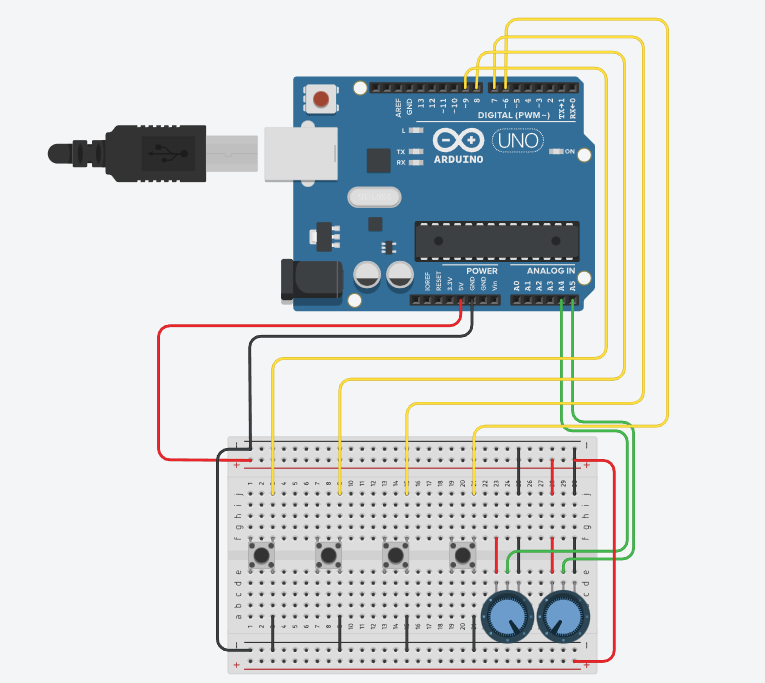
- 1x Microcontroller: Arduino UNO R3 (handles sensor data collection).
- 2x Potentiometers: Used as precision analog joysticks for one-dimensional paddle movement.
- 2x Push-buttons: For navigating menus and triggering the pause mode.
- 3x 1KΩ Resistors: Circuit protection (utilizing the Arduino's internal Pull-Up resistors as well).
- 2x Custom Plastic Cases: Ergonomic Paddle Game Controllers modeled and fabricated using 3D Printing.
- Jumper wires and breadboard for prototyping.
- Processing IDE: The environment and programming language (based on C/Java) used to develop the game logic and object-oriented graphical rendering (classes for ball, paddles, and buttons).
- Arduino IDE: Used for programming the firmware embedded in the microcontroller.
- TinkerCAD: Online platform utilized for circuit simulation and validation prior to physical assembly.
- Visual Studio Code & GitHub: Auxiliary tools for coding and version control.
To transfer the status of the physical controllers from the Arduino to the graphical interface on the computer, a simplified Serial Communication model was structured via USB.
- The Arduino performs analog readings from the potentiometers and digital readings from the buttons (using the
INPUT_PULLUPproperty). - The raw data is mapped (
map()) to a scale ranging from0 to 255. - The microcontroller concatenates all states into a single structured string package formatted as
[v_pot1-v_pot2-v_b01-v_b02\n]. - The Processing application continuously listens to the serial port, parses the incoming string (separating characters delimited by
-), and instantly updates the paddle positions and game states.
- Hardware Setup: Assemble the circuit according to the schematic verified in the TinkerCAD Simulation.
- Upload Firmware: Open the Arduino source code in the firmware directory and upload it to your Arduino UNO board.
- Launch the Game: Connect the Arduino to your computer via USB, open the main code in the Processing environment, select the correct COM port, and click Run.
Developed as a practical and applied computer engineering and electronics project.