
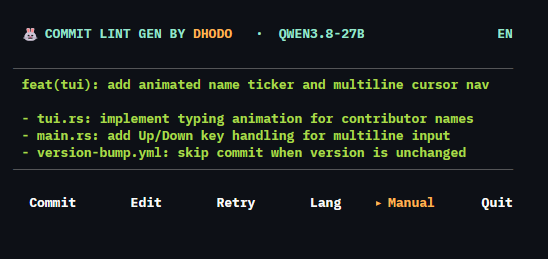
A terminal UI tool that generates commit messages following the Conventional Commits standard — straight from your staged git diff, so you don't have to think about the format every time you commit.
Developers often write lazy commit messages ("fix bug", "update", "wip") because getting the format right takes time and effort. clg reads your staged changes and generates a draft commit message powered by AI (Groq + Qwen3.8-27B by default).
- AI-powered generation — reads
git diff --stagedand produces a Conventional Commits draft automatically - Interactive TUI — accept, edit, retry, or write manual commits from a keyboard-driven interface
- Multi-language — generate commit messages in English or Bahasa Indonesia
- Flexible AI providers — works with any OpenAI-compatible provider (Groq, OpenAI, local Ollama, etc.)
- Retry with fallback — automatically retries with a fallback model if the primary model fails
- Rate-limit handling — respects
try again in Nsresponses from Groq with automatic retry - Simple configuration — set your provider, model, and language in a single
~/.commitlintgenrc.jsonfile - Single static binary — no runtime required, instant startup (~3 MiB memory)
| Category | Technology |
|---|---|
| Language | Rust (edition 2024) |
| Package manager | Cargo |
| Terminal UI | ratatui + crossterm |
| HTTP client | reqwest (rustls) |
| AI client | OpenAI-compatible (default: Groq + Qwen3.8-27B) |
| Text width | unicode-width |
Prebuilt Rust binaries are published to npm via the commitlg package. The npm package is just a shim — it detects your OS and delegates to a native binary. No Node.js runtime needed at execution time.
| Platform | Architecture | Install command |
|---|---|---|
| Linux | x86_64 | npm i -g commitlg |
| Windows | x86_64 | npm i -g commitlg |
Install a specific channel:
npm i -g commitlg@beta     # pre-release channel (Rust binary, auto-updated)
npm i -g commitlg@latest   # stable release (Rust binary)
Build from source:
git clone https://github.com/dhodo999/commit-lint-gen.git
cd commit-lint-gen
cargo build --release
./target/release/clgclg configThis creates ~/.commitlintgenrc.json with your Groq API key, model, and language preference.
git add .
clg
The TUI opens with a generated commit message. Use the menu:
| Key | Action |
|---|---|
| Enter | Commit with the generated message |
| e | Edit the message |
| r | Retry — regenerate a new suggestion |
| l | Switch language (EN ↔ ID) |
| m | Manual mode — write your own commit message |
| q | Quit without committing |
Arrow keys ← → navigate the menu. Arrow keys ↑ ↓ navigate inside the editor.
Select Manual from the menu, type your commit message, and press Enter to commit directly.
The config file lives at ~/.commitlintgenrc.json:
{
  "aiProvider": "groq",
  "apiKey": "your_groq_api_key_here",
  "baseURL": "https://api.groq.com/openai/v1",
  "language": "en",
  "model": "qwen/qwen3.8-27b"
}
Using other AI providers:
{
  "apiKey": "your_api_key",
  "baseURL": "https://api.openai.com/v1",
  "model": "gpt-4o-mini"
}
Any OpenAI-compatible API works. Change baseURL and model to match your provider.
| Metric | Value |
|---|---|
| Cold-start | < 5 ms |
| Resident memory (idle) | ~3-5 MiB |
| Disk size (release, stripped) | ~3 MiB |
| System dependencies | None |
| API latency (Groq, cold) | ~400 ms |
This project is open source and welcomes contributions. Feel free to open an issue or pull request.
MIT