Turn Slack conversations into Kandev tasks.
Mention the bot or run the slash command, and the plugin reads the surrounding thread, asks your triage agent which workspace, workflow and column the work belongs in, creates the task, and replies in-thread.
you (in #eng):  @Kandev the safari login redirect loops for SSO users
                :eyes:
Kandev:         Filed this in Platform › Engineering › Backlog as
                "Fix SSO login redirect loop on Safari". PLAT-482
The exchange above is what the plugin is built to do, written out rather than screenshotted: no live Slack workspace has exercised it yet, and a mocked-up screenshot would claim more than has been verified. The Kandev side below is real.
Two ways to trigger it:
@Kandev <what needs doing>in any channel the bot is in. Mention it inside a thread and the agent reads that thread; mention it in the channel and it reads the ~20 messages leading up to you, so "@Kandev file what Bob just said" works./kandev <what needs doing>anywhere, including channels the bot is not a member of. The answer comes back privately to you, since that is how you asked. It reads the recent channel conversation for context.
Two tokens, about two minutes.
- Create the app. Go to api.slack.com/apps →
Create New App → From a manifest, pick your workspace, and paste
slack-app-manifest.yamlfrom this repo. It declares the scopes, the/kandevcommand, theapp_mentionsubscription, and Socket Mode. - App-level token. Basic Information → App-Level Tokens → Generate,
with the
connections:writescope. That is thexapp-…token. - Install and copy the bot token. Install to Workspace, then OAuth &
Permissions → Bot User OAuth Token. That is the
xoxb-…token. - Paste both into Settings → Plugins → Slack, pick a triage agent, save.
- Invite the bot to the channels you want it to read:
/invite @Kandev.
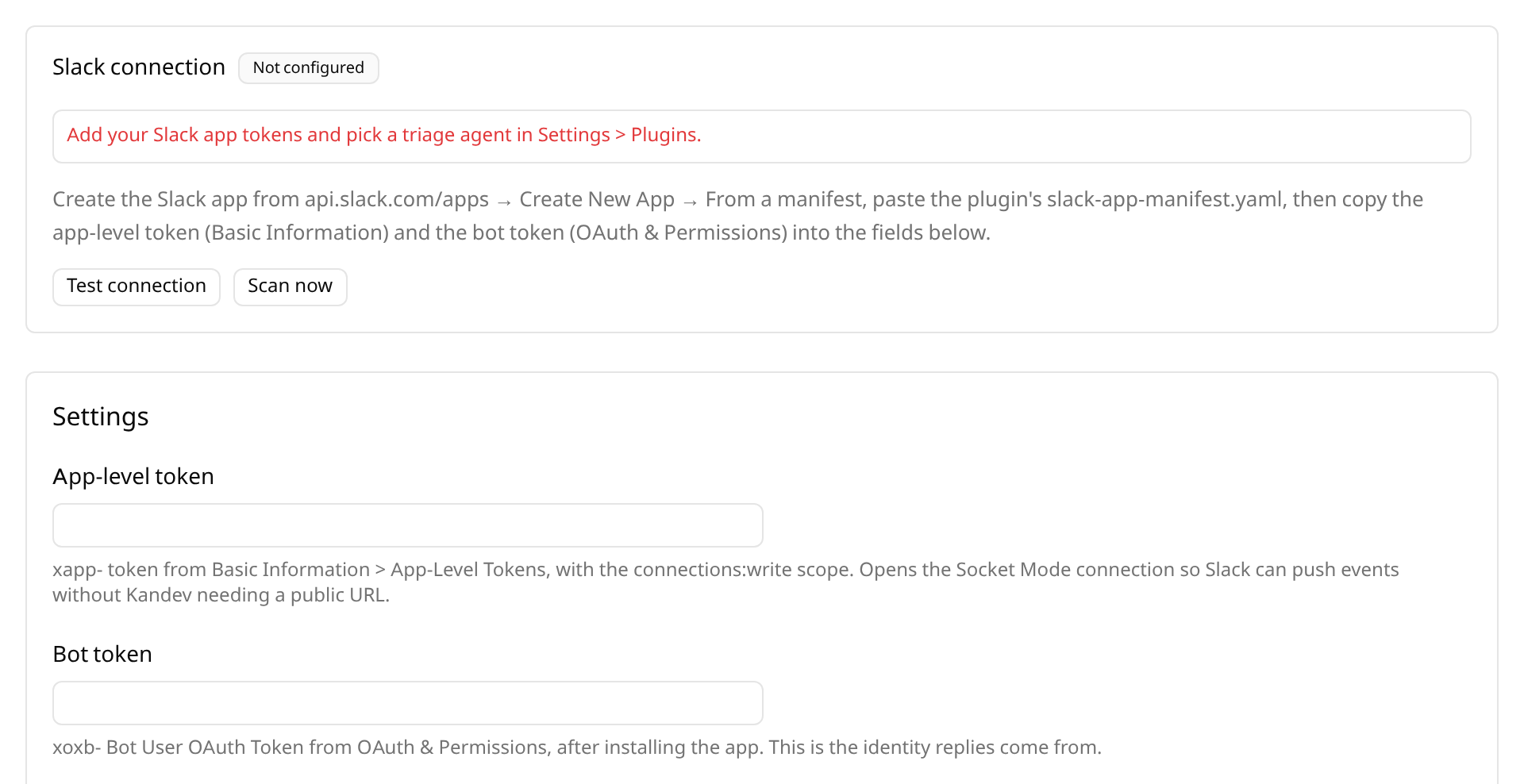
The badge reads Listening once the WebSocket is open. Credentials are stored in Kandev's encrypted vault and masked on read; only the plugin subprocess ever sees them in cleartext.
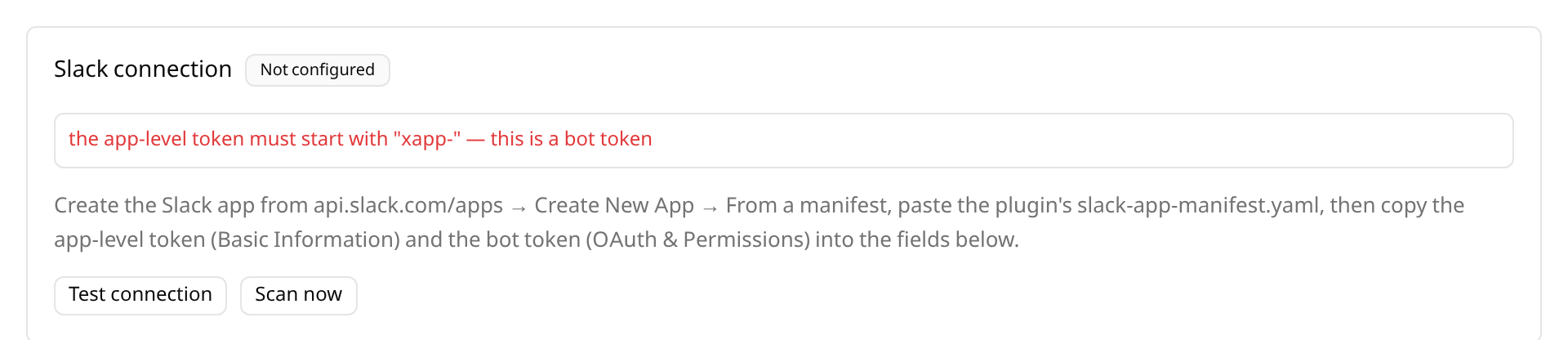
Both tokens come from the same Slack app but different pages, so swapping them is the easy mistake. The plugin says which one it got:
Kandev usually runs on localhost, and the ordinary Events API needs a public HTTPS request URL that Slack can POST to. Socket Mode exists for exactly this: the app opens a WebSocket to Slack and events are pushed down it, so nothing has to be publicly reachable and nothing has to be polled.
The trade-off is that Socket Mode apps cannot be listed in the public Slack Marketplace — irrelevant here, since each install is your own app in your own workspace.
There is no "Add to Slack" button because OAuth v2 requires a public HTTPS redirect URL to receive the authorization code, which a self-hosted install does not have. Creating your own app from the manifest is the standard alternative, and it keeps the tokens in your workspace rather than routing an install through someone else's server.
Some workspaces forbid app installs outright. For those, leave the app fields
empty and fill in the two Fallback fields instead: the xoxc-… token and
the d cookie from a logged-in Slack tab (the token is in
localStorage.localConfig_v2 under teams.<id>.token; the cookie is in
Application → Cookies). Both must come from the same session.
This mode is unofficial and unsupported by Slack. It cannot receive events, so
it polls search.messages for your own messages starting with !kandev, and
it breaks when you sign out or when the d cookie rotates. Prefer the app.
If both paths are filled in, the app wins — silently dropping to a polling fallback because a stale cookie was still saved would be a confusing way to lose real-time events.
| Field | Notes |
|---|---|
| App-level token | Secret. xapp-, scope connections:write. |
| Bot token | Secret. xoxb-, from OAuth & Permissions after install. |
| Triage agent | Which utility agent makes the decision. |
| Start agent on the new task | Off by default; the task lands on the board. |
Fallback: session token / d cookie |
Secret. Only for workspaces that forbid apps. |
| Fallback: command prefix / channels / poll interval | Fallback only; ignored by the app path. |
Kandev's InvokeUtilityAgent is a one-shot completion with no tool loop, so
the plugin does the tool work itself:
- Read the workspaces, workflows, columns and repositories you have.
- Send the agent the Slack thread plus that topology, and ask for one JSON decision.
- Validate the answer against the real topology — a hallucinated id falls back to the first workspace rather than dropping the request — and create the task through the Host API.
- Reply with the task identifier appended — in-thread for a mention, and
privately through the command's
response_urlfor/kandev, which also works in channels the bot was never invited to.
Slack redelivers any Socket Mode envelope it does not see acknowledged within
three seconds, so envelopes are acknowledged before triage starts and requests
are deduplicated by channel, timestamp and instruction. Slack also cycles
connections deliberately; a disconnect frame is treated as routine and
redialled without backoff.
Known gap: the Host task-creation API has no repository field, so triaged tasks are created without a repository attached even though the agent is shown which repositories each workspace has.
pkg/pluginsdk is not published as a standalone module yet, so go.mod
resolves it from a sibling checkout of the Kandev monorepo:
~/kandev-plugins/
├── kandev/                    # kdlbs/kandev checkout
└── kandev-plugin-slack/       # this repo
make test          # go test ./server
make vet
make package-host verify-package-host  # local platform only — the fast loop
make package verify-package            # all five manifest platforms
CI mirrors these on every pull request (ci.yml also enforces go mod tidy
and gofmt; build.yml packages and verifies all five platforms). Releases
are cut by running the release workflow from Actions on master: it calculates the
next version, rewrites manifest.yaml/Makefile/README.md, updates the
changelog, tags, and publishes kandev-plugin-slack-<version>.tar.gz with its
checksums.txt to a GitHub Release.
Kandev refuses to reinstall the same id and version. Uninstall first while iterating — the version is a release number, not an iteration counter, and nothing here has been released yet:
curl -X DELETE localhost:<port>/api/plugins/kandev-plugin-slack
curl -F package=@kandev-plugin-slack-0.1.1.tar.gz localhost:<port>/api/plugins/install