





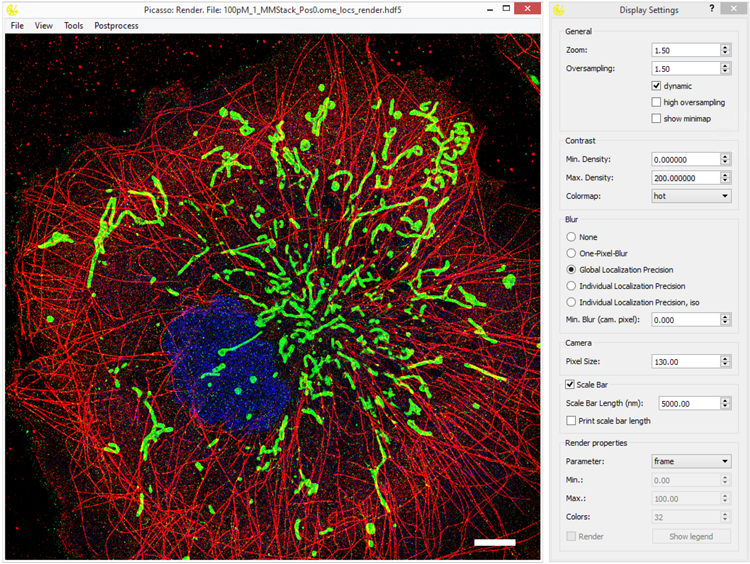
Collection of tools for painting super-resolution images. The Picasso software is complemented by our Nature Protocols publication.
A comprehensive documentation can be found here: Read the Docs.
To see all changes introduced across releases, see the changelog.
This release substantially expands Picasso: Localize. Localization can now be performed with an experimentally measured PSF (cubic-spline model), jointly across several channels (e.g. biplane 3D), and with a pixel-dependent sCMOS noise model; rotated and spherical 2D Gaussian models were added as well. All GPU fitting was reimplemented in Numba CUDA, removing the dependency on Gpufit. Localize also reads a much wider range of data directly - .tif and OME-TIFF stacks (including movies split across several folders), MicroManager single-image acquisitions, Zeiss .czi and Leica .lif - so Picasso: ToRaw is no longer required and has been removed. Further additions include a temporal median filter for spot identification, affine calibrations for astigmatism and chromatic aberration correction, localization metadata embedded in the .hdf5 files, a revised plugin system with an online plugin browser, and various performance and usability improvements throughout Localize, Render and SPINNA. We encourage all users to acquaint themselves with the new features in the Localize documentation. See the changelog for the complete list.
Check out the Picasso release page to download and run the latest compiled one-click installer for Windows or MacOS (the latter is experimental and feedback is welcome). Here you will also find the Nature Protocols legacy version (v0.1.0).
For Windows, two one-click installers are provided: a default (CPU) build and a GPU build. The GPU build additionally bundles the CUDA runtime so that GPU-accelerated (numba.cuda) code can run. It is larger and requires an NVIDIA (CUDA-capable) GPU; on machines without one, GPU-only options are simply hidden. Choose the GPU installer only if you have a compatible NVIDIA GPU and want to use the accelerated tools, for example localization fitting. Picasso uses Cuda12 in the one-click-installer.
Python is also distributed as a PyPI package that is platform-independent (pip install picassosr) which grants not only GUI but also access to Picasso’s internal routines in custom Python programs. For more details, see the Via PyPI section below. For examples of how to use Picasso in Python scripts, see the section Example Usage below.
Note: Since v0.10.0 Picasso is more flexible in terms of dependencies and Python versions. Previously only Python 3.10 was supported, now newer versions are encouraged.
- Open the console/terminal and create a new conda environment:
conda create --name picasso python=3.14. Note you can use other Python versions as well. - Activate the environment:
conda activate picasso. - Install Picasso package using:
pip install picassosr. - You can now run any Picasso function directly from the console/terminal by running:
picasso render,picasso localize, etc, or import Picasso functions in your own Python scripts. - To update Picasso (you should get a notification about available updates since v0.10.0) run
pip install --upgrade picassosr. - You can optionally install dependencies for .czi and .lif formats by passing
pip install picassosr[czi]orpip install picassosr[lif]. - To enable GPU-accelerated (numba.cuda) code, install the CUDA dependencies with
pip install picassosr[gpu]. This requires an NVIDIA (CUDA-capable) GPU. Thegpuextra targets CUDA toolkit 12.x; for other toolkits usepip install picassosr[cuda11]orpip install picassosr[cuda13]instead. Without these extras, Picasso runs fine on the CPU and GPU-only options are hidden.
If you wish to use your local version of Picasso with your own modifications:
- Open the console/terminal and create a new conda environment:
conda create --name picasso python=3.14. Note you can use other Python versions as well. - Activate the environment:
conda activate picasso. - Change to the directory of choice using
cd. - Clone this GitHub repository by running
git clone https://github.com/jungmannlab/picasso. Alternatively, download the zip file and unzip it. - Open the Picasso directory:
cd picasso. - You can modify Picasso code in this directory.
- To create a local Picasso package to use it in other Python scripts, run
pip install -e ".[dev]". When you change the code in thepicassodirectory, the changes will be reflected in the package. - You can install other extensions, such as
".[gpu]", etc. The whole list of optional dependencies can be found inpyproject.toml. - You can now run any Picasso module directly from the console/terminal by running:
picasso render,picasso localize, etc, or import Picasso functions in your own Python scripts.
This applies only to the users who installed Picasso via PyPI or through the editable, developer version and want to use desktop shortcuts. If you installed Picasso from the one-click installer on the Release page, you can ignore this section. Run the PowerShell script “createShortcuts.ps1” in the gui directory. This should be doable by right-clicking on the script and choosing “Run with PowerShell”. Alternatively, run the command
powershell ./createShortcuts.ps1 in the command line. Use the generated shortcuts in the top level directory to start GUI components. Users can drag these shortcuts to their Desktop, Start Menu or Task Bar.
Besides using the GUI, you can use picasso like any other Python module. Consider the following example::
from picasso import io, postprocess

path = 'testdata_locs.hdf5'
locs, info = io.load_locs(path)

# Link localizations and calculate dark times
linked_locs = postprocess.link(picked_locs, info, r_max=0.05, max_dark_time=1)
linked_locs_dark = postprocess.compute_dark_times(linked_locs)

print(f"Average bright time {linked_locs_dark['n'].mean():.2f} frames")
print(f"Average dark time {linked_locs_dark['dark'].mean():.2f} frames")
For more examples, visit the sample notebooks.
If you have a feature request or a bug report, please post it as an issue on the GitHub issue tracker. If you want to contribute, put a pull request (PR) for it. You can find more guidelines for contributing here. We will gladly guide you through the codebase and credit you accordingly. You can also contact us via picasso@jungmannlab.org.
If you use Picasso in your research, please cite our Nature Protocols publication describing the software.
- All fitting methods are ports of Gpufit. DOI: 10.1038/s41598-017-15313-9. License can be found here.
- Experimental PSF (cubic-spline) fitting. DOIs: 10.1038/nmeth.4661 (Li et al., experimental-PSF localization and bead alignment) and 10.1038/s41598-017-00622-w (Babcock & Zhuang, cubic-spline PSF model). The spline calibration follows the coefficient scheme of Gpuspline; license can be found here.
- Multichannel (global) experimental-PSF fitting. DOI: 10.1038/s41467-022-30719-4 (Li et al., globLoc).
- 3D fitting via astigmatism. DOI: 10.1126/science.1153529.
- sCMOS pixel-dependent noise modeling. DOI: 10.1038/nmeth.2488.
- NeNA. DOI: 10.1007/s00418-014-1192-3
- FRC. DOI: 10.1038/nmeth.2448
- Theoretical lateral localization precision (
lpx/lpy, Gaussian least-squares). DOI: 10.1038/nmeth.1447 - Theoretical axial localization precision (
lpzvalues, Gaussian). DOI: 10.1038/s41467-026-70198-5 - RCC undrifting: DOI: 10.1364/OE.22.015982
- AIM undrifting. DOI: 10.1126/sciadv.adm776
- SMLM clusterer. DOIs: 10.1038/s41467-021-22606-1 and 10.1038/s41586-023-05925-9
- DBSCAN: Ester, et al. Inkdd, 1996. (Vol. 96, No. 34, pp. 226-231).
- Anisotropic DBSCAN inspired by: 10.1021/acs.jpcb.4c02030
- HDBSCAN. DOI: 10.1007/978-3-642-37456-2_14
- RESI. DOI: 10.1038/s41586-023-05925-9
- Nanotron. DOI: 10.1093/bioinformatics/btaa154
- Picasso: Server. DOI: 10.1038/s42003-022-03909-5
- SPINNA. DOI: 10.1038/s41467-025-59500-z
- SPINNA for LE fitting. DOI: 10.1038/s41592-024-02242-5
- G5M. DOI: 10.1038/s41467-026-70198-5
- Design icon based on “Hexagon by Creative Stalls" from the Noun Project
- Simulate icon based on “Microchip by Futishia" from the Noun Project
- Localize icon based on “Mountains" by MONTANA RUCOBO from the Noun Project
- Filter icon based on “Funnel" by José Campos from the Noun Project
- Render icon based on “Paint Palette" by Vectors Market from the Noun Project
- Average icon based on “Layers" by Creative Stall from the Noun Project
- Server icon based on “Database" by Nimal Raj from the Noun Project
- SPINNA icon based on "Spinner" by Viktor Ostrovsky from the Noun Project