
.NET 10 api gateway is a project aimed at integrating Comelit Vedo alarm system to Home Assistant (or what you want 🙂) with ease.
- Get global alarm status
- Get alarm status of single area
- Insert/remove alarm from a specific area
- Include/exclude elements (e.g. window) from a specific area
- Get radar status
- Arm/Disarm alarm system
- Get status of your alarm system
- Get status of areas
- Include/exclude elements from a specific area
- Get information from radar/motion sensors
- Pull docker image whith this command (available on Docker Hub):

docker pull giogdev/comelit-api-gateway:latest
- Run container with this command:
docker run -d giogdev/comelit-api-gateway:latest
    -p 5000:5000
    -e ASPNETCORE_URLS=http://0.0.0.0:5000
    -e VEDO_KEY=<key>
    -e VEDO_URL=<url>
    -e VEDO_EXCLUDED_AREAS_ID=<id>
    -e VEDO_API_VERSION_OVERRIDE=<v1,v2 or leave empty for auto detect>
    -e ENABLE_SWAGGER=<true/false>
    -e KEEPALIVE_ENABLED=<true/false>
    -e KEEPALIVE_INTERVAL_SECONDS=<seconds>
or use docker-compose:
services:
  comelit-api-gateway:
    image: giogdev/comelit-api-gateway:latest
    ports:
      - "5000:5000"
    environment:
      VEDO_KEY: "000000"
      VEDO_URL: "http://192.168.1.10"
      ENABLE_SWAGGER: "true"
      VEDO_EXCLUDED_AREAS_ID: "5,6,7"
      VEDO_API_VERSION_OVERRIDE: "" # leave empty for auto detect
      KEEPALIVE_ENABLED: "true"
      KEEPALIVE_INTERVAL_SECONDS: "60"
Code to lock and unlock your alarm system, the same used on your keypad.
If you insert a wrong code your alarm will start ringing!
Example: 123456
Local IP address of your vedo alarm system.
Example: http://192.168.1.10
List of area's IDs that are not configured in your system or you won't include in this gateway. \
By default there are 8 areas in comelit configuration but not all areas need to be configured. Separate them with comma.
Example: 5,6,7
Forces the API dialect used to arm/disarm the alarm. Leave empty to auto-detect the firmware.
Older firmwares (e.g. 2.7.X) use v1 (HTTP GET on /action.cgi), newer ones (e.g. 2.15.X) use v2 (HTTP POST).
Auto-detection inspects the panel home page, so normally you don't need to set this; use it only if detection fails.
Default = empty (auto-detect)
Example: v1
Enable swagger UI, navigate <container_IP><container:port>/swagger.
Default = true
Example: true
Enable the background keep-alive ping that periodically queries the Comelit Vedo system to avoid session timeout on the CGI interface.
Required from version 2.15.X onwards: without it the Comelit control unit goes into sleep mode.
Default = false
Example: true
Interval, in seconds, between keep-alive pings. Only relevant when KEEPALIVE_ENABLED is true.
Default = 60
Example: 120
- Manage the alarm from Home Assistant
- Get a (Telegram) notification when radar or state changes (HA detects when a value changes, so you can use it as a hook and send a notification)
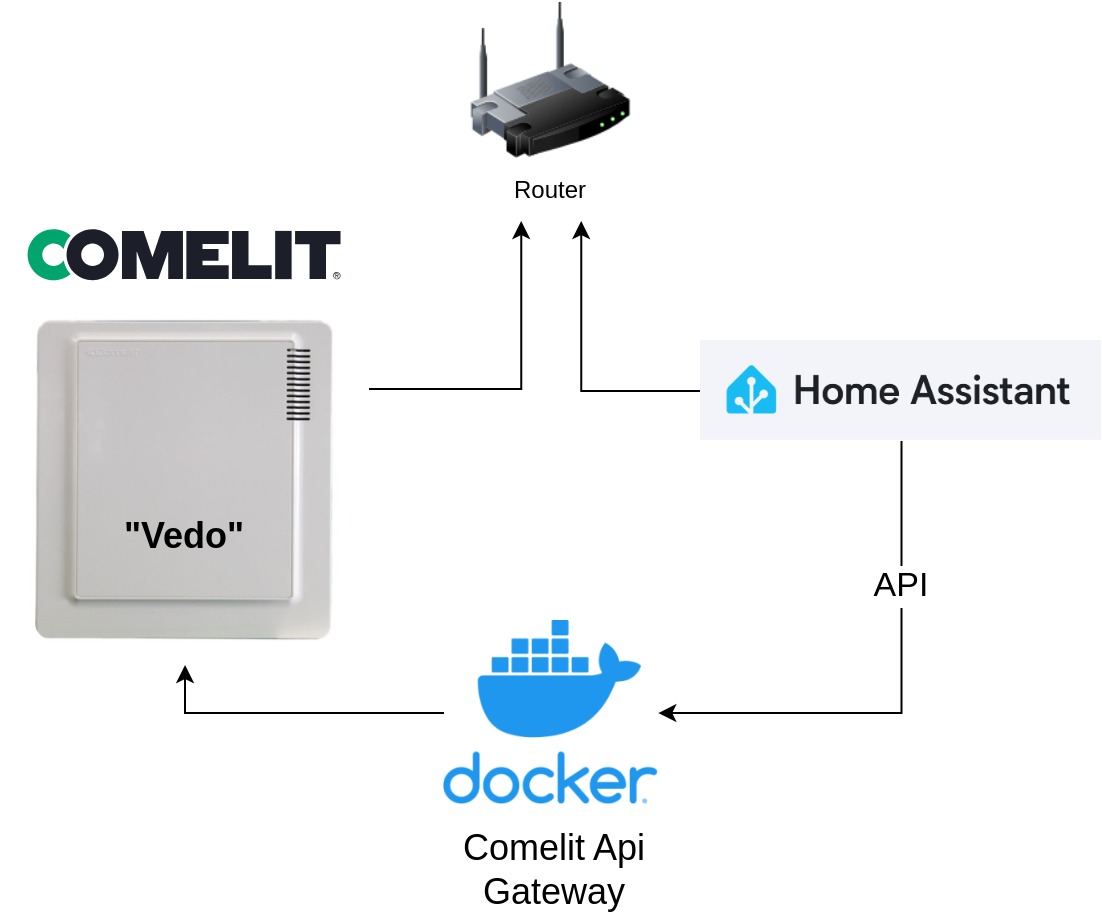
You can call the APIs of Comelit Api Gateway by adding them as alarm, switch and/or rest command. Here you can see how to configure them as switch commands.
- Open configuration.yaml in Home Assistant directory
- Add a new line:
switch: !include switch.yaml- In the same directory create new file "switch.yaml"
- Here you can add api calls, for example:
#Switch configuration for total alarm
- platform: rest
  name: switch total alarm system
  unique_id: alarm_total_switch
  resource: http://<container_ip>:<container_port>/vedo/areas/all/arm-disarm
  state_resource: http://<container_ip>:<container_port>/vedo/areas/all/is-active
  method: POST
  verify_ssl: false
  is_on_template: "{{ value_json }}"

#Switch configuration for garage
- platform: rest
  name: switch garage
  unique_id: alarm_switch_garage
  resource: http://<container_ip>:<container_port>/vedo/areas/<area_id>/arm-disarm
  state_resource: http://<container_ip>:<container_port>/vedo/areas/<area_id>/is-active
  method: POST
  verify_ssl: false
  is_on_template: "{{ value_json }}"
<area_id> you can discover the areas configurated in your alarm system with this API: http://<container_ip>:<container_port>/Vedo/areas
- Open Home Assistant (on browser or app)
- Go to Home--> Developer tools
- Reboot Home Assistant
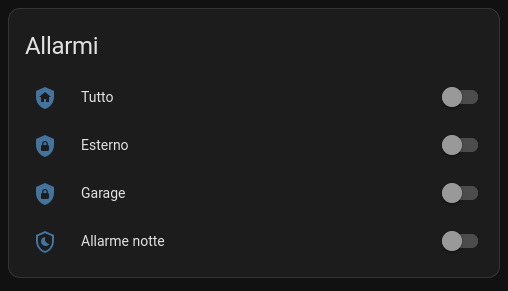
- Now you can add a switch to your Home Assistant UI:
Text me if you want to partecipate to this project!