


SafeHit is a modern, enterprise-grade Browser Extension (Manifest V3) designed to protect Production environments from accidental CRUD operations by QA teams, while also providing a robust API Mocking engine and a Session-Aware API Client right inside your browser.
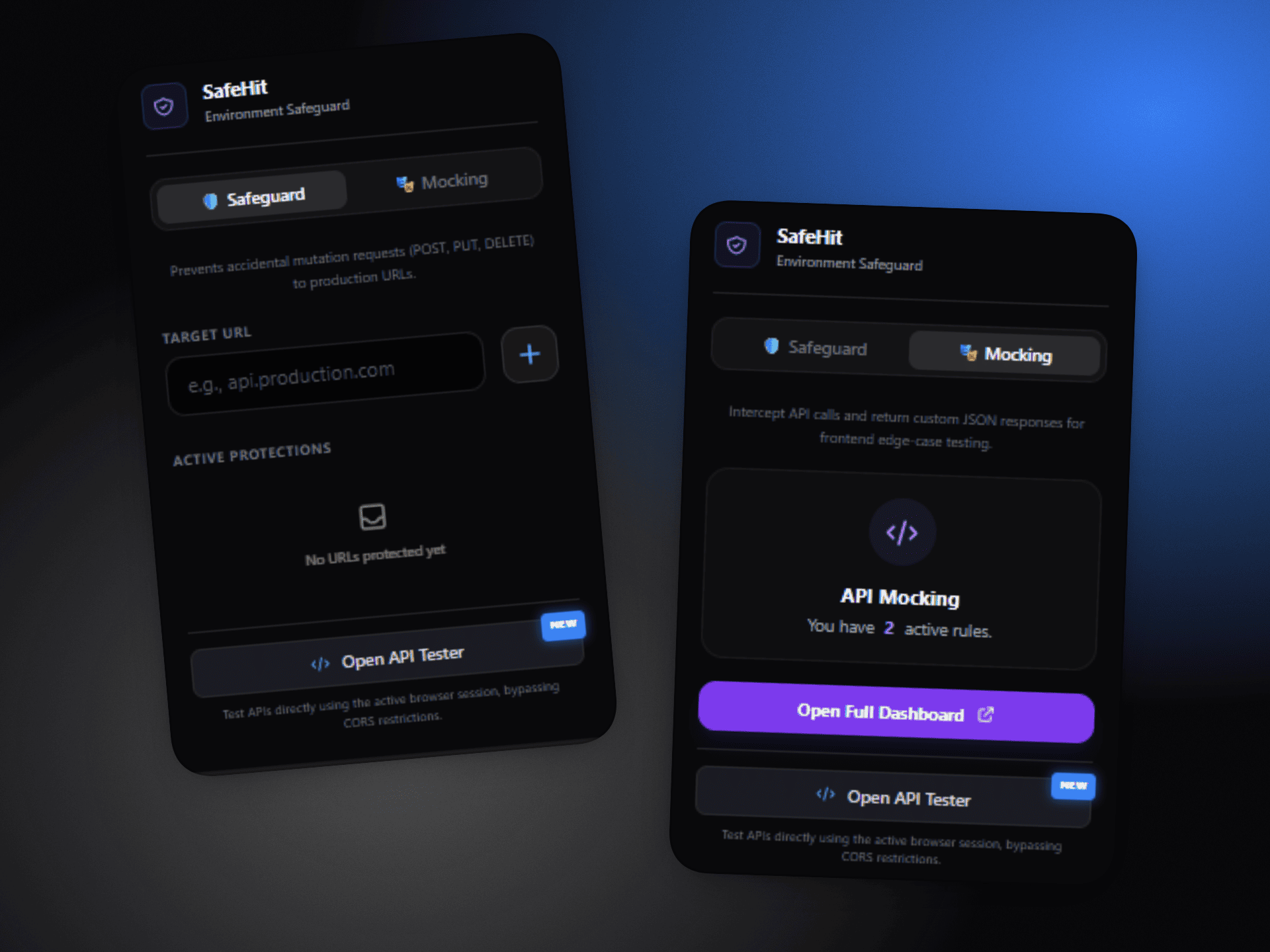
- Production Safeguard: Intercepts outgoing mutations (
POST,PUT,PATCH,DELETE) to configured production URLs and prompts a beautifully designed warning modal. - Comprehensive Request Interception: Intercepts both
fetchAPI andXMLHttpRequestto ensure complete coverage across all web applications, including legacy systems. - Shadow DOM Isolation: The warning modal is injected using Shadow DOM to ensure the extension's Tailwind styling never conflicts with the target website's CSS.
- Accessibility First: Warning modal includes full keyboard navigation (Escape to dismiss, Tab focus trap), ARIA attributes, and click-outside-to-close functionality.
- Session-Aware API Client (Mini Postman): A built-in API tester that executes requests using the active browser tab's context.
- No CORS Issues: Inherits the tab's origin and bypasses CORS restrictions.
- Smart Token Extraction: Automatically detects and attaches auth tokens from 10+ common storage patterns (token, accessToken, jwt, api_key, etc.).
- Advanced Request Builder: Supports custom JSON Body, Headers (Auto-Merge), and Query Params (Auto-URL Encoded) powered by CodeMirror syntax highlighting.
- Response Viewer: Inspect Status Codes, JSON Payloads, and Response Headers instantly.
- Smart API Mocking: Intercept specific API calls and return custom JSON responses to test frontend edge cases without hitting real servers.
- Flexible URL Matching: Choose between Contains, Exact, or Regex matching modes for precise control over which requests get mocked.
- Real-time Toggle: Enable/disable mock rules instantly without refreshing the page.
- Real-time Dynamic Configuration: Add or remove protected URLs directly from the extension Popup. Changes take effect instantly without needing to refresh the target page.
- Modern UI/UX: Features a sleek, dark-mode Glassmorphism design inspired by native macOS components and enterprise developer tools.
- Framework: Vite + Vanilla TypeScript
- Styling: Tailwind CSS
- Editor: CodeMirror 6 (JSON Syntax Highlighting & One Dark Theme)
- Extension Tooling: @crxjs/vite-plugin
- Testing: Vitest + jsdom
- Code Quality: ESLint + Prettier
- Architecture: Manifest V3, Storage Sync API, Window postMessage Bridge, Content Script injection.
/safehit
├── public/                 # Static assets (Icons)
├── src/
│   ├── __tests__/          # Unit tests (Vitest)
│   ├── content/            # Injected scripts (Interceptor, UI, Bridge for API Client)
│   ├── options/            # Full-page Dashboard
│   │   ├── mocking.ts      # Mocking Engine module
│   │   ├── api-client.ts   # API Client Tester module
│   │   └── options.ts      # Main coordinator
│   ├── popup/              # Quick action popup (URL Safeguard Management)
│   ├── styles/             # Tailwind global entries
│   └── utils/              # Helpers (i18n, Storage sync, Toast, Logger)
├── manifest.json           # Extension configuration
├── tailwind.config.js      # Tailwind setup
├── vite.config.ts          # Vite build setup
├── vitest.config.ts        # Vitest test configuration
├── .eslintrc.json          # ESLint configuration
└── .prettierrc             # Prettier configuration
Make sure you have Node.js installed (v16 or higher recommended).
You can install the stable version directly from the Microsoft Edge Add-ons Store.
- Clone this repository.
   git clone <repository-url>
cd safehit- Install dependencies.
npm install- Build the extension for development (with Hot Module Replacement).
npm run build(Note: The dist/ folder will be generated).
- Open your browser and navigate to
chrome://extensions/(oredge://extensions/if using Edge). - Enable Developer mode in the top right corner.
- Click Load unpacked in the top left corner.
- Select the
dist/folder that was generated by the build step. - The SafeHit extension should now appear in your list. Pin it to your toolbar for easy access!
| Command | Description |
|---|---|
npm run dev |
Start Vite dev server with HMR |
npm run build |
Build the extension for production |
npm run preview |
Preview the production build |
npm run zip |
Package the dist/ folder into a zip file |
npm test |
Run unit tests with Vitest |
npm run test:watch |
Run tests in watch mode |
npm run test:coverage |
Run tests with coverage report |
npm run lint |
Lint TypeScript files with ESLint |
npm run lint:fix |
Auto-fix ESLint issues |
npm run format |
Format code with Prettier |
npm run format:check |
Check code formatting |
SafeHit includes a test suite powered by Vitest. Tests cover core functionality like URL matching:
npm test- Click the SafeHit icon in your browser toolbar.
- In the target URL field, enter a domain you want to protect (e.g.,
api.production.com) and click Add. - Navigate to a website that makes API calls to that domain.
- Trigger a
POST,PUT,PATCH, orDELETErequest. - SafeHit will intercept the request and show a warning modal before the payload leaves the browser.
- Keyboard shortcuts: Press
Escapeto cancel,Tabto switch between buttons.
- Right-click the SafeHit extension icon and select Options to open the Dashboard.
- Navigate to the "Mocking Engine" tab.
- Configure your mock rule:
- Method: Select HTTP method (GET, POST, PUT, PATCH, DELETE).
- Match Type: Choose how the URL should be matched:
Contains— Matches if the request URL contains the pattern (default).Exact— Matches only if the request URL is exactly the pattern.Regex— Matches using a regular expression pattern.
- Target URL: Enter the URL pattern to match.
- Status Code: Set the HTTP status code to return.
- Response Body: Write the JSON response to return.
- Click Save Mock Rule and toggle rules on/off as needed.
- Open the Dashboard (right-click extension icon → Options).
- Navigate to the "API Client" tab.
- Select an active web tab from the Execution Context dropdown.
- Define your Method, URL, Body, Headers, and Params.
- Click Execute Request to fire the API call directly from that tab's session, utilizing its existing cookies and tokens seamlessly.
SafeHit is built with security and data privacy as core priorities:
- 100% Client-Side: All request interception, API client executions, and mocking configurations happen entirely inside your local browser instance.
- No External Data Transmission: SafeHit does not collect, log, or transmit your cookies, auth tokens, headers, or payloads to any external servers or third-party analytics.
- Data Storage: Your configurations and rules are stored strictly inside your browser using the standard
chrome.storage.sync/chrome.storage.localAPIs.
Contributions are welcome! If you want to improve SafeHit, please follow these steps:
- Fork the Project.
- Create your Feature Branch (
git checkout -b feature/AmazingFeature). - Commit your Changes (
git commit -m 'Add some AmazingFeature'). - Push to the Branch (
git push origin feature/AmazingFeature). - Open a Pull Request.
Distributed under the MIT License. See LICENSE for more information.
Built with ❤️ for better QA & Developer Experience.