IP Geolocation · DNS Lookup · HTTP Headers · Port Scanner · SSL/TLS Checker






Features · Getting Started · API Reference · Deploy · Structure · Contributing
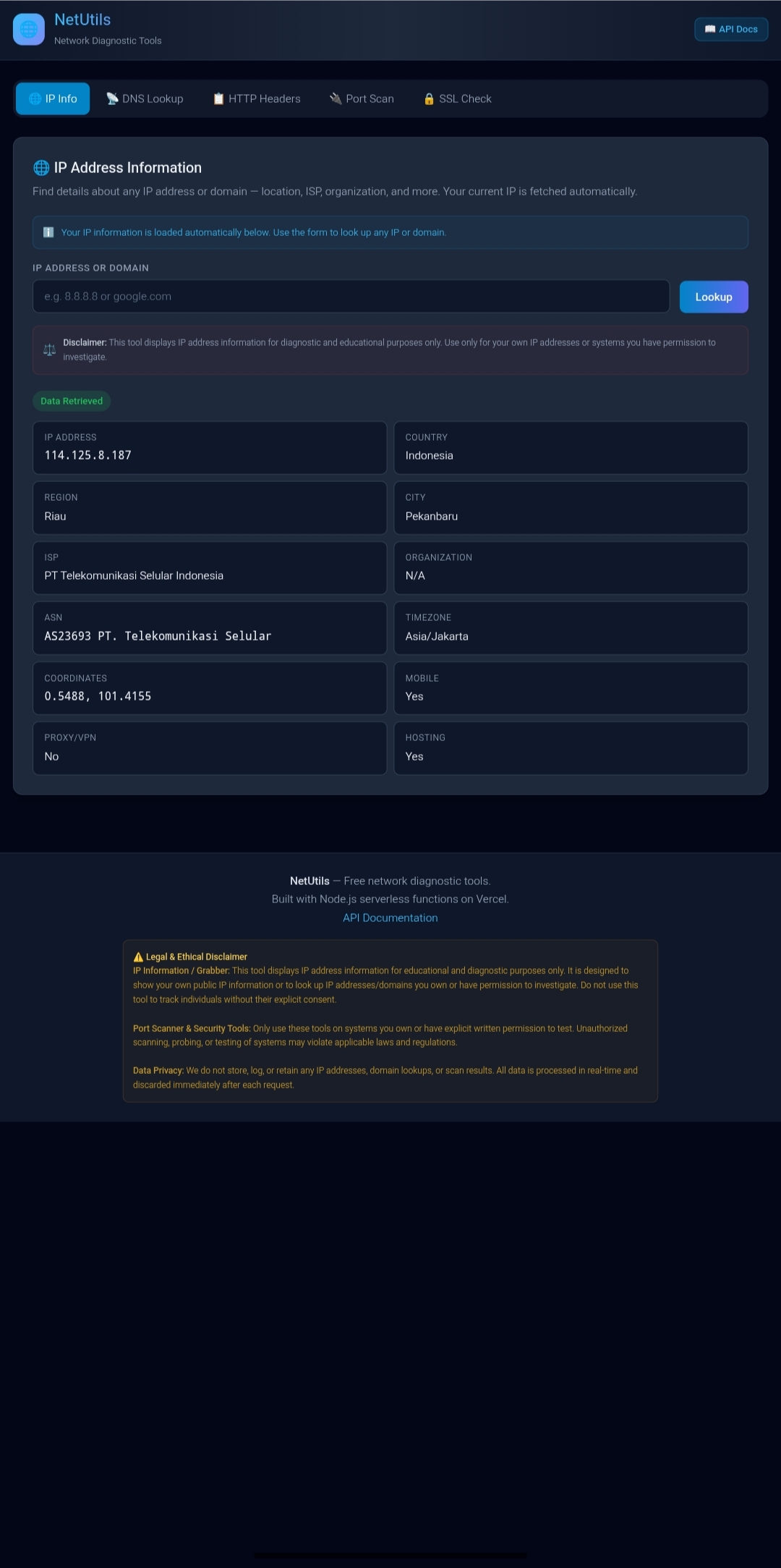
NetUtils is a lightweight, serverless network diagnostic toolkit built entirely on native Node.js modules — no third-party dependencies required. It bundles five essential networking tools behind a clean web UI and a simple JSON API, and deploys to Vercel in minutes.
Tip
Every endpoint returns a consistent { status, message, data } JSON shape, so it's easy to script against or plug into your own dashboard.
| Tool | Description | Endpoint | |
|---|---|---|---|
| 🌐 | IP Info | Geolocation, ISP, ASN, proxy/VPN detection | GET /api/ip |
| 📡 | DNS Lookup | A, AAAA, MX, TXT, NS, CNAME, SOA, SRV records | GET /api/dns |
| 📋 | HTTP Headers | Response header analysis, redirect tracking | GET /api/headers |
| 🔌 | Port Scanner | TCP scan, up to 50 ports, 3s timeout | GET /api/portscan |
| 🔒 | SSL Checker | Certificate details, expiry, cipher info | GET /api/ssl |
| Layer | Technology |
|---|---|
| Frontend | HTML5 · CSS3 (dark theme) · Vanilla JavaScript |
| Backend | Node.js (built-in dns, net, tls, http modules) |
| Hosting | Vercel Edge Network + Serverless Functions |
| Dependencies | Zero — no npm packages required |
# Clone the repository
git clone https://github.com/TheyanzXD/ip-track.git
cd ip-track

# Install the Vercel CLI
npm i -g vercel

# Start the local dev server
vercel dev
The app will be available at http://localhost:3000.
Option A — Vercel CLI
npm i -g vercel
vercel login
vercel
# Framework Preset: Other
Option B — GitHub Import
- Push this repository to your own GitHub account
- Go to vercel.com/new
- Import the repo
- Set Framework Preset to Other
- Click Deploy ✅
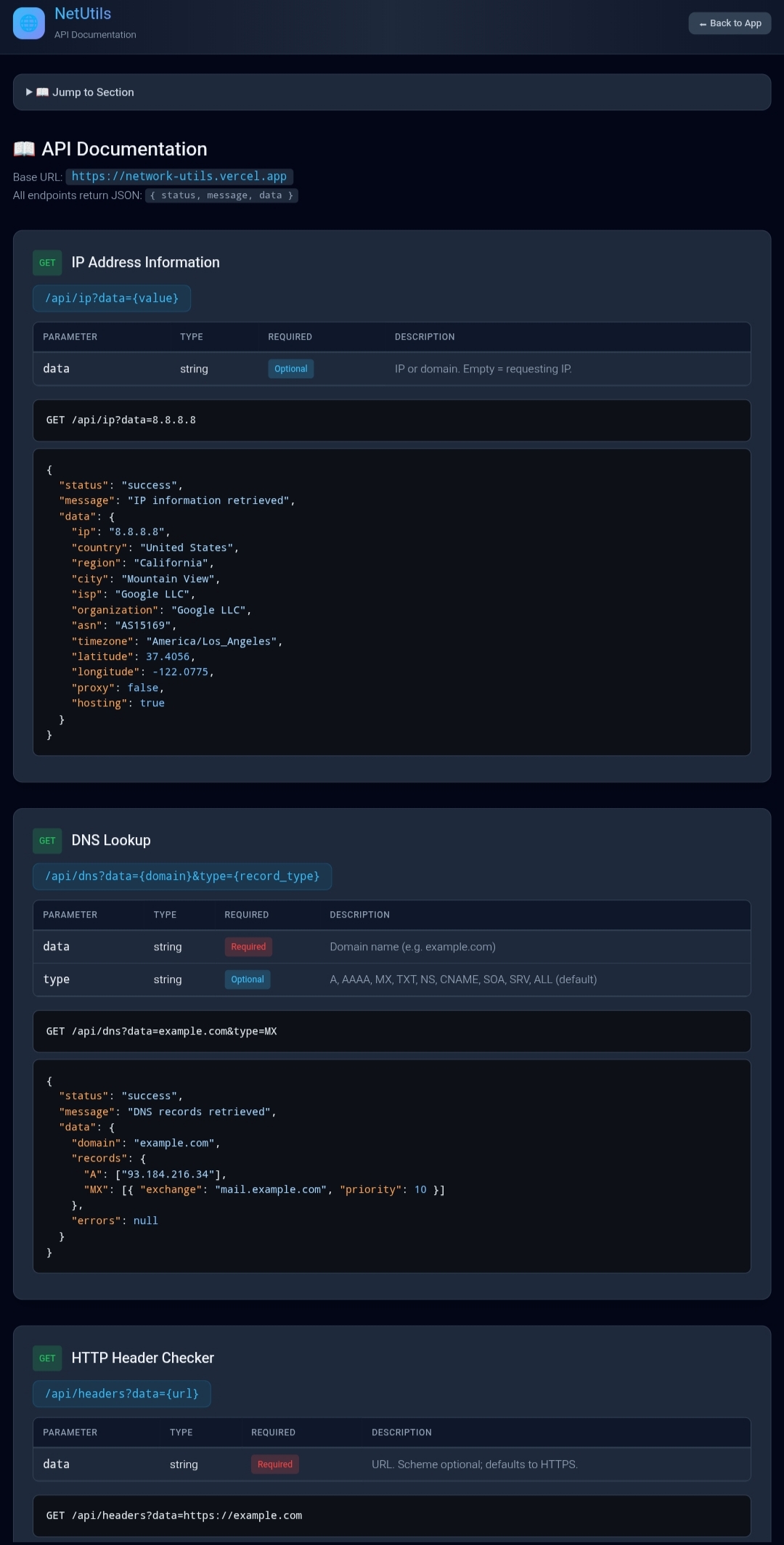
All endpoints follow the pattern GET /api/{feature}?data={value} and return JSON in the shape { status, message, data }.
/api/ip                  → your own IP info
/api/ip?data=8.8.8.8      → lookup a specific IP
📦 Example response
{
  "status": "success",
  "message": "IP information retrieved",
  "data": {
    "ip": "8.8.8.8",
    "country": "United States",
    "region": "California",
    "city": "Mountain View",
    "isp": "Google LLC",
    "asn": "AS15169",
    "timezone": "America/Los_Angeles",
    "latitude": 37.4056,
    "longitude": -122.0775,
    "proxy": false,
    "hosting": true
  }
}/api/dns?data=example.com → all records
/api/dns?data=example.com&type=MX → MX records only
📦 Example response
{
  "status": "success",
  "message": "DNS records retrieved",
  "data": {
    "domain": "example.com",
    "records": {
      "A": ["93.184.216.34"],
      "MX": [{ "exchange": "mail.example.com", "priority": 10 }]
    }
  }
}/api/headers?data=https://example.com
/api/portscan?data=example.com
/api/portscan?data=example.com&ports=80,443,8080
/api/ssl?data=google.com
/api/ssl?data=google.com&port=443
Tip
Full interactive docs are available at /docs once deployed.
📦 ip-track
├── 📄 index.html          # Main application
├── 📄 docs.html           # API documentation
├── 🎨 css/style.css       # Dark theme styles
├── ⚡ js/main.js          # Frontend logic
├── 🖥️ api/
│   ├── ip.js              # IP geolocation
│   ├── dns.js             # DNS records
│   ├── headers.js         # HTTP headers
│   ├── portscan.js        # Port scanner
│   └── ssl.js             # SSL/TLS checker
├── 📦 package.json        # Zero deps
├── ⚙️ vercel.json         # Vercel config
└── 📖 README.md           # This file
┌─────────────┐     ┌──────────────────┐     ┌─────────────────┐
│   Browser   │────▶│   Vercel Edge    │────▶│   Serverless    │
│  (static)   │     │  (CDN + CORS)    │     │   Functions     │
└─────────────┘     └──────────────────┘     └────────┬────────┘
                                                        │
                    ┌───────────────────────────────────┴────────┐
                    │       Built-in Node.js Modules              │
                    │   ┌─────┐ ┌─────┐ ┌──────┐ ┌──────┐ ┌─────┐ │
                    │   │ dns │ │ net │ │ tls  │ │ http │ │ tls │ │
                    │   └─────┘ └─────┘ └──────┘ └──────┘ └─────┘ │
                    └──────────────────────────────────────────────┘
Contributions are welcome! Here's how to get started:
- Fork the repository
- Create your feature branch (
git checkout -b feature/amazing-feature) - Commit your changes (
git commit -m 'Add amazing feature') - Push to the branch (
git push origin feature/amazing-feature) - Open a Pull Request
Important
Please keep the zero-dependency philosophy in mind — new features should rely on native Node.js modules wherever possible.
Warning
- IP Grabber: Shows your own IP or domains you own. Not intended for tracking without consent.
- Port Scanner: Only scan systems you own or have explicit permission to test.
- Privacy: Zero data is stored — everything is processed in-memory and discarded after the response.
This project is licensed under the MIT License — see the LICENSE file for details.
Have a question, found a bug, or want to request a feature?



Made with ❤️ for network diagnostics · by TheyanzXD