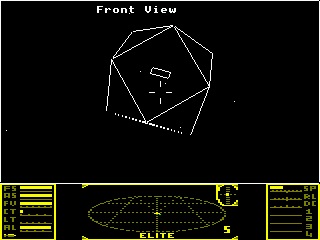
A port of elite-ce — a C reimplementation of the classic space trading game Elite — to the MediaTek Runtime Environment (MRE) platform, targeting the Nokia 225 feature phone as a .vxp application.
elite-ce was originally written for the TI-84 Plus CE calculator using the CE C/C++ toolchain and TI-proprietary APIs (graphx.h, keypadc.h, fileioc.h). This port replaces all platform-specific code with MRE C API calls while keeping all game logic intact.
The project structure follows XimikBoda/CmakeMreTemplate.
| Tool | Purpose |
|---|---|
| MRE C API SDK | Headers (vmgraph.h, vmio.h, vmsys.h, etc.) and .a libs for ARM |
| TinyMRESDK | Packs compiled ELF + resources into a .vxp app bundle |
| arm-none-eabi-gcc | ARM cross-compiler (GCC 9+) |
| CMake 3.10+ | Build system |
- Install
arm-none-eabi-gcc(e.g.sudo apt install gcc-arm-none-eabi) - Obtain the MRE C API SDK and TinyMRESDK
- Set environment variables (or pass as CMake args):
export MRE_SDK=/path/to/mre-sdk
export TinyMRESDK=/path/to/TinyMRESDK# Release build (ARM, Unix/Linux host)
cmake --preset arm-release-unix \
-DMRE_SDK=$MRE_SDK \
-DTinyMRESDK=$TinyMRESDK
cmake --build build/arm-release-unixThe output .vxp will be in build/arm-release-unix/main/.
| Preset | Description |
|---|---|
arm-release |
ARM release (Windows host) |
arm-debug |
ARM debug (Windows host) |
arm-release-unix |
ARM release (Linux/macOS host) |
arm-debug-unix |
ARM debug (Linux/macOS host) |
win32 |
Win32/MoDis simulation build |
| Game Action | Nokia 225 Key | MRE Keycode |
|---|---|---|
| Throttle up | # key |
VM_KEY_POUND |
| Throttle down | 1 key |
VM_KEY_NUM1 |
| Pitch up | Up arrow | VM_KEY_UP |
| Pitch down | Down arrow | VM_KEY_DOWN |
| Roll left | Left arrow | VM_KEY_LEFT |
| Roll right | Right arrow | VM_KEY_RIGHT |
| Fire laser | 0 key |
VM_KEY_NUM0 |
| Arm/fire missile | 5 key |
VM_KEY_NUM5 |
| Disarm missile | 4 key |
VM_KEY_NUM4 |
| View direction | Right soft key + arrows | VM_KEY_RIGHT_SOFTKEY |
| Open menu | Left soft key | VM_KEY_LEFT_SOFTKEY |
| Jump / Hyperspace | * (hold) |
VM_KEY_STAR |
| Galactic jump | 2 (hold) |
VM_KEY_NUM2 |
| In-system jump | 3 key |
VM_KEY_NUM3 |
| ECM | 6 key |
VM_KEY_NUM6 |
| Delete (name entry) | 7 key |
VM_KEY_NUM7 |
| OK / Confirm | Center/OK key | VM_KEY_OK |
- Copy the built
.vxpfile to the SD card of your Nokia 225. - On the phone, navigate to the SD card via the file manager.
- Open the
.vxpfile — the phone will prompt to install it. - After installation, launch Elite from the applications menu.
The save file is stored at E:\elite.sav on the SD card.
For use on Nokia mobile phones, the application must be signed using the IMSI code of your SIM card.
More information: https://vxpatch.luxferre.top
The game runs at 320×240 pixels (landscape), rendered via MRE layer rotation.
- View area: 320×210 pixels (top portion) — 3D space view
- Dashboard: 320×30 pixels (bottom strip) — ship status, radar, gauges