


Note
Vim-R users should read the release notes of version 1.0.0.
R.nvim adds R support to Neovim, including:
-
Communication with R via Neovim's built-in terminal or tmux
-
A built-in object explorer and autocompletions built from your R environment
-
Keyboard shortcuts for common inserts like
<-and|> -
Quarto/R Markdown/Rtypst support
-
...And much more!

The R.nvim directory has four different things:
-
A R package (subdirectory
nvimcom). -
The C code of an language server for R (subdirectory
rnvimserver). -
A tree-sitter parser for
.Routfiles (Git submoduletree-sitter-routin the subdirectoryresources). -
A Lua plugin for Neovim (most of everything else).
R.nvim automatically:
- builds and install the R package
nvimcom; - compiles the
rnvimserverbinary in thernvimserverdirectory; - generates the
routparser and installs it in theparsersubdirectory.
The R.nvim repository must be cloned with its submodule tree-sitter-rout.
If your plugin manager does not clone the submodules, you can clone the
repository manually with this command:
git clone --recurse-submodules https://github.com/R-nvim/R.nvimPlease, see the list of dependencies at section 3.1 of doc/R.nvim.txt.
Here's a (very) minimal configuration using
lazy.nvim (not including R.nvim
dependencies):
{
    "R-nvim/R.nvim",
     -- Only required if you also set defaults.lazy = true
    lazy = false
},
A longer example adding some custom behaviour:
{
    "R-nvim/R.nvim",
     -- Only required if you also set defaults.lazy = true
    lazy = false,
    -- R.nvim is still young and we may make some breaking changes from time
    -- to time (but also bug fixes all the time). If configuration stability
    -- is a high priority for you, pin to the latest minor version, but unpin
    -- it and try the latest version before reporting an issue:
    -- version = "~0.1.0"
    config = function()
        -- Create a table with the options to be passed to setup()
        ---@type RConfigUserOpts
        local opts = {
            hook = {
                on_filetype = function()
                    vim.api.nvim_buf_set_keymap(0, "n", "<Enter>", "<Plug>RDSendLine", {})
                    vim.api.nvim_buf_set_keymap(0, "v", "<Enter>", "<Plug>RSendSelection", {})
                end
            },
            R_args = {"--quiet", "--no-save"},
            min_editor_width = 72,
            rconsole_width = 78,
            objbr_mappings = { -- Object browser keymap
                c = 'class', -- Call R functions
                -- Use {object} notation to write arbitrary R code.
                ['<localleader>gg'] = 'head({object}, n = 15)',
                v = function()
                    -- Run lua functions
                    require('r.browser').toggle_view()
                end
            },
            disable_cmds = {
                "RClearConsole",
                "RCustomStart",
                "RSPlot",
                "RSaveClose",
            },
        }
        -- Check if the environment variable "R_AUTO_START" exists.
        -- If using fish shell, you could put in your config.fish:
        -- alias r "R_AUTO_START=true nvim"
        if vim.env.R_AUTO_START == "true" then
            opts.auto_start = "on startup"
            opts.objbr_auto_start = true
        end
        require("r").setup(opts)
    end,
},
See the plugin documentation for a complete list of possible options. You can also consult the Wiki and R.nvim-config-examples.
R autocompletion is provided by a built-in language server.
Note that languageserver can also be used for autocompletions, but using autocompletions from both sources simultaneously is not advised.
The following Tree-sitter parsers are required:
rfor all file types.csvto view data.frame and matrixes in a Neovim buffer.markdown, andmarkdown_inlinefor Rmd and Quarto.latex, andrnowebfor Rnoweb.typstfor RTypst.yamlfor Rmd, Quarto, Rnoweb and RTypst.
The parsers can be installed with any Tree-sitter parser manager, such as nvim-treesitter or tree-sitter-manager.nvim.
Example configuration using nvim-treesitter:
{
    "nvim-treesitter/nvim-treesitter",
    branch = "main",
    lazy = false,
    build = ":TSUpdate",
    config = function()
        local langs = { "markdown", "markdown_inline", "r", "rnoweb", "yaml", "latex", "csv" }
        require("nvim-treesitter").install(langs)

        vim.api.nvim_create_autocmd("FileType", {
            pattern = langs,
            callback = function()
                vim.treesitter.start()
            end,
        })
    end,
}Please see the documentation for instructions on usage. For a
complete list of keymaps, see the output of :RMapsDesc.
R.nvim is still maturing and its public API (configuration options, commands, and some of the Lua internals) may undergo breaking changes from time to time. This project uses semantic versioning to help with this, and we will always bump the minor version, e.g. from 0.1.x to 0.2.0, when we make a breaking change. Users are thus encouraged to pin their installation of R.nvim to the latest minor release and to check the release notes for any breaking changes when upgrading.
Eventually we plan to release a version 1.0.0, at which point we will make a firm commitment to backwards compatibility.
None yet! Please let us know if you publish a video presenting R.nvim features 😃
- colorout: If you have [colorout]
installed and are not loading it in your
~/.Rprofile, it should be version1.3-1or higher. This is because R.nvim usescolorout::isColorOut()which in previouscoloroutversions was unduly enabling the output colorizing.
The diagram below shows how the communication between Neovim and R works.
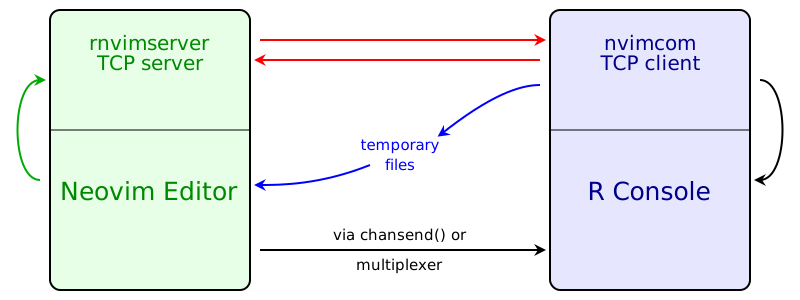
The black arrows represent all commands that you trigger in the editor and that you can see being pasted into R Console. There are three different ways of sending the commands to R Console:
-
When running R in a Neovim built-in terminal, the function
chansend()is used to send code to R Console. -
When running R in an external terminal emulator, Tmux is used to send commands to R Console.
-
Some terminal emulators have built-in multiplexer capabilities and can be used without Tmux.
The application rnvimserver runs as a language server that communicates with Neovim through the standard input/output, but it also includes a TCP server. When nvimcom is loaded, it immediately starts a TCP client that connects to rnvimserver (red arrows).
Some commands that you trigger are not pasted into R Console and do not output
anything in the R Console; their results are seen in the editor itself. These
are the commands to do auto completion (of names of objects and function
arguments), start and manipulate the Object Browser (\ro, \r= and \r-),
call R help (\rh or :Rhelp), insert the output of an R command
(:Rinsert), and format selected text (:Rformat).
When new objects are created or new libraries are loaded, nvimcom sends messages that tell the editor to update the Object Browser, update the syntax highlight to include newly loaded libraries, and open the PDF output after knitting an Rnoweb file, and compiling the LaTeX result. Most of the information is transmitted through the TCP connection to the rnvimserver, but temporary files are used in a few cases.
-
languageserver: a language server for R.
-
colorout: a package to colorize R's output.