PHP language support for Visual Studio Code powered by PHPantom, a fast language server with deep type intelligence, generics, and framework-awarness.
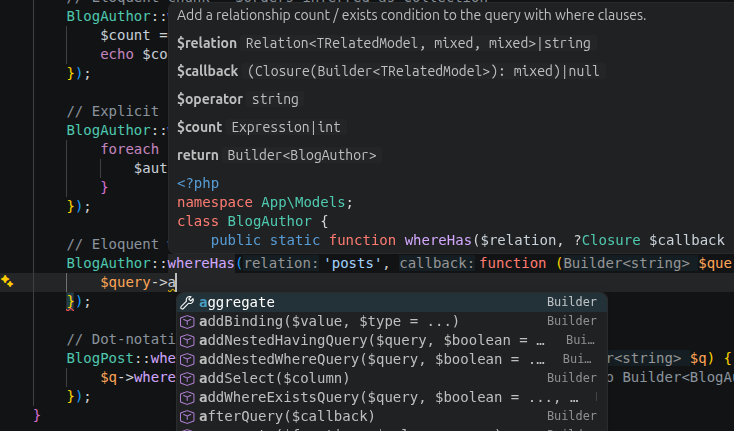
- Code completion. Type-aware suggestions for symbols, keywords, and members with automatic use declaration insertion.
- Signature help. Parameter hints for constructors, methods, and functions.
- Navigation. Go to definition, type definition, implementation, find all references, and rename.
- Diagnostics. Undefined symbols, type errors, argument count mismatches, deprecated usage, unused imports, and implementation errors.
- Hover. Type information and PHPDoc documentation.
- Code actions. Extract variable/method/constant, inline variable, generate constructor/getters/setters, implement interface methods, auto-import, and PHPDoc generation.
- Call hierarchy and type hierarchy.
- Semantic tokens, inlay hints, and code lens.
- Document highlight and workspace symbol search.
- Formatting. PSR-12 compatible, with optional Laravel Pint integration.
- Code folding and smart selection.
- Document links for include/require paths.
- Deep type intelligence. Generics (
@template), PHPStan/Psalm annotations, and framework-aware analysis including Laravel Eloquent. - Blade templates. Completion, diagnostics, and navigation in
.blade.phpfiles, with VS Code's native HTML completion and Emmet still active in the markup. - Log viewer. A panel that tails
storage/logs/*.logwith log-level highlighting and click-through on stack-trace frames. A status bar item shows a subtle dot when a log changes since you last looked. - Artisan command runner. Browse your application's artisan commands in a quick-pick, fill in their arguments and options, and run them in the integrated terminal.
- Laravel file generation. Create a model, controller, request, migration, and more via
artisan make:*from the command palette or by right-clicking a folder in the explorer, which pre-fills the namespace. Toggle the commonmake:*flags in the picker, and PHPantom opens the generated file. When artisan cannot boot, the common kinds fall back to a bundled template written straight to disk. - Route list. A panel listing your application's routes (method, URI, name, action) with a filter box and click-through from an action to the controller method. It refreshes as your route files change.
- Model annotations. Generate
@propertydocblocks on your Eloquent models from the live database schema, honouring$casts, so column access is fully typed. A one-time boot you trigger; the language server itself stays purely static.
- Disable the built-in VS Code PHP Language Features.
- Go to
Extensions. - Search for
@builtin php. - Disable
PHP Language Features. LeavePHP Language Basicsenabled for syntax highlighting.
- Go to
- Disable other PHP language servers (Intelephense, Phpactor, PHP Tools) to avoid duplicate content.
- Open a PHP project. PHPantom downloads and starts the language server automatically.
To use a custom binary, set phpantom.serverPath to the path of your phpantom_lsp binary. You can build from source with cargo install phpantom_lsp or download a release from GitHub.
| Setting | Default | Description |
|---|---|---|
phpantom.serverPath |
"" |
Path to a custom phpantom_lsp binary. |
phpantom.phpPath |
"" |
PHP executable used to run artisan commands. Empty uses php on PATH. |
phpantom.releaseTag |
"latest" |
GitHub release tag to download. |
phpantom.autoDownload |
true |
Automatically download the server if not found. |
phpantom.autoUpdate |
true |
Check for newer releases periodically. |
phpantom.updateCheckIntervalHours |
24 |
How often to check for updates (1-168 hours). |
phpantom.trace.server |
"off" |
Trace communication with the language server. |
- PHPantom: Restart Language Server. Restart the language server.
- PHPantom: Show Output. Open the PHPantom output channel.
- PHPantom: Show Server Version. Display the running server version.
- PHPantom: Check for Server Update. Check for a newer server binary.
- PHPantom: Clear Downloaded Language Server. Remove cached server binaries.
- PHPantom: Show Logs. Open the log viewer for
storage/logs/*.log. - PHPantom: Run Artisan Command. Pick an artisan command, fill in its arguments and options, and run it in the terminal.
- PHPantom: New Laravel Class... Pick a class kind (model, controller, request, migration, job, and more), type a name, toggle the common
make:*flags, and PHPantom generates it via the matchingartisan make:*command and opens the file. Also available by right-clicking a folder in the explorer, where the namespace is pre-filled from the folder. Falls back to a bundled template for the common kinds when artisan cannot boot. - PHPantom: Show Route List. Open the route list panel with filtering and click-through to controller methods.
- PHPantom: Generate Model Annotations. Boot the app once to read your Eloquent models' column types from the database and write them as
@propertydocblocks. - PHPantom: Regenerate Model Annotations. Refresh existing model annotations after migrations, without prompting.
On activation the extension locates a server binary in this order:
phpantom.serverPathsettingphpantom_lsponPATH- A previously cached binary
- Download from GitHub Releases (when
phpantom.autoDownloadis enabled)
When phpantom.releaseTag is "latest", the extension checks for updates on startup and periodically while active. A status bar item shows the server state.
If the download fails, open the PHPantom output channel for details. You can always download a binary manually and set phpantom.serverPath.
If your platform is unsupported, build from source and point phpantom.serverPath at the result.
See the PHPantom language server changelog for improvements to type intelligence, diagnostics, and completions.