An Intelligent, AI‑Powered CLI Assistant, Red-Team Platform, and Native Shell
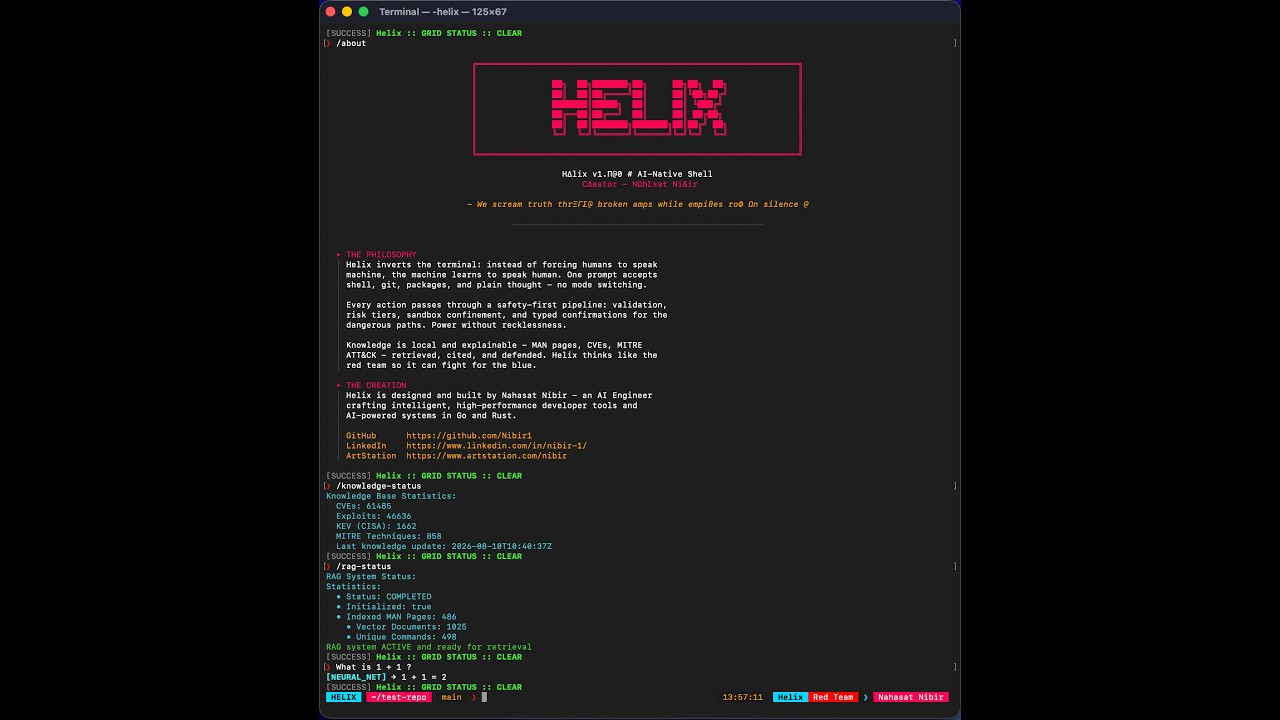
📺 Watch the full end-to-end demo featuring core functionalities.




Helix is an AI-powered command‑line assistant and adversarial cybersecurity platform that turns natural language into safe, executable actions. It bridges the gap between human intent and machine execution, combining local LLM inference, retrieval-augmented generation (RAG), live threat intelligence, and strict safety pipelines.
It combines:
- Multi-Provider AI (OpenAI, Anthropic, DeepSeek, Ollama and more)
- Live Threat Intelligence (NVD, CISA KEV, Exploit-DB, MITRE ATT&CK)
- RAG over System Docs (900+ indexed MAN pages and CLI tools)
- A Multi-Layer Safety & Sandbox Engine around shell, git, packages, and recon
- Enterprise-Grade Hardening (Kernel confinement, instruction firewalls, and signed supply chains)
- Synthetic Tonal Audio for immersive, synchronized terminal feedback
It’s built as a portfolio‑grade, enterprise-hardened systems project in Go, demonstrating real‑world skills in AI integration, sandboxed execution, strict JSON planner protocols, memory-only stealth execution, live threat intelligence pipelines, and verifiable supply-chain security.
The fastest way to get Helix running. This one-liner clones the repository, builds the optimized binary, initializes your ~/.helix configuration directories, and prompts you to set Helix as your default system shell.
git clone https://github.com/Nibir1/Helix.git && cd Helix && ./scripts/install.shOpen PowerShell as Administrator and run the automated Windows setup script. This will build the binary, add it to your system PATH, and optionally bootstrap Ollama.
git clone https://github.com/Nibir1/Helix.git; cd Helix; .\scripts\install.ps1If you already have Go 1.25+ installed and just want the binary in your $GOPATH/bin:
go install github.com/Nibir1/Helix/cmd/helix@latestDon't want to build from source? Download the latest pre-compiled binary, checksums, and archives for your OS directly from the Releases Page. All official releases are cryptographically signed and include a Software Bill of Materials (SBOM). (See "Verifying Releases" below).
Helix operates on a local-first architecture, downloading and indexing the National Vulnerability Database (NVD), CISA KEV, Exploit-DB, and MITRE ATT&CK directly into your local SQLite knowledge base. This allows /vuln and /explain queries to run instantly with full context, even when completely offline.
However, the NVD enforces strict rate limits on unauthenticated API requests to prevent server overload.
| Configuration | Initial Sync Time (119-day window) | Subsequent Syncs |
|---|---|---|
| Without API Key | 25 - 40 minutes (6.5s delay per page) | ~10 seconds |
| With API Key | 10 - 15 minutes (1.0s delay per page) | ~2 seconds |
While the initial sync runs silently in the background on first boot, providing an API key dramatically accelerates the hydration of your local threat intelligence database.
- Navigate to the NVD API Key Request Page.
- Enter your email address and complete the captcha.
- Check your inbox and click the activation link to reveal your API key.
To make the API key permanently available to Helix, add it to your shell's environment variables.
For Zsh (macOS default):
echo 'export NVD_API_KEY="your-actual-api-key-here"' >> ~/.zshrc
source ~/.zshrc
For Bash (Linux default):
echo 'export NVD_API_KEY="your-actual-api-key-here"' >> ~/.bashrc
source ~/.bashrcLaunch Helix and execute the knowledge update command:
/knowledge-update
The live TrueColor progress bar will now reflect the accelerated sync speed, bypassing the 6.5-second rate limit and fully indexing ~290,000 CVEs in a fraction of the time.
If you prefer to build and run Helix locally without installing it globally:
git clone https://github.com/Nibir1/Helix.git
cd Helix
make current   # Builds the optimized binary
./dist/helix # Launches HelixHelix inverts the traditional terminal paradigm. Instead of forcing humans to speak machine, the machine learns to speak human.
Using an advanced Input Classification Engine (internal/shell/classify.go), Helix analyzes every line you type and dynamically routes it:
- Type
ls -laorgit status→ Helix recognizes shell structure and executes it safely. - Type
why is my build failing?→ Helix routes it to the AI Planner. - Type
/vuln CVE-2024-1234→ Helix queries the local threat intelligence database.
No mode switching. No prefixes required. Just type.
find all .go files modified in the last 24 hourslist all large files in this directory and delete the logscompress the src folder and move it to backup
increase the version in the README to 1.1.0, then stage, commit, and tag v1.1.0undo the last commit but keep the changesforce push my changes to origin main(Requires typed confirmation: "YES, FORCE PUSH")
install dockerupdate node to the latest versionuninstall python2(Blocks critical system package removal)
/vuln CVE-2021-44228(Fetches CVSS, KEV status, and patch guidance)/explain "git merge --squash feature-branch"(AI-powered defensive analysis with MITRE context)/scan authorize 192.168.1.10 --reason "Internal pentest scope"/scan 192.168.1.10(Runs nmap/masscan through the authorized recon engine)
/sandbox strict(Enforces kernel-grade write confinement via Landlock/Seatbelt)/doctor(Surfaces local, telemetry-free crash diagnostics and system health)/purge(Cryptographically wipes all local Helix data, keys, and crash reports)
Helix exposes a rich set of slash commands for system control, intelligence gathering, and UX tuning.
| Command | Description |
|---|---|
/help |
Show the SOS protocol and command menu. |
/about |
Display the Helix philosophy, ASCII banner, and creator info. |
/setup |
Unified setup wizard (Identity, AI Provider configuration). |
/status |
Check background RAG indexing, AI provider, and audio engine status. |
/doctor |
Run full system diagnostics (DB ping, network, confinement backend, and local crash reports). |
/online |
Check internet connectivity for remote AI and threat feeds. |
/debug <on|off> |
Toggle verbose byte-level debug logging. |
/cd <dir> |
Change directory (sandbox-aware). |
| Command | Description |
|---|---|
/provider <name> |
Switch AI provider (openai, anthropic, ollama etc.). |
/provider-status |
Show detailed provider health and API key status. |
/model <id> |
Switch the active AI model. |
/test-basic-ai |
Smoke test the active AI model with a simple prompt. |
/explain <cmd> |
AI-powered defensive analysis of a command or technique. |
| Command | Description |
|---|---|
/knowledge-update |
Fetch latest CVEs, CISA KEV, Exploits, and MITRE data. |
/knowledge-status |
Show knowledge database row counts. |
/knowledge-reindex |
Rebuild FTS5 search index. |
/rag-status |
Show RAG indexing progress and vector stats. |
/rag-reindex |
Trigger background RAG reindex. |
/rag-rebuild |
Force full RAG knowledge base rebuild (with live progress). |
/rag-reset |
Wipe all RAG vector data. |
| Command | Description |
|---|---|
/vuln <query> |
Defensive vulnerability intel (CVE/EDB/MITRE lookup). |
/scan authorize <ip> |
Authorize recon target with a written scope/reason. |
/scan <ip> |
Run nmap/masscan on an authorized target. |
/sandbox <mode> |
Directory confinement (off, current, strict [kernel-enforced]). |
/stealth <on|off> |
Private history mode (suppresses shell history, memory-only). |
/crash <list|view 1|clear> |
Inspect and manage local crash diagnostics. |
/dry-run |
Toggle command execution preview mode. |
| Command | Description |
|---|---|
/git <request> |
Natural language git operations with safety confirmations. |
/audio <on|off> |
Toggle synthetic tonal audio feedback. |
/typewrite-all <on|off> |
Toggle typewriter effect for ALL output. |
| Command | Description |
|---|---|
/purge |
Wipe ALL Helix data (keys, DBs, caches, crash reports) for a fresh start. |
Helix uses a full agent-style planner that outputs strict JSON.
The planner always returns a JSON Plan:
{
  "intent": "chat" | "shell" | "git" | "package" | "multi_step",
  "steps": [
    {
      "tool": "response" | "shell" | "git" | "package" | "recon",
      "message": "...",
      "command": "...",
      "action": "...",
      "args": { "key": "value" }
    }
  ]
}The planner is guided by a very strict system prompt (internal/ai/planner.go) that enforces:
- JSON‑only output (no markdown, no backticks, no commentary).
- First character must be
{, last character must be}. - No trailing commas, no partial fields, no truncated objects.
- Strong rules about which tools are allowed, which git actions are safe vs dangerous, and which commands are forbidden at the shell level.
ParsePlanFromModelOutput includes:
- JSON extraction that strips accidental ``` fences if they sneak in.
- A tolerant
rawPlantype withmap[string]interface{}forargs. - A safe conversion layer: Arrays like
["README.md"]are normalized to"README.md". - A
fixPlanpass that normalizes intent names, mapsupgrade→updatefor packages, and collapses noisy arg keys. - A
validatePlanpass that drops malformed steps, enforces allowed actions per tool, and strips illegal fields.
If the planner ever returns junk, Helix will drop invalid steps or fall back to a plain chat response.
Arbitrary shell execution is heavily guarded by a 5-stage pipeline in internal/commands/safety/ and internal/confinement/.
Every shell step flows through ValidateAndCleanShellCommand:
- Unicode hazard detection: Blocks zero-width characters, bidi-spoofing, and control characters.
- Quick unmatched quote detection with auto‑fix attempt.
- Strict balanced quote & brace validation.
- Extra high‑level rules: Blocks
curl ... | sh,wget ... | bash,eval, andmkfs. - Light path sanity checks: Catches
rm -rf /and parent directory traversals (..) combined with write operators.
AnalyzeShellRisk classifies commands:
- Low – harmless, read‑only (e.g.
ls,cat). Executes directly. - Medium – file‑modifying (e.g.
sed -i, redirections>). Shows reasons and asks:Execute anyway? [y/N] - High – catastrophic patterns (e.g.
rm -rf, pipe‑into‑shell). Hard-blocked.
All shell commands execute via a DirectorySandbox:
- Prevents traversal outside the allowed root.
- Resolves symlinks and handles case-insensitivity (macOS/Windows).
- Allows READ-ONLY absolute paths anywhere, but MODIFY/WRITE actions are blocked outside the sandbox.
When strict mode is enabled, write/delete operations outside the jail root are denied by the OS kernel, not by string matching:
- macOS: Seatbelt (
sandbox-exec) profile enforcement. - Linux: bubblewrap namespaces (preferred) or the Landlock LSM via pure-Go, CGO-free raw syscalls using a
--confined-childre-exec architecture. - Unsupported platforms: Graceful advisory fallback with a visible warning.
Helix maintains a local SQLite + FTS5 + Vector database updated with live threat feeds (internal/rag/).
- NVD CVEs: Rolling 120-day window with checkpointing, rate-limit handle, and browser-spoofing.
- CISA KEV: Known Exploited Vulnerabilities catalog.
- Exploit-DB: Sanitized exploit references for defensive validation.
- MITRE ATT&CK: Technique mappings for detection engineering.
- MAN Pages: Background indexing of 900+ system commands using 6 parallel workers.
- First-Run Bootstrap:
KnowledgeBootstrapruns silently in the background on first boot to populate the DB without blocking the CLI.
Retrieved knowledge is treated as untrusted data with zero authority. The RAG pipeline is defended by five layered controls:
- Structured-fields-only context: Raw text never reaches the planner; only sanitized structured fields wrapped in
authority="data-only"fences. - Sanitization: Invisible/bidi Unicode, markdown fences, and imperative injection patterns ("ignore previous instructions") are stripped.
- Canary Honeypot: A per-request random token is embedded in the context; if the model echoes it, execution aborts with an injection alert.
- Critic Pass: A fail-closed, low-temperature JSON call validates the proposed shell plan against the user request alone.
- Provenance Escalation: Plan commands carrying tokens sourced from retrieved context (but absent from user input) are forced to Medium risk (mandatory confirmation).
Helix has a dedicated GitManager with two faces: /git mode (natural language) and Agent mode (structured JSON actions).
commit,tag,add,checkout,create-branch.- Commit messages are written to a temporary
.helix-commit-msg.txtfile and passed viagit commit -Fto avoid shell-escaping issues.
For advanced workflows, the planner may emit dangerous actions. These require typed confirmation:
- Force push:
Type "YES, FORCE PUSH" to confirm - Hard reset:
Type "YES, RESET HARD" to confirm - Clean:
Type "YES, CLEAN WORKTREE" to confirm - Delete main branch:
Type "YES, DELETE MAIN" to confirm
Instead of letting the LLM call apt/brew directly, Helix exposes a package tool.
IsPackageActionSafeblocks obviously dangerous operations (e.g., uninstallinglibc6,systemd, orbashon Linux).HandlePackageCommandroutes to the appropriate system package manager (apt, brew, choco, winget, pacman) through the sandbox.
Helix includes a built-in multi-tool recon orchestrator (nmap, masscan, ffuf, amass).
- Written Scope Enforcement: Targets must be explicitly authorized with a written reason (
/scan authorize <ip> --reason "...") before scanning. - Dangerous Flag Blocking: Prevents accidental network floods (e.g., blocking
masscan --rate 1000000).
/stealth onroutes commands through a memory-only executor.- Suppresses local shell history (
HISTFILE=/dev/null,HISTSIZE=0) for private execution. - Strictly local privacy; no anti-forensic log wiping.
- TrueColor animated prompt with git telemetry, glitch effects, and transient history rendering.
- Width-safe glyphs and in-place resize healing (no duplicate prompt lines on SIGWINCH).
- Semantic syntax highlighting (
internal/utils/syntax.go) colorizes 10+ token types in real-time as you type.
A custom beep/oto synthesizer generates Tron-style audio feedback:
- 350Hz percussive data-tap synchronized perfectly with the AI typewriter effect.
- 880Hz high-tech alert ping for modals and confirmations.
- 110Hz sawtooth buzz for errors.
- 50ms buffer latency for tight rhythm sync.
Helix isn't just an interactive TUI; it's a fully compliant shell bridge (cmd/helix/noninteractive.go).
# Execute a single command
helix -c "find . -name '*.log' -delete"

# Pipe a script into Helix (respects safety tiers)
cat deploy.sh | helix

# Execute a script file
helix ./scripts/build.sh
Note: High-risk commands are blocked in non-interactive mode. Medium-risk commands require HELIX_AUTOCONFIRM=1 to bypass interactive prompts.
Helix is built with a verified, mathematically defensible supply chain and rigorous testing harnesses:
- SBOM & Cryptographic Signing: Every release artifact ships with an SPDX Software Bill of Materials (via
syft) and is cryptographically signed using Sigstore keyless signing (cosign). - Continuous Fuzzing: The safety surface (shell validation, JSON planner parsing, sandbox path resolution) is continuously fuzzed with invariant assertions to prevent ReDoS and state-machine bypasses.
- E2E TTY Harness: A pseudo-terminal (PTY) test suite boots the real Helix binary against a mock provider, proving the safety pipeline end-to-end with zero real AI and zero network.
- Telemetry-Free Crash Diagnostics: Panics and fatal signals generate local, 0600, secret-redacted JSON crash reports (
~/.helix/crash-*.json). The diagnostics package imports zero networking primitives (grep-verified in CI), ensuring field failures are debuggable without violating user privacy.
You can verify the integrity and provenance of any downloaded Helix binary using cosign and syft:
# Verify the Sigstore signature
cosign verify-blob \
  --certificate Helix_Linux_x86_64.tar.gz.pem \
  --signature Helix_Linux_x86_64.tar.gz.sig \
  --certificate-identity-regexp "https://github.com/Nibir1/Helix/.*" \
  --certificate-oidc-issuer "https://token.actions.githubusercontent.com" \
  Helix_Linux_x86_64.tar.gz

# Inspect the SBOM
syft Helix_Linux_x86_64.tar.gzHelix/
├── cmd/helix # CLI entrypoint, handlers, and non-interactive bridge
├── internal/
│ ├── ai/ # Planner, OpenAI/local model integration, strict JSON parsing
│ ├── agent/ # Agent orchestrator, Instruction Firewall, and step executor
│ ├── audio/ # Synthetic tonal audio engine (beep/oto)
│ ├── commands/ # Shell safety, git manager, package manager, sandbox
│ ├── confinement/ # Kernel-grade write confinement (Seatbelt, Landlock, bwrap)
│ ├── diagnostics/ # Telemetry-free, redacted crash reporting
│ ├── shell/ # SYNAPSE prompt, raw-mode reader, input classifier, TTY hardening
│ ├── rag/ # MAN page indexing, vector store, SQLite FTS5, NVD/KEV/MITRE updaters
│ ├── recon/ # Authorized multi-tool reconnaissance engine
│ ├── stealth/ # Memory-only private history execution
│ ├── ux/ # Terminal UX (typewriter, prompts, colors)
│ └── utils/ # Quote/brace validation, syntax highlighting, history, interrupts
├── tests/e2e/ # PTY-based end-to-end TTY harness
├── dist/ # Built binaries (make current)
└── scripts/ # Developer, build, and install scripts
Helix supports a massive array of AI providers out of the box, managed via /setup or /provider:
- Remote APIs: OpenAI, Anthropic, DeepSeek, Kimi, Qwen, GLM.
- Local Runtimes: Ollama (auto-installs and pulls models).
API keys are securely stored in ~/.helix/secrets.json with 0600 permissions, or passed via environment variables.
- RAG-enhanced natural language command generation over 900+ indexed MAN pages
- Background RAG indexing with 6 parallel workers without blocking CLI usage
- Live Threat Intelligence pipeline (NVD, CISA KEV, Exploit-DB, MITRE ATT&CK)
- Defensive vulnerability intel (
/vuln) with CVSS, KEV status, and patch guidance - Command explanation engine (
/explain) with MITRE ATT&CK context mapping - Automatic fallback to standard chat when planning fails
- Instruction Firewall with canary honeypots and fail-closed critic passes
- Unified multi-tool agent system: response, shell, git, package, recon
- Ultra-strict JSON planner protocol with schema enforcement and truncation-resistance
- Dual-provider inference: local Ollama + remote APIs
- Argument normalization (array flattening, trimming, synonym resolution)
- Auto-intent classification: chat, shell, git, package, multi_step
- Directory sandbox with safe-path enforcement and symlink resolution
- Multi-layer safety pipeline (Unicode validation → risk scoring → sandbox → execution)
- Kernel-Grade Confinement (Landlock/Seatbelt) for
/sandbox strict - Automatic quote/brace/syntax repairs for minor command issues
- Detection of destructive patterns (e.g.,
rm -rf /,curl | sh,eval) - Medium-risk command confirmation prompts (
sed -i, redirections) - Cross-shell integration: bash, zsh, fish, PowerShell, CMD
- Safe Git actions: commit, add, tag, checkout, create-branch
- High-risk Git actions requiring typed confirmations (push --force, reset --hard, clean -fdx)
- Commit messaging via safe temporary file to prevent shell injection
- Multi-step Git flows: update → stage → commit → tag
- Ollama integration (auto-installs and pulls recommended models based on RAM)
- Parallel RAG indexing with persistent vector stores for instant reload
- OS & shell auto-detection with TTY hardening (SIGTTIN/SIGTTOU handling)
- Non-interactive shell bridge for pipes and scripts
- Telemetry-Free Crash Diagnostics (local, redacted, opt-outable)
- Supply Chain Security: SBOM generation (Syft) and Sigstore keyless signing (Cosign)
- Continuous Fuzzing: Invariant-aware fuzzing of all safety and planner parsers
- E2E TTY Harness: PTY-based integration tests with mock providers
- Vulnerability Scanning: Automated
govulncheckand CodeQL SAST in CI
- SYNAPSE TrueColor animated prompt with glitch effects and transient history
- Semantic syntax highlighting (10+ token types) in real-time
- Synthetic tonal audio feedback (350Hz tap, 880Hz alert, 110Hz error)
- Animated typewriter effects synchronized with audio
- In-place terminal resize healing (no duplicate prompt lines)
Helix is intentionally structured as a systems‑level AI project, not just a wrapper:
- Real Tool‑Use & Safety: Implements actual sandboxing, risk-tiering, kernel confinement, and typed confirmations for dangerous paths.
- Architectural Thinking: Clear separation between planning, safety, execution, and telemetry layers.
- Modern AI Practices: Strict JSON tool calling, truncation-resistant prompt engineering, RAG augmentation, instruction firewalls, and local/remote model fallbacks.
- Cybersecurity Focus: Integrates live NVD/KEV pipelines, MITRE ATT&CK mappings, authorized recon engines, and prompt-injection defenses.
- Enterprise Assurance: Verifiable supply chain, continuous fuzzing, and telemetry-free diagnostics.
- Written in Go: Demonstrates mastery of concurrency (goroutines for background indexing/audio), raw TTY manipulation, CGO-free builds, Landlock syscalls, and modular package design.
Where to start reading the code:
internal/ai/planner.go(Strict JSON protocol)internal/shell/classify.go(Unified input routing)internal/commands/safety/shell.go(Multi-layer risk analysis)internal/confinement/confine_linux.go(Kernel-grade Landlock enforcement)internal/agent/firewall.go(Prompt-instruction firewall)internal/rag/updater.go(Live threat intelligence pipeline)internal/audio/audio.go(Synthetic tonal feedback)
Ideas, issues, and PRs are welcome:
- Fork the repo
- Create a feature branch
- Run your changes locally with
make start - Open a PR with a clear description and demo steps
Helix is released under the MIT License (see LICENSE).
LLaMA and other model weights have their own licenses — please review them before use.
Nahasat Nibir — Building intelligent, high‑performance developer tools, AI‑powered systems, and adversarial platforms in Go and Rust.
- GitHub: https://github.com/Nibir1
- LinkedIn: https://www.linkedin.com/in/nibir-1/
- ArtStation: https://www.artstation.com/nibir