


English | 简体中文
An interactive neuroscience data viewer built as a DeepSeek Harness plugin.
NeuroPreviewer is a DeepSeek Harness (DSH) plugin, not a standalone desktop viewer. Open its MPR workbench directly from the DSH sidebar, or enter it from a neuro_preview tool result. The Host reads local data while the browser receives only bounded preview frames and a sampled time series.
@brainpilot/dsh-neuro-previewer · GitHub · MIT License
Release status: npm
0.1.0is the stable static-preview release. The multi-format workbench is currently0.2.0-alpha.5onmainand must be installed from source. Both target DSH0.1.0-rc.6; DSH is still a developer preview and may make breaking changes.
| Capability | Status | Details |
|---|---|---|
| Direct DSH viewer entry | ✅ alpha | Sits below New Session and above Workspaces in the sidebar |
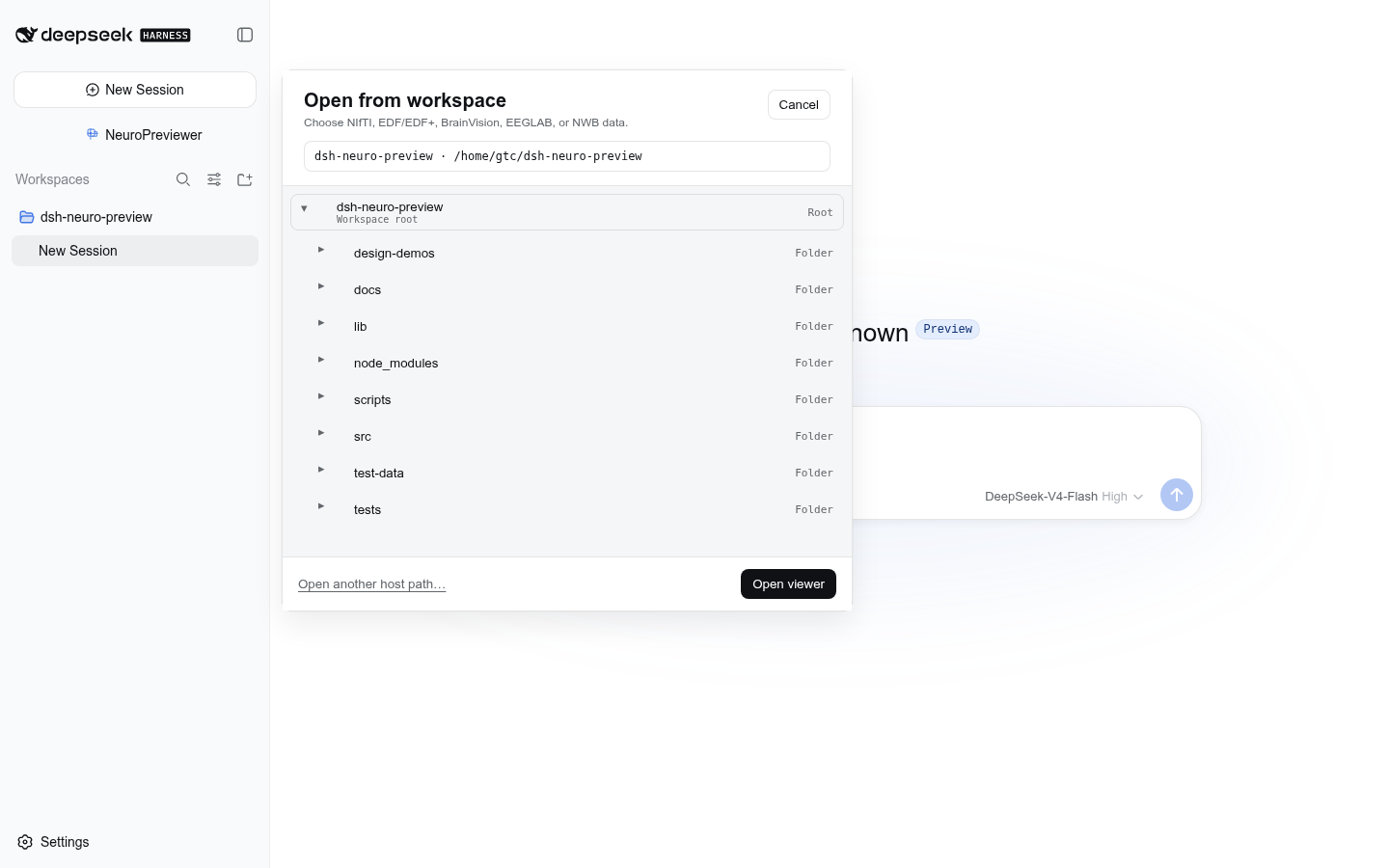
| Workspace file tree | ✅ alpha | Compact non-blocking popup; folders expand in place and preserve all ancestors |
| DSH theme integration | ✅ alpha | Uses DSH semantic colors, borders, typography, hover states, and shadows |
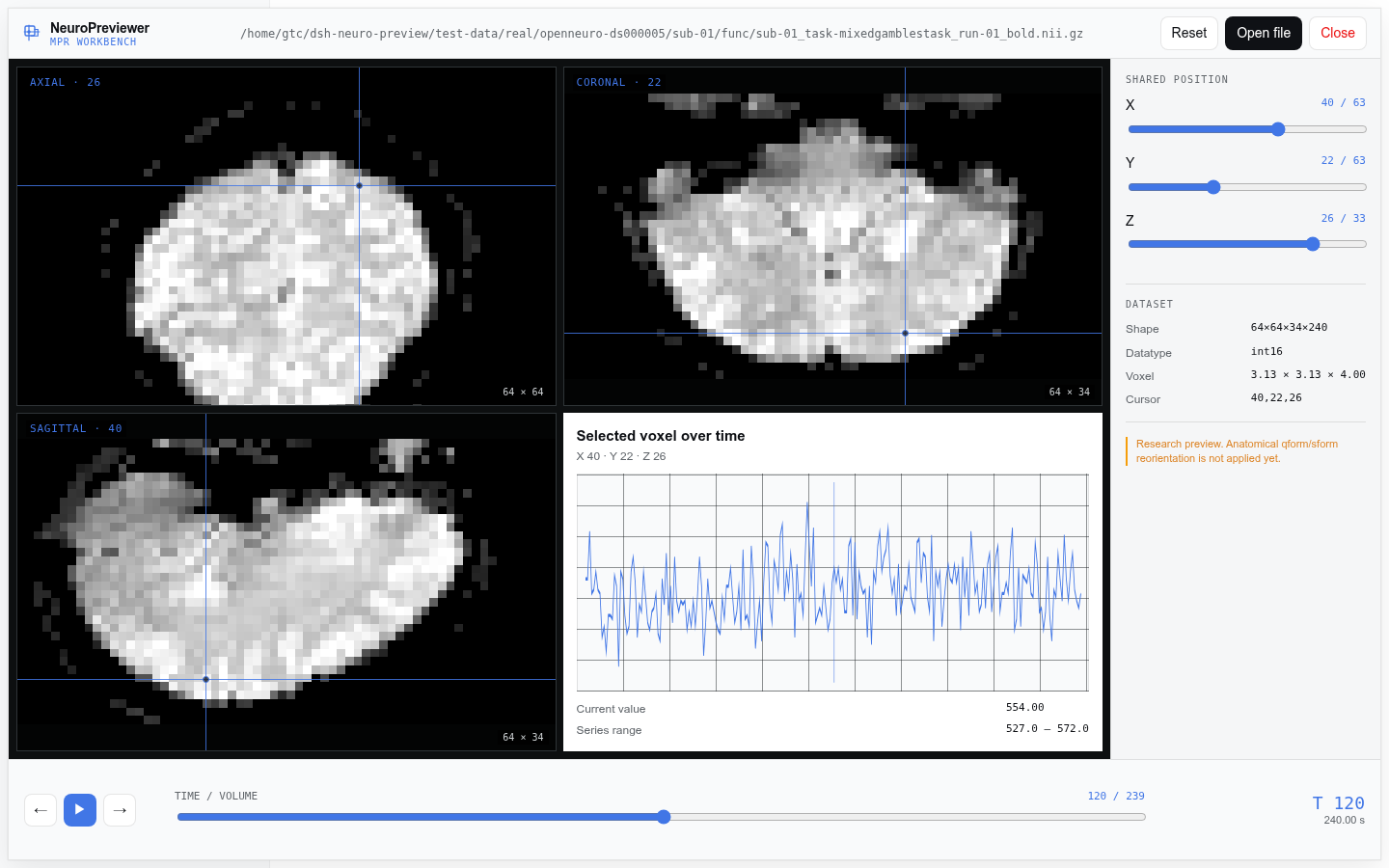
| Linked MPR views | ✅ alpha | Axial, coronal, and sagittal canvases share one voxel cursor |
| Direct spatial navigation | ✅ alpha | Click a plane or move the X/Y/Z sliders |
| 4D navigation | ✅ alpha | Scrub, step, or play fMRI volumes |
| Voxel time series | ✅ alpha | Plots the selected voxel across all volumes, with bounded sampling |
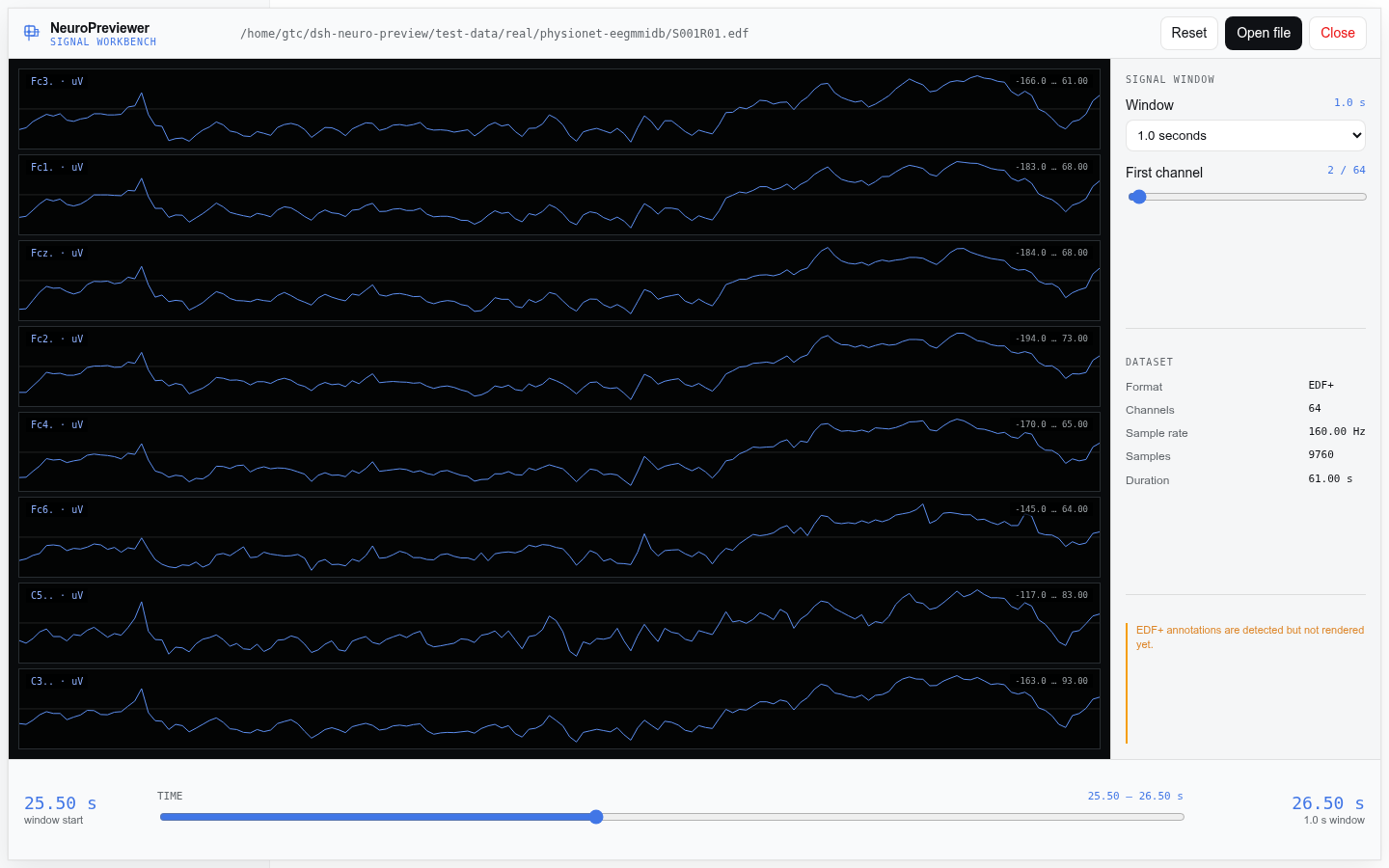
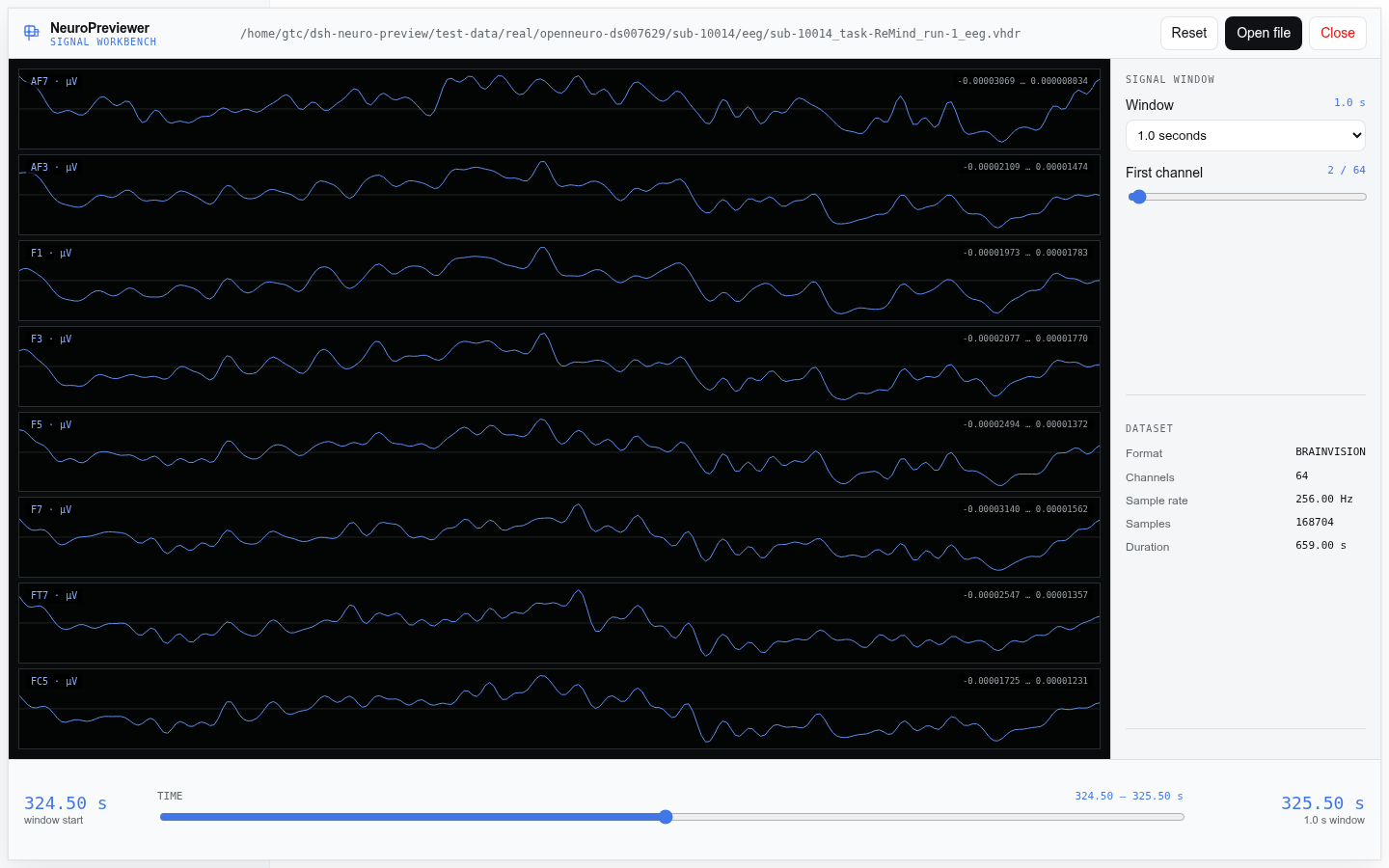
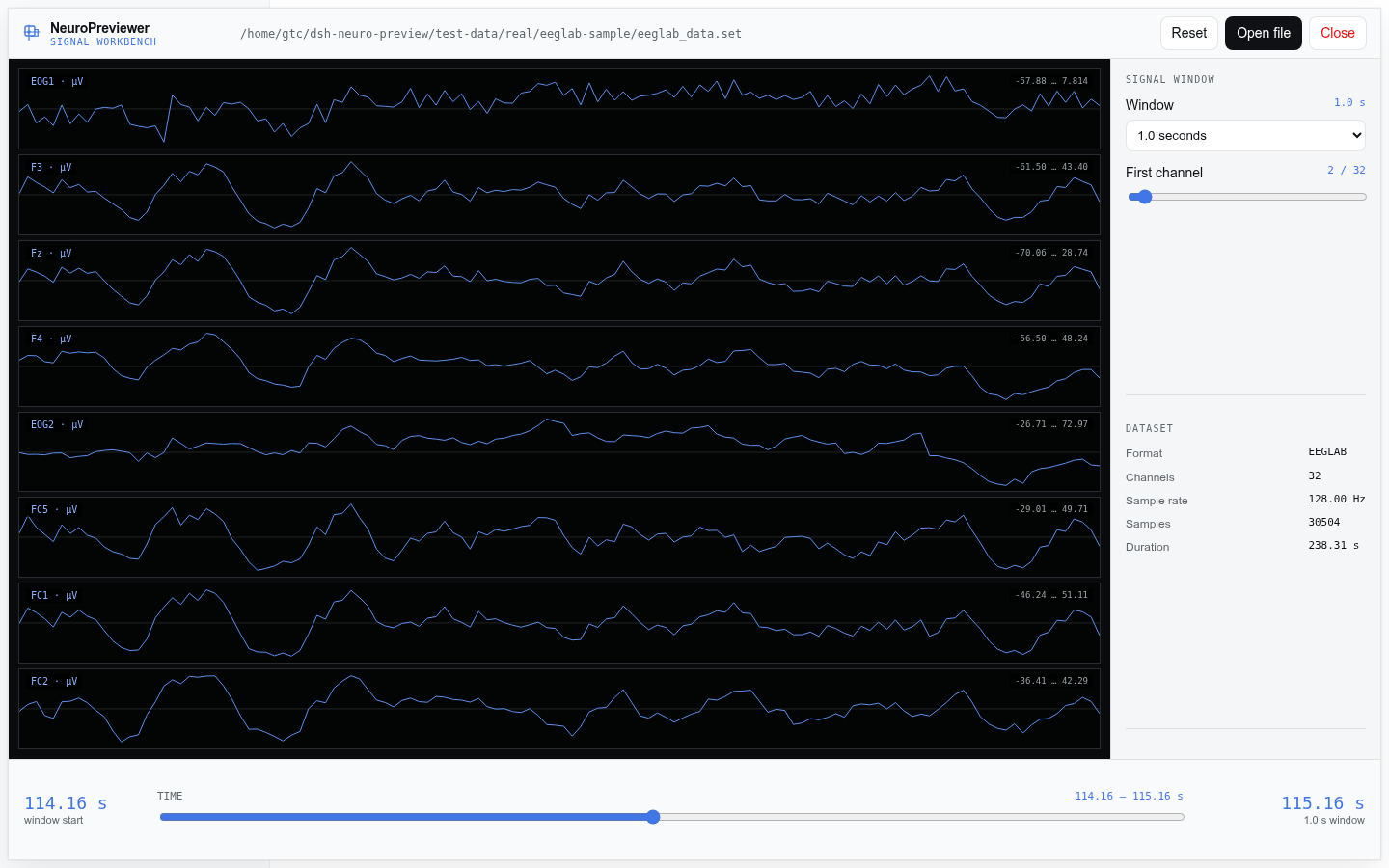
| Multichannel signal workbench | ✅ alpha | Eight stacked traces, movable time window, and channel paging |
| Conversation entry | ✅ | neuro_preview returns a preview card with a button into the workbench |
NIfTI-1 .nii, .nii.gz |
✅ | 3D MRI and 4D fMRI; little- and big-endian; direct gzip decompression |
EDF / EDF+ .edf |
✅ alpha | Calibrated multichannel EEG/PSG waveforms; mixed sample rates are aligned |
BrainVision .vhdr + .eeg |
✅ alpha | Multiplexed float32/int16/uint16 signals; companion data is resolved automatically |
EEGLAB .set + .fdt |
✅ alpha | MATLAB v5 headers and external float32 signal files |
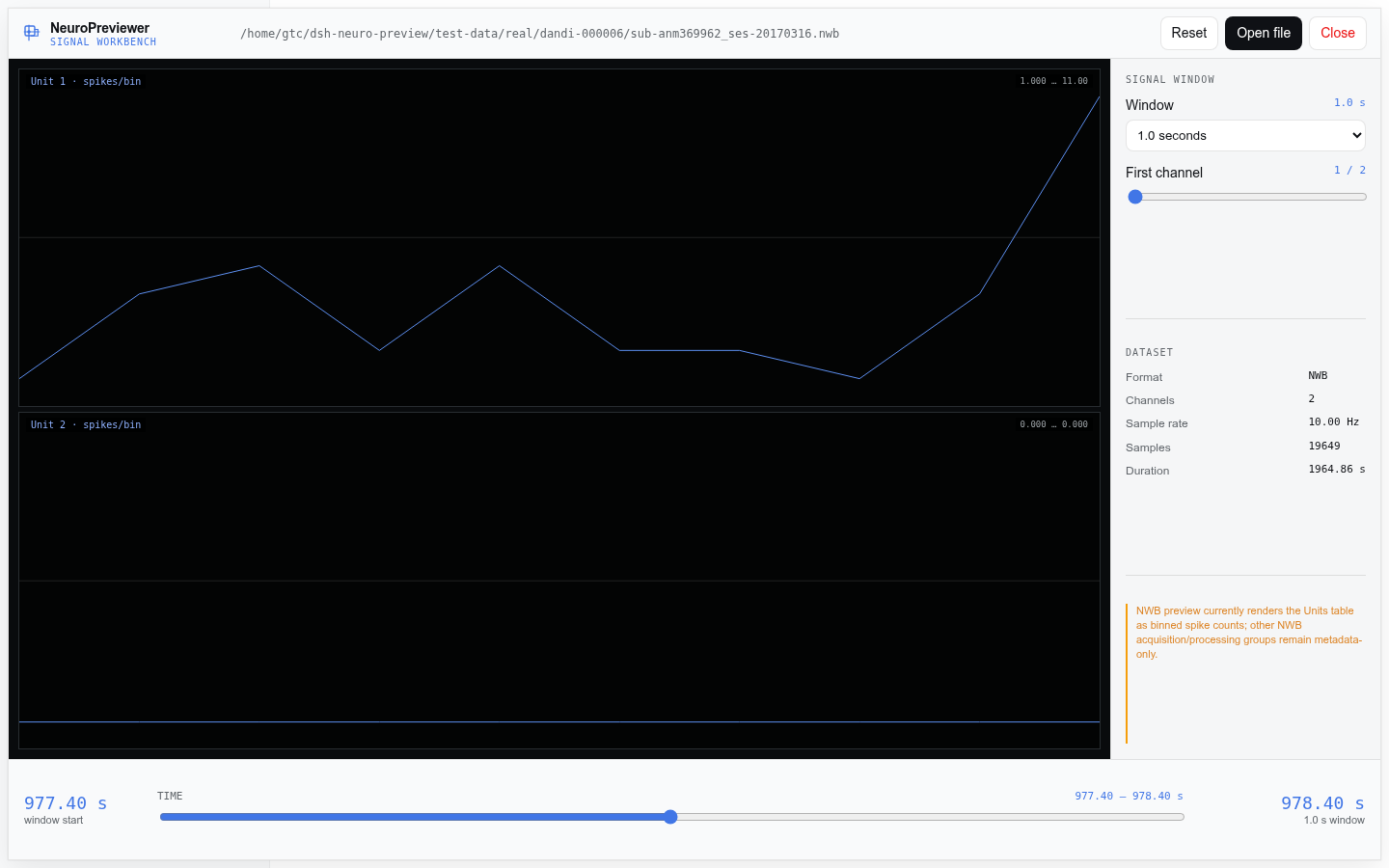
NWB .nwb |
✅ subset | Units/spike_times rendered as per-unit binned spike-count timelines |
| Numeric data | ✅ | uint8/int8/int16/uint16/int32/uint32/float32/float64 |
| Intensity processing | ✅ | Applies scl_slope/scl_inter and a 2%–98% percentile window |
| NIfTI-2 | Planned | Header and datatype support pending |
| BIDS JSON/TSV | Planned | Sidecars, events, and dataset relationships |
| DICOM, FIF, CIFTI, GIFTI | Planned | DICOM needs series assembly; the others need additional adapters |
Images currently follow voxel storage order; qform/sform reorientation is not yet applied. NeuroPreviewer is for research-data inspection and development, not clinical interpretation or diagnosis.
All screenshots below are captured by the reproducible Playwright matrix against a real local DSH 0.1.0-rc.6 deployment. They use the public research fixtures documented in docs/real-datasets.md.
| Open from a workspace | NIfTI-1 .nii.gz MPR |
|---|---|
 |
|
| EDF/EDF+ waveforms | BrainVision waveforms |
|---|---|
 |
 |
| EEGLAB waveforms | NWB unit spike counts |
|---|---|
 |
 |
- Node.js
^22.19.0or>=24.0.0 - npm and pnpm
- DeepSeek Harness
0.1.0-rc.6
dsh plugin --profile web add @brainpilot/dsh-neuro-previewer@0.1.0
dsh --profile web --dump-config
dsh --profile webgit clone https://github.com/NeuroAIHub/NeuroPreviewer.git
cd NeuroPreviewer
npm install
npm run check
dsh plugin --profile web add "$(pwd)"
dsh --profile web --dump-config
dsh --profile webThe dumped configuration should include:
- id: neuro-previewer
  name: '@brainpilot/dsh-neuro-previewer'
  config:
    maxFileBytes: 268435456
    maxSlicePixels: 4194304
    maxOpenDatasets: 2
maxTimeSeriesPoints: 1024- Start the DSH Web profile.
- Click NeuroPreviewer in the DSH sidebar.
- If one workspace is registered, its root opens immediately; otherwise choose a workspace.
- Expand folders, select a supported file, and click Open viewer (or double-click). Parent folders stay visible.
- For volume data, click a plane or move X/Y/Z; scrub 4D volumes with the time control.
- For signal data, move the time window, choose its duration, and page through channel groups.
The compact popup leaves the DSH page visible and does not add a full-screen backdrop. It hides dot-prefixed entries and unsupported files. An advanced absolute-path field remains available under Open another host path….
The same viewer can be opened from the preview card after a conversational tool call. Conversation is an optional entry point, not a requirement for interaction.
Example neuro_preview input:
{
  "path": "/absolute/path/to/image.nii",
  "axis": "axial",
  "index": 48,
  "volume": 0
}
Without the Web extension, the tool still returns a text summary of dimensions, voxel size, datatype, location, intensity range, and warnings.
DSH sidebar ───────────────┐
                          ├──► Web volume / signal workbench
neuro_preview result card ┘          │
                                     │ loopback RPC: workspaces / browse / open / view / close
                                     ▼
                            InteractiveNeuroPreview
                              bounded Host cache
                                     │
                                     ▼
                         Format Adapter seam
                      ┌──────────────┴──────────────┐
                 NIfTI volume                 signal adapters
                                      EDF · BrainVision · EEGLAB · NWB
                                     ▼
                                  Browser
Interactive formats sit behind one volume/signal seam. The important module boundaries are:
src/core/nifti.ts: validates NIfTI-1 and extracts slices, voxel values, and time series.src/core/edf.ts,brainvision.ts,eeglab.ts,nwb.ts: format adapters that produce bounded signal windows.src/core/interactive.ts: detects formats, owns bounded datasets, and produces volume or signal views.src/dsh/source.ts: adapts DSHctx.fsinto a size-limited binary source.src/dsh/rpc.ts: exposes loopback-onlyopen,view, andcloseoperations.src/dsh/workspace-browser.ts: lists registered roots and filters contained directories and supported files.src/index.ts: registers the Host tool, configuration, and RPC service.src/client/workbench.tsx: renders the DSH MPR and multichannel signal workbenches.
Real datasets are downloaded to gitignored test-data/real/; they are not committed or packed. Downloads are verified against scripts/real-data.sha256.
npm run data:download  # complete corpus, approximately 190 MiB
npm run test:real
The real-data smoke test parses OpenNeuro T1/fMRI volumes, PhysioNet EDF/EDF+, OpenNeuro BrainVision, an EEGLAB .set/.fdt pair, and DANDI NWB unit tables. See docs/real-datasets.md for sources, licenses, citations, privacy notes, and hashes.
npm run typecheck  # strict TypeScript
npm test           # fast parser, safety, session, RPC, and workspace tests
npx playwright install chromium # one-time browser setup
npm run test:design # browser checks for the three approved design prototypes
npm run test:real  # parse all downloaded real volume and signal fixtures
npm run test:deep  # typecheck + 24 tests + build + complete real-data smoke matrix
npm run build      # Host ESM and DSH Web client bundles
npm run check      # typecheck + unit tests + build
With a freshly built plugin running in DSH, execute the complete browser matrix:
npm run test:browser:real -- http://127.0.0.1:3080The current deep matrix covers:
- 24 deterministic tests: endian/datatype handling, calibration, mixed-rate alignment, bounded sampling, malformed/truncated input, gzip expansion limits, companion-path containment, cache eviction, cancellation, RPC serialization, and workspace filtering.
- 8 real files: 3D T1, 4D fMRI, EDF, EDF+, BrainVision, EEGLAB, and two NWB sessions.
- 5 end-to-end DSH datasets:
.nii.gz, EDF+, BrainVision, EEGLAB, and NWB, all opened through the workspace tree. - Direct interaction assertions: non-diagonal MPR crosshair clicks, X/Y/Z/T movement, finite waveform geometry, time-window movement, duration changes, channel paging, DSH theme tokens, and absence of browser errors.
The browser run also regenerates the six screenshots in design-demos/screenshots/. It requires the downloaded real-data corpus and a running DSH instance; npm run test:deep does not require DSH.
- File access is read-only and goes through DSH
ctx.fs. - The RPC is registered with loopback authority.
- The Host defaults to a 256 MiB file limit and two cached open datasets.
- Slice size defaults to 4,194,304 pixels; time-series transfer defaults to 1,024 samples.
- The browser receives three normalized 2D frames and a bounded time series, not the full volume.
- Signal views send at most eight visible channels and 1,024 points per trace by default, not the full recording.
- Header-derived dimensions, offsets, and multiplications are checked as safe integers.
- Reads and view requests support cancellation; stale UI responses are discarded.
- DSH currently has no filesystem byte-range read, so the Host reads each accepted file in full.
- BrainVision marker events, EDF+ annotations, embedded EEGLAB arrays, and general NWB acquisition/processing groups are not rendered yet.
- NIfTI-2 and qform/sform anatomical reorientation.
- Window/level controls, overlays, colormaps, and keyboard navigation.
- BIDS relationships, JSON/TSV tables, and event timelines.
- EDF+/BrainVision markers, annotations, and event overlays.
- Broader NWB acquisition groups, DICOM series, MNE FIF, CIFTI, and GIFTI.
NeuroPreviewer is released under the MIT License. Real test datasets remain subject to their original licenses, citation requirements, and privacy terms.