Real-time, two-way ASL ↔ Speech communication. SignBridge is an innovative application designed to bridge the communication gap between deaf/hard-of-hearing individuals and hearing individuals seamlessly.
- Signer → Listener: Sign into your webcam, and the app translates your ASL gestures into spoken words.
- Listener → Signer: Speak into the microphone, and the app transcribes your words into text.



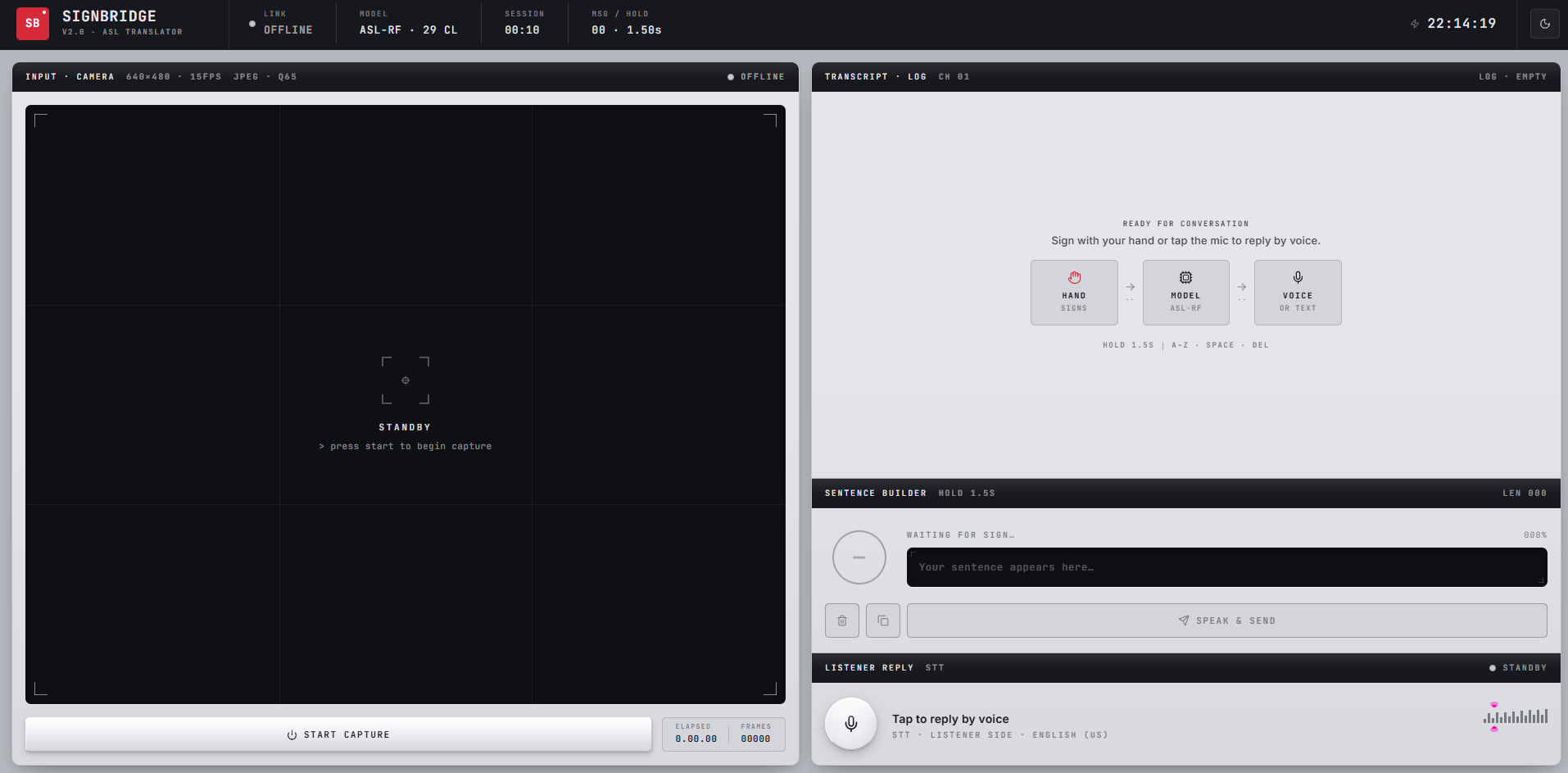
- ⚡ Real-time Sign Detection: Utilizes a 21-landmark MediaPipe pipeline with single-frame WebSocket inference to ensure zero-queue latency.
- 🎯 Hold-to-Confirm Interaction: Features an intuitive hold-ring mechanism (1.5s) to confirm letters, preventing accidental inputs and typos.
- 🗣️ Two-way Translation: Bridges the gap fully—Signer to Text-to-Speech (TTS), and Listener to Speech-to-Text (STT).
- 🌗 Premium Neumorphic UI: Boasts beautiful dark and light modes with smooth Framer Motion animations for a modern feel.
- 🧪 Rock-Solid Reliability: Backed by 91 automated tests (59 frontend Vitest + 32 backend pytest) to ensure stability.
SignBridge uses a high-performance WebSocket architecture to stream binary JPEG frames to a Python backend, process them via MediaPipe and a Random Forest classifier, and return predictions instantly.
sequenceDiagram
    actor S as 🤟 Signer
    participant B as Browser
    participant WS as WebSocket
    participant MP as MediaPipe Hands
    participant RF as Random Forest
    participant UI as Sentence Builder
    actor L as 👂 Listener

    Note over S,L: ── ASL → Speech  (Signer to Listener) ──────────────────────

    S->>B: Show ASL sign to webcam
    B->>WS: JPEG frame (binary · 15 fps)
    WS->>MP: Raw frame bytes
    MP->>MP: Extract 21 hand landmarks (63 floats)
    MP->>RF: Landmark feature vector
    RF-->>WS: Predicted letter + confidence
    WS-->>UI: Prediction JSON
    UI->>UI: Hold-ring fills over 1.5 s → letter confirmed
    UI->>L: Speak & Send → speechSynthesis reads aloud

    Note over S,L: ── Speech → Text  (Listener to Signer) ──────────────────────

    L->>B: Speaks into microphone
    B->>B: Web Speech API — continuous SpeechRecognition
    B-->>S: Transcript appears in conversation feed
Click to expand technology details
| Layer | Technology | Purpose |
|---|---|---|
| Frontend | React 19 + Vite + TypeScript | UI and camera capture |
| Styling | Tailwind CSS v4 + custom neumorphic system | Dark/light neumorphism theme |
| Animations | Framer Motion | Transitions, ripple rings, entrance choreography |
| Backend | FastAPI + Uvicorn | WebSocket endpoint, inference API |
| Hand Tracking | MediaPipe Hands | 21-landmark extraction (63 floats per frame) |
| Classifier | scikit-learn Random Forest | Letter prediction from landmarks |
| Real-time | WebSocket binary frames | JPEG bytes → JSON prediction |
| Speech | Web Speech API | TTS (speechSynthesis) + STT (SpeechRecognition) |
Make sure you have Python 3.10+, Node.js 18+, a working webcam, and Chrome/Edge (for Speech-to-Text).
git clone https://github.com/pvchaitanya8/Sign-Language-Translator.git
cd Sign-Language-Translatorcd backend
python -m venv venv
# Activate the virtual environment:
# Windows: venv\Scripts\activate
# Mac/Linux: source venv/bin/activate
pip install -r requirements.txt(Skip if backend/model/asl_model.pkl is already present)
Download the Kaggle ASL Alphabet dataset and place the train/ and test/ folders inside backend/dataset/.
# Process images to extract landmarks (~2-5 mins)
python model/preprocess.py

# Train the Random Forest classifier (~30s)
python model/train.pyTerminal 1 (Backend):
cd backend
uvicorn main:app --reload --port 8000
API health check: http://localhost:8000/health
Terminal 2 (Frontend):
cd frontend
npm install
npm run dev
App interface: http://localhost:5173
Signing a message (Signer → Listener)
- Show your hand to the camera.
- A prediction overlay appears with the detected letter and confidence percentage.
- The ring disc in the Sentence Builder fills clockwise as you hold the sign.
- Hold for 1.5 seconds → the letter is confirmed and appended to your sentence.
- Special signs:
SPACE: Adds a space between wordsDEL: Removes the last character
- Click Speak & Send to read the sentence aloud via Text-to-Speech.
Replying by voice (Listener → Signer)
- Click the mic button (bottom-right) — ripple rings will pulse.
- Speak naturally; interim text appears dynamically.
- Click the mic button again to stop. Your speech is transcribed to text.
ASL Classes Supported
The model recognises 29 classes: A-Z, space, del, and nothing.
Note: J and Z involve motion and have reduced accuracy in this static-landmark model.
SignBridge is heavily tested to ensure reliability.
Backend (pytest):
cd backend
pip install -r requirements-dev.txt
pytest -v
Frontend (Vitest):
cd frontend
npm run test:runEnvironment Variables
For production, create frontend/.env.local:
VITE_WS_URL=wss://your-app.onrender.com/wsWebSocket API (/ws)
Accepts raw JPEG bytes. Returns JSON predictions:
Consider supporting by:


Distributed under the Apache-2.0 License. See LICENSE for more information.
{
  "hand_detected": true,
  "letter": "A",
  "confidence": 0.94
}