
Un'applicazione web leggera, reattiva e completamente personalizzabile per gestire e visualizzare l'orario scolastico o universitario. Progettata con un'architettura Dual-UI: un'interfaccia dedicata per schermi Desktop (con switch in tempo reale tra stile Windows 11 Fluent e macOS Vibrancy) e una ottimizzata per Mobile (stile Android Material You).


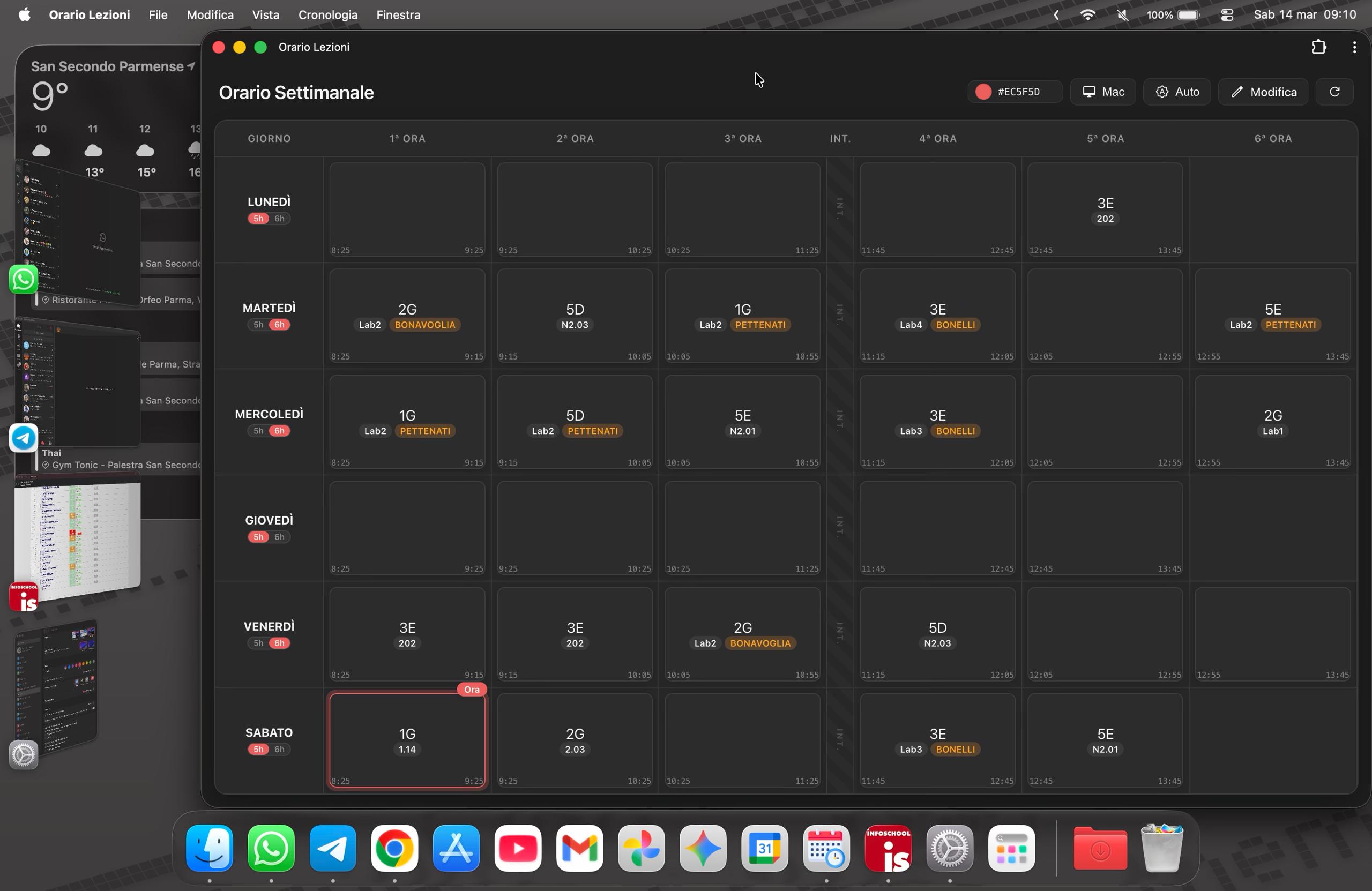
- ☁️ Sincronizzazione Cloud (Google Sheets): I dati dell'orario non sono hardcoded. L'app scarica l'orario dinamicamente da un file CSV generato tramite un foglio Google. Modifichi il foglio, e l'app si aggiorna.
- 🖥️ Doppio Stile OS (Desktop): Scegli il tuo ambiente preferito! Alterna con un clic tra le geometrie pulite di Windows 11 e le trasparenze effetto vetro satinato ("Vibrancy") di macOS.
- 🎨 Tema Dinamico (Material You / Monet): Scegli il tuo colore preferito tramite il color picker integrato e l'intera interfaccia (sfondi, pulsanti, accenti, badge, Focus Ring) ricalcolerà dinamicamente la propria palette colori.
- 🌓 Modalità Chiara / Scura: Supporto nativo per il tema di sistema (Auto) o forzatura manuale della modalità chiara o scura, con colori ricalibrati per l'accessibilità.
- ⏳ Evidenziazione in Tempo Reale: L'app calcola l'ora esatta e i minuti correnti, evidenziando automaticamente la lezione o l'intervallo attualmente in corso.
- 📱 PWA Ready: L'app è dotata di un
manifest.jsone può essere installata come una vera e propria applicazione nativa sulla schermata Home del telefono (Aggiungi a schermata Home). - 📶 Supporto Offline: Una volta scaricato l'orario, i dati vengono salvati nel
localStoragedel browser. L'app funzionerà perfettamente anche senza connessione internet. - 🔄 Doppia Vista (Mobile): Su smartphone è possibile alternare tra una vista "Giornaliera" (con orari precisi e slot larghi) e un "Recap Settimanale" a griglia compatta.
Il progetto utilizza un redirect intelligente per servire l'interfaccia migliore in base al dispositivo:
index.html: La versione Desktop. Utilizza un layout a griglia espansa. Permette di selezionare l'estetica preferita tra Microsoft Fluent Design (icone sottili, bordi netti) e lo stile macOS (sfocature, ombre morbide, tipografia San Francisco). Include un redirect automatico se rileva uno User Agent mobile.android.html: La versione Mobile. Dispone di navigation tab, recap orizzontale scrollabile, bottoni fluttuanti (FAB) e icone con stile Google Material Symbols (piene e arrotondate).
- Prepara il tuo Google Sheet: Crea un foglio Google con la struttura dell'orario.
- Pubblica in CSV: Vai su File > Condividi > Pubblica sul web. Scegli l'intero documento e come formato seleziona Valori separati da virgole (.csv).
- Collega l'App: Copia il link generato da Google. Apri i file
index.htmleandroid.html, cerca la costanteSHEET_URLe sostituisci la stringa"INSERISCI_QUI_IL_LINK_DEL_CSV_PUBBLICATO"con il tuo link. - Modifica Rapida: (Opzionale) Sostituisci il link del bottone "Modifica" (o del FAB su mobile) con l'URL standard del tuo foglio Google per aprirlo comodamente in modalità modifica.
- HTML5 e CSS3 (CSS Grid, Flexbox, CSS Variables per il theming).
- Vanilla JavaScript (ES6) (Fetch API, LocalStorage, Manipolazione DOM, Regex).
- Google Fonts (Roboto, Material Symbols Rounded).
- Nessun framework esterno: Solo codice puro per la massima leggerezza e velocità.
A lightweight, responsive, and fully customizable web application to manage and view school or university schedules. Designed with a Dual-UI architecture: a dedicated interface for Desktop screens (with a real-time toggle between Windows 11 Fluent and macOS Vibrancy styles) and one optimized for Mobile (Android Material You style).
- ☁️ Cloud Sync (Google Sheets): Timetable data is not hardcoded. The app fetches the schedule dynamically from a CSV file generated via a Google Sheet. Edit the sheet, and the app updates.
- 🖥️ Dual OS Style (Desktop): Choose your preferred environment! Toggle effortlessly between the clean geometry of Windows 11 and the frosted glass ("Vibrancy") transparencies of macOS.
- 🎨 Dynamic Theming (Material You / Monet): Choose your favorite color via the built-in color picker, and the entire interface (backgrounds, buttons, accents, badges, Focus Rings) will dynamically recalculate its color palette.
- 🌓 Light / Dark Mode: Native support for the system theme (Auto) or manual toggle for light/dark mode, with colors automatically recalibrated for accessibility.
- ⏳ Real-Time Highlighting: The app calculates the exact current time and automatically highlights the ongoing lesson or break slot.
- 📱 PWA Ready: Equipped with a
manifest.json, the app can be installed as a native-like application on your smartphone's Home screen (Add to Home Screen). - 📶 Offline Support: Once the schedule is downloaded, the data is saved in the browser's
localStorage. The app will work perfectly even without an internet connection. - 🔄 Dual View (Mobile): On smartphones, you can easily toggle between a "Daily" view (with precise times and large slots) and a compact "Weekly Recap" grid.
The project uses a smart redirect to serve the best UI based on the user's device:
index.html: The Desktop version. It features an expanded grid layout and allows you to select your preferred aesthetic between Microsoft Fluent Design (thin icons, sharp borders) and macOS style (blurs, soft shadows, San Francisco typography). Includes an automatic redirect if a mobile User Agent is detected.android.html: The Mobile version. Features navigation tabs, a scrollable horizontal recap, Floating Action Buttons (FAB), and icons styled after Google Material Symbols (filled and rounded).
- Prepare your Google Sheet: Create a Google Sheet containing your schedule structure.
- Publish as CSV: Go to File > Share > Publish to web. Choose the entire document and select Comma-separated values (.csv) as the format.
- Link the App: Copy the generated Google link. Open both
index.htmlandandroid.html, locate theSHEET_URLconstant, and replace the"INSERISCI_QUI_IL_LINK_DEL_CSV_PUBBLICATO"string with your link. - Quick Edit: (Optional) Replace the link of the "Edit" button (or the FAB on mobile) with the standard URL of your Google Sheet to easily open the editor.
- HTML5 and CSS3 (CSS Grid, Flexbox, CSS Variables for theming).
- Vanilla JavaScript (ES6) (Fetch API, LocalStorage, DOM Manipulation, Regex).
- Google Fonts (Roboto, Material Symbols Rounded).
- No External Frameworks: Pure, dependency-free code for maximum lightness and speed.