Embeddable web UI for inspecting in-process memory caches (and Redis) in Node.js services. One-line integration, zero required dependencies beyond your framework.
app.use("/cache-ui", cacheViewer({ adapter: fromCacheManager(cache) }));Browse keys, inspect values (pretty-printed JSON with a live TTL countdown), and delete entries — all from a single self-contained HTML page with no build step and no third-party scripts.
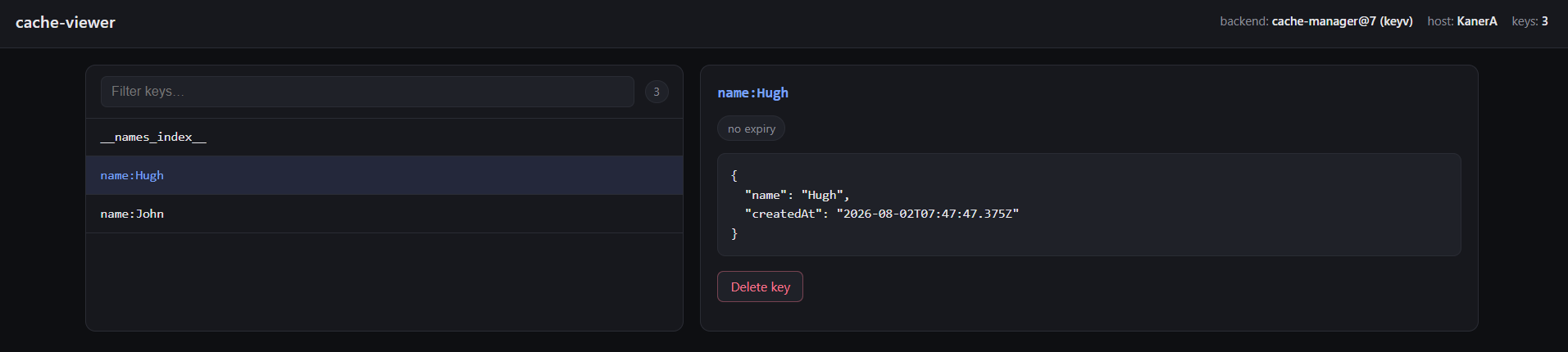
Inspecting a cache-manager@7 (Keyv) store. The header names the backend and the host —
which matters when the cache is per-pod.
Cache values often contain PII, session data, tokens, or other secrets. This viewer exposes them, unredacted, to anyone who can reach the mounted route. Treat it accordingly:
- It is disabled by default in production (
NODE_ENV === "production") — you must opt in explicitly if you want it there. - Gate it behind your own authentication (see Auth below) before enabling it anywhere reachable outside a trusted network.
- Never mount it on a public-facing router without an
authguard. - When disabled or when
authrejects a request, every route (UI and API) responds404, not403— an unauthenticated caller can't even tell the viewer exists.
npm install cache-viewerexpress is an optional peer dependency, required only if you use the cache-viewer/express
subpath.
import { caching } from "cache-manager";
import { fromCacheManager } from "cache-viewer";
import { cacheViewer } from "cache-viewer/express";

const cache = await caching("memory", { max: 1000, ttl: 60_000 });

app.use("/cache-ui", cacheViewer({ adapter: fromCacheManager(cache) }));import { createCache } from "cache-manager";
import Keyv from "keyv";
import { fromKeyv } from "cache-viewer";
import { cacheViewer } from "cache-viewer/express";
const keyv = new Keyv();
const cache = createCache({ stores: [keyv] });
app.use("/cache-ui", cacheViewer({ adapter: fromKeyv(keyv) }));Not every Keyv store implements
iterator(). When it doesn't,keys()returnsnulland the UI shows a "keys not enumerable" empty state instead of an empty list — the two are deliberately distinguished.
import Redis from "ioredis";
import { fromRedis } from "cache-viewer";
import { cacheViewer } from "cache-viewer/express";

const redis = new Redis(process.env.REDIS_URL);

app.use("/cache-ui", cacheViewer({ adapter: fromRedis(redis) }));
Key enumeration uses SCAN (never KEYS), so it's safe against a production-sized Redis
instance.
app.use(
  "/cache-ui",
  cacheViewer({
    adapter: fromCacheManager(cache),
    enabled: true, // override the NODE_ENV default if you must run this in prod
    auth: (req) => req.headers["x-admin-token"] === process.env.CACHE_VIEWER_TOKEN,
  }),
);enableddefaults toprocess.env.NODE_ENV !== "production".auth(req)receives the Express request; returnfalseto hide the viewer as if it were disabled (404, not403).- Prefer wiring the viewer behind whatever session/SSO middleware already gates the rest of your admin surface, rather than inventing a bespoke token scheme.
An in-process memory cache (fromCacheManager, most Keyv memory stores) exists per pod,
not cluster-wide. If you're running multiple replicas, each pod has its own independent
cache, and hitting /cache-ui through a load balancer will land you on a different pod's
data every request.
The header always shows hostname (os.hostname(), i.e. the pod name) next to the backend
label so you can tell which replica you're actually looking at. To inspect a specific pod
deterministically:
kubectl port-forward pod/<pod-name> 3000:3000and hit that pod directly, or- Set a sticky-session / pod-affinity rule on the ingress in front of the route while debugging.
A Redis-backed cache (fromRedis) doesn't have this problem — it's already a single shared
backend regardless of which pod serves the request.
If you're not using Express, wire the JSON API into your own server with createApiHandler
from the package root, and serve ui/index.html (shipped in the published package) yourself:
import { createApiHandler, fromCacheManager } from "cache-viewer";

const handleCacheApi = createApiHandler({ adapter: fromCacheManager(cache) });

server.on("request", async (req, res) => {
  const handled = await handleCacheApi(req, res);
  if (!handled) {
    // fall through to the rest of your routing
  }
});
Routes, relative to wherever you mount it:
| Method | Path | Response |
|---|---|---|
GET |
/api/keys?q= |
{ keys: string[] | null } |
GET |
/api/keys/:key |
{ value, ttlMs, serialized } |
DELETE |
/api/keys/:key |
204 |
GET |
/api/stats |
{ count, backend, hostname } |
After building (npm run build), mount the viewer in a throwaway Express app and open it in
a browser:
// scratch.mjs — a hand-rolled adapter is enough to exercise the UI without pulling in a
// specific cache-manager major.
import express from "express";
import { cacheViewer } from "./dist/express.js";

const store = new Map([["demo:1", { hello: "world" }]]);
const expiresAt = Date.now() + 30_000;

const adapter = {
  async keys(pattern) {
    const all = [...store.keys()];
    return pattern ? all.filter((k) => k.includes(pattern)) : all;
  },
  async get(key) {
    return store.has(key) ? { value: store.get(key), ttlMs: expiresAt - Date.now() } : null;
  },
  async del(key) {
    store.delete(key);
  },
  async stats() {
    return { count: store.size, backend: "demo", hostname: "localhost" };
  },
};

const app = express();
app.use("/cache-ui", cacheViewer({ adapter }));
app.listen(3000, () => console.log("open http://localhost:3000/cache-ui/"));
node scratch.mjsThen open http://localhost:3000/cache-ui/ and confirm: the key list shows demo:1, the TTL
countdown ticks down, search filters the list, and deleting the key removes it after
confirmation.
- RESP protocol shim (connecting RedisInsight directly)
- WebSocket live updates (2s polling is used instead)
- NestJS binding
- Editing/setting values — this is a viewer, not an editor
MIT