


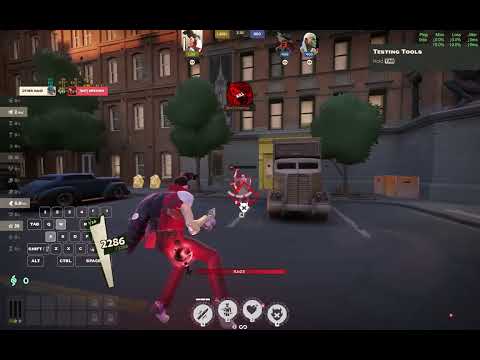
Welcome to the Deadlock Mods Collection. This repository houses a set of custom HUD modifications and gameplay scripts for Valve's Deadlock. These mods were created to experiment with the internal Panorama UI system, unlocking new ways to visualize game data like buff timers, health checking, and rank displays.
Whether you're looking to customize your own HUD or understand how Deadlock's UI works under the hood, this collection serves as a practical resource.
For current layout and cleanup conventions, see
WORKSPACE_STRUCTURE.md.
Archived non-runtime metadata and one-off artifacts are kept in _archive/.
- Valve Panorama UI: The underlying UI framework used by Deadlock (and Dota 2/CS2).
- JavaScript / XML / CSS: Core technologies for layout and logic.
This collection includes several discrete modules:
Two mutually exclusive editions replace the former combined design with a clean cutover: the V40D TopBarPlus base plus the ES5 ShowRank Barebones rank surfaces. They preserve native GameTime, all TopBarPlus script includes, account-ID authority, duplicate-name/account safety, bounded Escape probing, six/twelve verified-account caching, native Escape behavior, and ranks in profile, context menu, topbar, team average, and player list. They do not use the old canonical ShowRank bridge.
- Alert edition (
topbar_rank) — ranks plus missing labels, portrait darkening, clock polling, notification root, and hero-icon announcements. - No-missing edition (
topbar_rank_no_missing) — rank-only; it contains none of the alert-only features.
Both editions check in 16 TopBarPlus base assets derived from the supplied G:\v40d_top_bar_plus.zip. Archive witnesses: ZIP SHA-256 9610965fc621c7d2f8fa5054c79c1d31f32ef30bb93dfd2ea2475598ba6bd608; VPK SHA-256 986d28a49f06919d84a090e9921929075fb2b9c5a445df58de13b1e06921d10d. Each source tree packages 22 assets: those 16 base assets, four rank layouts (profile, context menu, Escape, player list), one Barebones runtime, and one Barebones style. The topbar root and player layouts are merged replacements, not additions.
Build from the repository root:
powershell -ExecutionPolicy Bypass -File .\build_topbar_rank_barebones.ps1
powershell -ExecutionPolicy Bypass -File .\build_topbar_rank_barebones_no_missing.ps1
The artifacts are topbar_rank_barebones_dir.vpk and topbar_rank_barebones_no_missing_dir.vpk. Either build may use -KeepStaging; use -Install only to install one edition as G:\SteamLibrary\steamapps\common\Deadlock\game\citadel\addons\pak89_dir.vpk. Because both use pak89_dir.vpk, install only one at a time.
These TopBar Rank editions are separate from the standalone showrank_barebones editions and their release artifacts. Source/build validation verifies inputs and packages; it is not live in-game proof. Smoke-test the installed edition in Deadlock.
- Custom Health Bars: Modified health bars (
hp,self_hp) including color-blind friendly options.
- Recent Purchase Tracker: Keeps a history of items bought in the current session.
- Buff Timer (
buff_timer_virgin): Full timer edition with Bridge Buff minimap glows, claim indicators, and enemy-fog linger markers. - Buff Timer Minimal (
buff_timer_virgin_minimal): Timers-only edition. It keeps Rejuvenator, Bridge Buff, Rift, Urn, neutral-phase, and team-chat timers without custom minimap glows, claim overlays, or enemy?markers. - Legacy Target: Restores targeting indicators to previous styles.
Note: This repository contains the raw source code. before installing, you must compile the mods.
- Compile Source: Use the Dota 2 Workshop Tools to compile the scripts and layout files.
- Create VPK Structure: After compiling, you need to pack the files into a VPK format or folder structure.
- The game requires this format to load the mods correctly.
Before mods can work, you must tell the game to look for them.
-
Navigate to your Deadlock installation directory:
- Usually:
C:\Program Files (x86)\Steam\steamapps\common\Deadlock\game\citadel
- Usually:
-
Open
gameinfo.giwith a text editor (Notepad, VS Code, etc.). -
Locate the
SearchPathssection. -
Add the line
Game citadel/addonsABOVE theGame citadelline. It should look like this:SearchPaths { Game citadel/addons <-- ADD THIS LINE Game citadel Game core ... } -
Save and close the file.
Building this collection involved reverse-engineering the existing HUD XML layouts.
- Challenge: Finding the correct parent panels to attach custom elements to was trial-and-error.
- Learning: Learned how to hook into game events (like
OnTakeDamageorOnBuyItem) using the Panorama event system. - Technique: Discovered the "CSS Hijack" pattern to override game styles without modifying XML, by creating CSS files with matching names and using
@importto load the base styles. - Improvement: Future versions could use a centralized loader instead of separate folders for easier management.




Unless otherwise noted, original code and original mod source in this repository are licensed under the Apache License, Version 2.0. See LICENSE.
Attribution notices for this project are included in NOTICE. If you distribute this software or derivative works, preserve the applicable copyright, license, and notice files as required by Apache-2.0.
When distributing this project or derivative works based on its original code, please preserve the included LICENSE and NOTICE files. This project was created by Hantu-Raya.
Deadlock, Source 2, Valve, Panorama, and related names, paths, formats, trademarks, and game assets belong to their respective owners. This project is an unofficial fan modification and is not affiliated with Valve.