Generate a TypeScript build-info constant from package.json and Git in milliseconds.



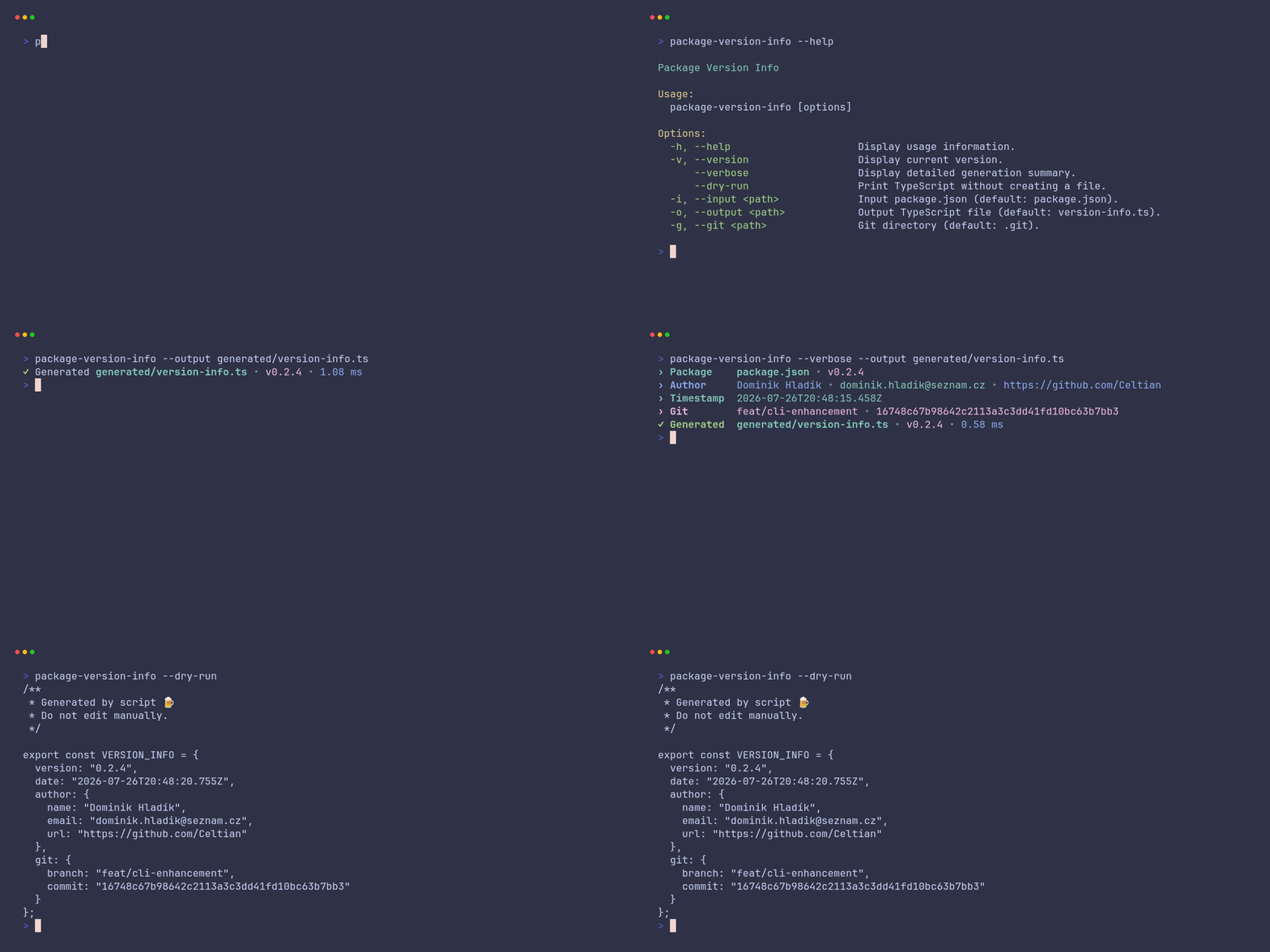
package-version-info is a fast native CLI for embedding your package version, build date,
author, Git branch, and commit into TypeScript applications. It has no runtime dependencies and
gracefully omits optional metadata when it is unavailable.
| Feature | Details |
|---|---|
| ⚡ Fast native executable | Built with Zig and starts without a JavaScript runtime. |
| 📦 Zero runtime dependencies | Installs as a standalone executable for your platform. |
| 🧩 TypeScript-ready output | Generates a directly importable VERSION_INFO constant. |
| 🌿 Optional Git metadata | Reads loose refs, packed refs, and detached HEAD states. |
| 👤 Package author metadata | Includes author name, email, and URL when available. |
| 🧘 Quiet by default | Prints one compact result line, with --verbose when you need details. |
npm install package-version-info --save-devbun add --dev package-version-infoThe npm package includes native executables for macOS arm64/x64, Linux arm64/x64, and Windows x64. A small Node.js launcher selects the matching executable at runtime; no platform-specific packages are installed separately.
npx package-version-info --output src/version-info.ts✓ Generated src/version-info.ts • v1.0.0 • 2.00 ms
import { VERSION_INFO } from "./version-info";

console.log(`Version ${VERSION_INFO.version}`);
console.log(`Built at ${VERSION_INFO.date}`);/**
* Generated by script 🍺
* Do not edit manually.
*/
export const VERSION_INFO = {
version: "1.0.0",
date: "2026-07-16T18:53:01.908Z",
author: {
name: "Dominik Hladík",
email: "dominik.hladik@seznam.cz",
url: "https://github.com/Celtian"
},
git: {
branch: "main",
commit: "8be6ca60256cc90e0a41d40b9ee222165f239444"
}
};The author property is omitted when package.json has no object-style author metadata. The
git property is omitted when the configured Git directory or ref cannot be resolved.
Running the CLI without arguments generates version-info.ts from package.json:
npx package-version-info| Option | Alias | Default | Description |
|---|---|---|---|
--help |
-h |
— | Display usage information. |
--version |
-v |
— | Display the installed package version. |
--verbose |
— | Disabled | Display a detailed generation summary. |
--dry-run |
— | Disabled | Print TypeScript without creating a file. |
--input <path> |
-i |
package.json |
Input package file. |
--output <path> |
-o |
version-info.ts |
Generated TypeScript file. |
--git <path> |
-g |
.git |
Git directory or pointer file used for branch and commit metadata. |
The Git path may be a regular .git directory or the .git pointer file used by linked
worktrees and submodules.
# Generate with default paths
npx package-version-info

# Show detailed progress
npx package-version-info --verbose

# Preview generated TypeScript without creating a file
npx package-version-info --dry-run

# Pipe the preview to another command
npx package-version-info --dry-run | less

# Use custom paths
npx package-version-info \
  --input package.json \
  --output src/generated/version-info.ts \
  --git .git

# Short aliases
npx package-version-info \
  -i package.json \
  -o src/generated/version-info.ts \
-g .gitCompact mode is designed for normal builds:
✓ Generated src/version-info.ts • v1.0.0 • 2.00 ms
Use verbose mode when diagnosing package, author, timestamp, Git, or output-path behavior:
npx package-version-info --verbose› Package package.json • v1.0.0
› Author Dominik Hladík • dominik.hladik@seznam.cz • https://github.com/Celtian
› Timestamp 2026-07-16T18:53:01.908Z
› Git main • 8be6ca60256cc90e0a41d40b9ee222165f239444
✓ Generated version-info.ts • v1.0.0 • 2.00 ms
Use --dry-run to print the generated TypeScript to stdout without creating the configured output
file or its parent directories:
npx package-version-info --dry-runThe stdout stream contains only TypeScript, with no colors or status text, so it can be redirected
or piped directly. Combining --verbose with --dry-run keeps the TypeScript on stdout and writes
the colored diagnostic summary to stderr, ending with ✓ Previewed.
Generate version information automatically before your application build:
{
  "scripts": {
    "version-info": "package-version-info --output src/version-info.ts",
    "prebuild": "npm run version-info",
    "build": "tsc"
  }
}
The generated file is regular TypeScript, so the same approach works with Angular, React, Vue, Vite, Node.js, and other TypeScript-based build systems.
Requirements:
- Zig 0.16.0
- Node.js 24
- Bun 1.3.14
# Build the executable
zig build

# Run the CLI
zig build run

# Run all formatting, build, and test checks
bun run validate
Regenerate the terminal demo
The animation is defined in docs/terminal-demo.tape and rendered with
VHS. The official Docker image includes VHS and its media
dependencies:
zig build
docker run --rm -v "$PWD:/vhs" ghcr.io/charmbracelet/vhs docs/terminal-demo.tape
Contributions are welcome. See CONTRIBUTING.md before opening a pull request.
Copyright © 2025–2026 Dominik Hladík.
Licensed under the MIT License.