A post-shot companion for GaggiMate espresso machines.
I kept forgetting to log my shots. Not for lack of caring — but after every shot the ritual was: pull out the phone, open the web UI, find Shot History, tap edit, type everything in. Most days that didn't happen, and by 23:47, lying in bed, the grind setting of today's best shot was gone for good.
matebot turns the workflow around: when a shot finishes, the machine messages you and asks the few things you'd otherwise forget — rating, taste, beans, grind, doses. Thirty seconds of tapping while you sip. The answers are written straight back into GaggiMate's own Shot Notes, exactly as if you'd typed them into the web UI.
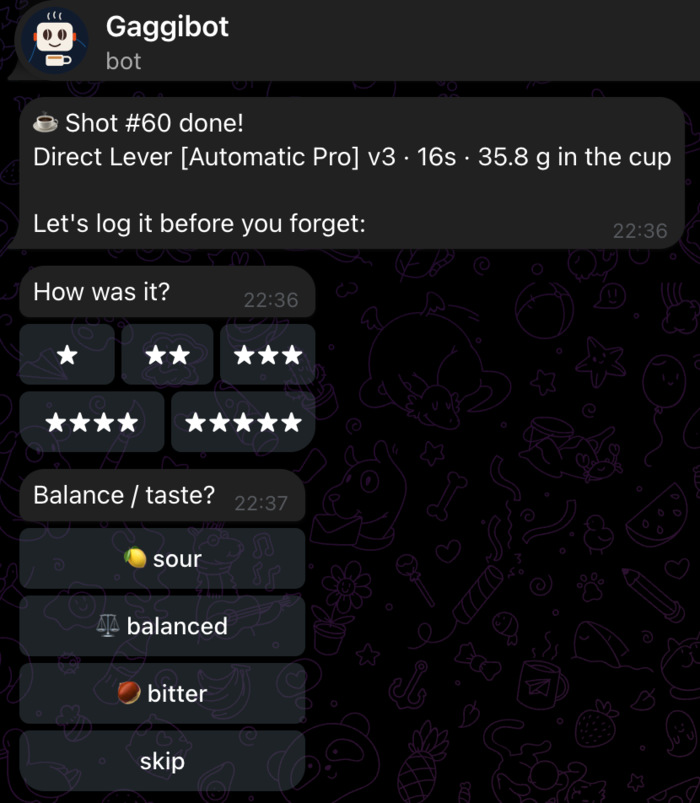
- Watches the machine over its WebSocket API and detects finished brew shots (backflush/descale/flush runs and anything under 10 s are ignored).
- Runs a short questionnaire via Telegram or Discord (Matrix planned), with one-tap "same as last shot" defaults for beans, grind and dose.
- Saves the answers into the machine's shot history — GaggiMate stays the source of truth, with or without matebot.
- Optionally archives every shot (
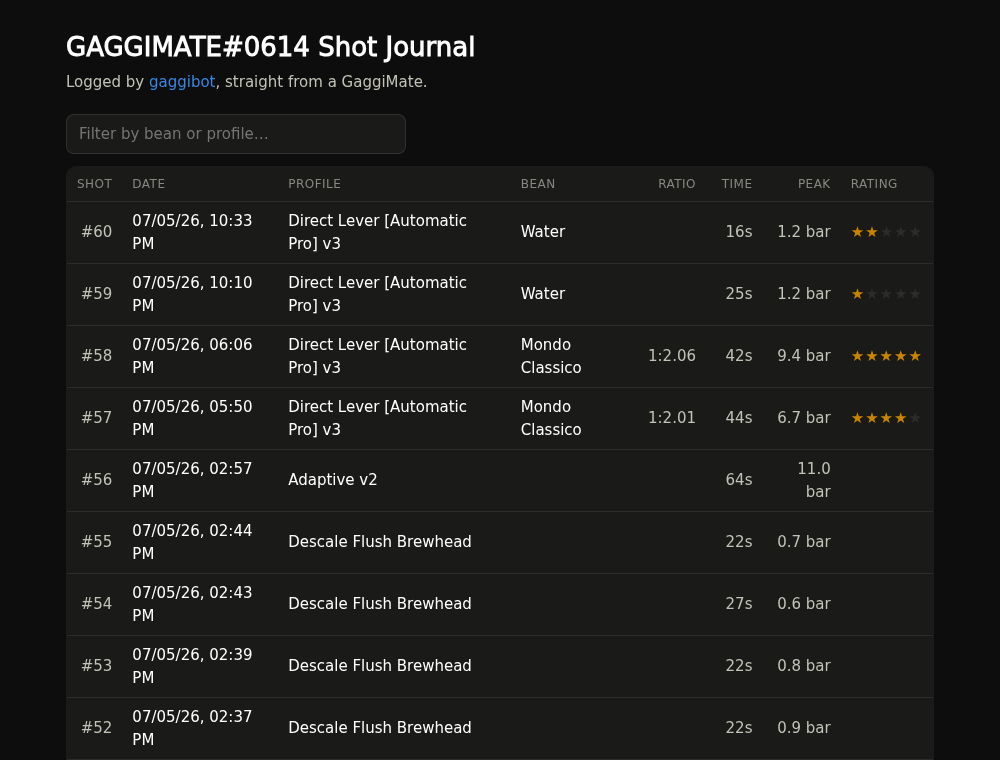
.slog+ notes), your brew profiles and machine settings (credentials redacted) to a git repository after each shot. - Generates a static shot journal from that archive, ready for GitHub Pages. Because the journal lives outside the machine, it survives firmware updates and downgrades, a dying SD card, or a water-damaged machine.
- Ships a standalone
.slogdecoder (matebot decode shot.slog --csv). - After a sour, bitter or low-rated shot it suggests the next dial-in step
(grind → ratio → temperature, one variable at a time), following
modsmthng's Automatic Pro cheat sheet
— disable with
MATEBOT_HINTS=0.
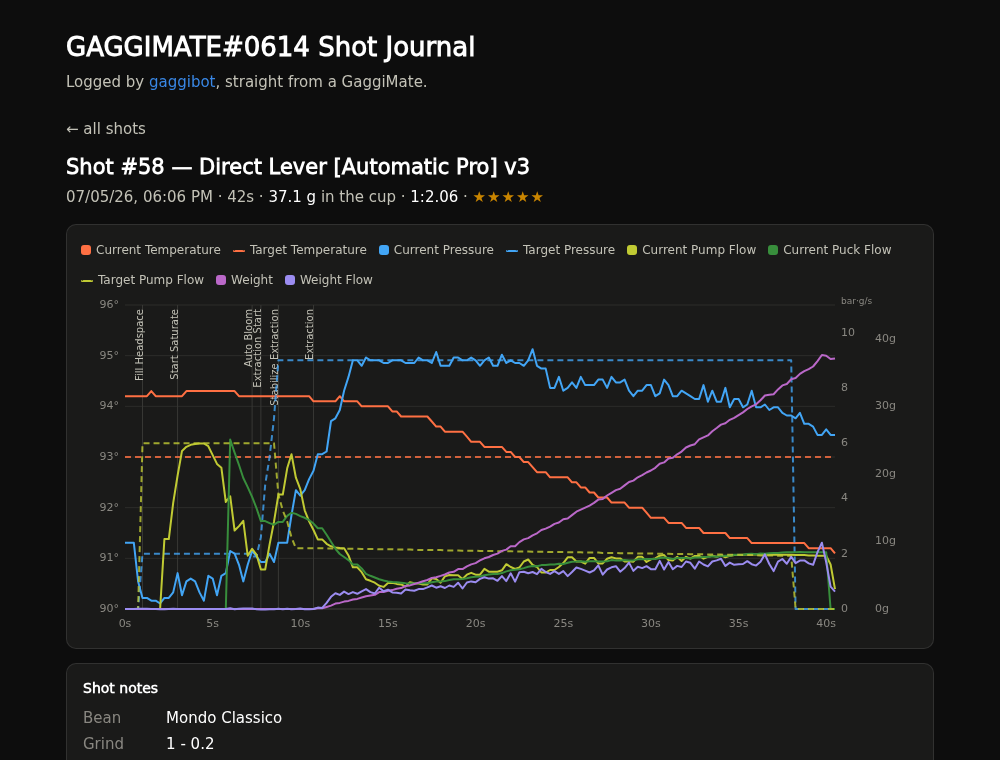
Live example — every shot with the familiar combined pressure/flow/temperature chart, phase markers, ratings and notes.
mkdir matebot && cd matebot
curl -O https://raw.githubusercontent.com/AlexNly/matebot/main/docker-compose.example.yml
cp docker-compose.example.yml docker-compose.yml
# edit: machine host, bot token, chat id
docker compose up -d
Images are multi-arch (amd64 + arm64, so a Raspberry Pi works):
ghcr.io/alexnly/matebot:latest. There is no cloud service behind this —
the bot needs to run on something in your home network that is always on.
A Pi Zero 2 W and a USB charger is the whole data center.
pipx install "matebot[telegram]"   # or: pip install "matebot[telegram]"
matebot runinputs.matebot.url = "github:AlexNly/matebot";
services.matebot = {
enable = true;
machineHost = "192.168.1.50";
environmentFile = "/etc/secrets/matebot"; # TELEGRAM_BOT_TOKEN=... / TELEGRAM_CHAT_ID=...
dataRepo = "/var/lib/gaggimate-journal"; # optional
};- Telegram: create a bot with @BotFather
(
/newbot), copy the token. Message your bot once, then read your chat id fromhttps://api.telegram.org/bot<TOKEN>/getUpdates. Discord: create an application + bot, invite it to a server, enable the message content intent, copy the channel id. - Point
MATEBOT_MACHINE_HOSTat your GaggiMate. A DHCP reservation is more reliable thangaggimate.local. - Pull a shot.
Besides the post-shot questionnaire, the bot answers commands (any messenger):
/wake     turn the machine on — pings you when it's at temperature
/sleep    back to standby
/status   mode, boiler temperature, water level
/last     the last logged shot (with journal link if configured)
/fix      redo the questionnaire for the last shot
/help     list commands
GaggiMate in standby still draws power, so many people cut it at a smart
plug — which normally kills /wake. Give MATEbot the plug's on/off commands
and /wake becomes a true cold start (plug on → wait for the machine to
boot → brew mode → ready ping), while /sleep powers everything down:
# Tasmota (Nous A1T, Eightree, ...)
MATEBOT_WAKE_HOOK='curl -sf "http://192.168.1.60/cm?cmnd=Power%20On"'
MATEBOT_SLEEP_HOOK='curl -sf "http://192.168.1.60/cm?cmnd=Power%20Off"'

# Shelly
MATEBOT_WAKE_HOOK='curl -sf "http://192.168.1.60/relay/0?turn=on"'
Any shell command works (Home Assistant webhook, tinytuya, zigbee2mqtt…).
NixOS module users: write % as %% in the hook options — the values pass
through a systemd unit, which treats single % as a specifier.
Opt in with MATEBOT_CAMERA=1 and MATEbot serves a phone-camera page on
MATEBOT_CAMERA_PORT (default 8877). Open it on a phone near the machine,
allow camera access, and leave the page open — recording starts and stops
automatically with each shot. Clips are transcoded (720p, with audio),
committed to the journal repo, and the shot page plays them in sync with the
curves (scrub the chart, the video follows).
HTTPS is required — browsers only grant camera access on secure pages. MATEbot itself serves plain HTTP; put it behind whatever TLS you have:
- a reverse proxy with certificates (nginx/caddy/traefik), e.g.
matebot.example.com→127.0.0.1:8877(WebSocket support needed) - or zero-config on a tailnet:
tailscale serve https / http://127.0.0.1:8877
Sync is calibrated automatically: the pump is loud, so MATEbot aligns its
audio onset in the clip with the pump command in the shot data and writes the
exact per-shot offset. If a clip has no usable audio the fallback is
MATEBOT_CAMERA_OFFSET (default -1.0), and /vsync +0.5 still nudges any
shot manually. Videos rotate out after MATEBOT_VIDEO_KEEP shots (git
history keeps every clip recoverable).
After each recorded shot MATEbot also renders a shot reel — a portrait
video with the clip on top and the chart animating below it, playhead
tracking the x axis — and sends it to the chat (ready for sharing). Disable
with MATEBOT_REEL=0; it needs ffmpeg and the plots extra (matplotlib).
Environment variables, or the same keys in ~/.config/matebot/config.toml:
| Variable | Default | Meaning |
|---|---|---|
MATEBOT_MACHINE_HOST |
gaggimate.local |
GaggiMate hostname/IP |
MATEBOT_MESSENGER |
telegram |
telegram or discord |
TELEGRAM_BOT_TOKEN / TELEGRAM_CHAT_ID |
— | Telegram credentials |
DISCORD_BOT_TOKEN / DISCORD_CHANNEL_ID |
— | Discord credentials |
MATEBOT_DATA_REPO |
— | Path to a git clone; enables archive + journal |
MATEBOT_SITE_TITLE |
Shot Journal |
Title of the generated journal |
MATEBOT_JOURNAL_URL |
— | Public journal URL, used for /last deep links |
MATEBOT_HINTS |
1 |
Dial-in hints after sour/bitter/low-rated shots |
MATEBOT_STATE_DIR |
~/.local/state/matebot |
Bot state (defaults, resume) |
MATEBOT_MIN_SHOT_S |
10 |
Ignore shots shorter than this |
MATEBOT_IGNORE_PROFILES |
(?i)backflush|descale|flush|clean |
Profile regex to skip |
matebot run                 # the bot (--replay frames.jsonl --dry-run to test)
matebot decode SHOT.slog    # .slog -> JSON (--csv for CSV)
matebot sitegen shots/ -o docs/ --title "My Shot Journal"
matebot sync                # one-off journal sync (shots, profiles, settings, site)
- Create a repo for your data, clone it where matebot runs, set
MATEBOT_DATA_REPOto the clone. - On GitHub: Settings → Pages → Deploy from branch →
main//docs. - Every shot now updates
https://<you>.github.io/<repo>/.
Local network only — nothing leaves your LAN except the messenger API and your own git remote. Requires GaggiMate firmware ≥ v1.7 (binary shot logs).
ws://<machine>/ws—evt:statusfor shot detection,req:history:notes:savefor notes,req:profiles:listfor backupGET /api/history/index.bin,<id>.slog,<id>.json— shot downloadsGET /api/settings— settings backup; WiFi/AP/Home-Assistant credentials are redacted before anything is written to disk
The .slog v5 binary format (512-byte header, 26-byte samples at 250 ms) is
documented in src/matebot/slog.py.
There is no reasonable self-hosted WhatsApp bot API. Two workable paths: bridge your Telegram/Matrix chat via mautrix, or Meta's WhatsApp Business Cloud API (requires a business account). Native support: contributions welcome.
- GaggiMate by jniebuhr — the machine controller this companion talks to.
- The journal's shot chart recreates the look of GaggiMate's own web UI (independent reimplementation — GaggiMate's UI code is CC BY-NC-SA and none of it is copied). Rendered with Chart.js and chartjs-plugin-annotation (MIT, vendored).
- The dial-in hints follow the guide from Automatic Pro cheat sheet by modsmthng.
MIT. Not affiliated with the GaggiMate project.