What happens
Six distinct elements on the header and dashboard alone fail WCAG AA contrast in the shipped default (light) theme. Measured live by computing each element's resolved foreground against its first opaque ancestor background:
| Element |
Foreground |
Background |
Ratio |
Required |
.app-title (header title) |
#3498db |
#ffffff |
3.15:1 |
4.5:1 |
.system-info .value |
#3498db |
#2c3e50 |
3.48:1 |
4.5:1 |
.tour-btn ("Guide") |
#ffffff |
#2980b9 |
4.30:1 |
4.5:1 |
.logout-btn ("Logout") |
#ffffff |
#e74c3c |
3.82:1 |
4.5:1 |
.widget-trend.highlight ("0 Pending Approvals") |
#f39c12 |
#ffffff |
2.19:1 |
4.5:1 |
.widget-value.healthy ("Online", 36px bold) |
#2ecc71 |
#ffffff |
2.10:1 |
3:1 (large text) |
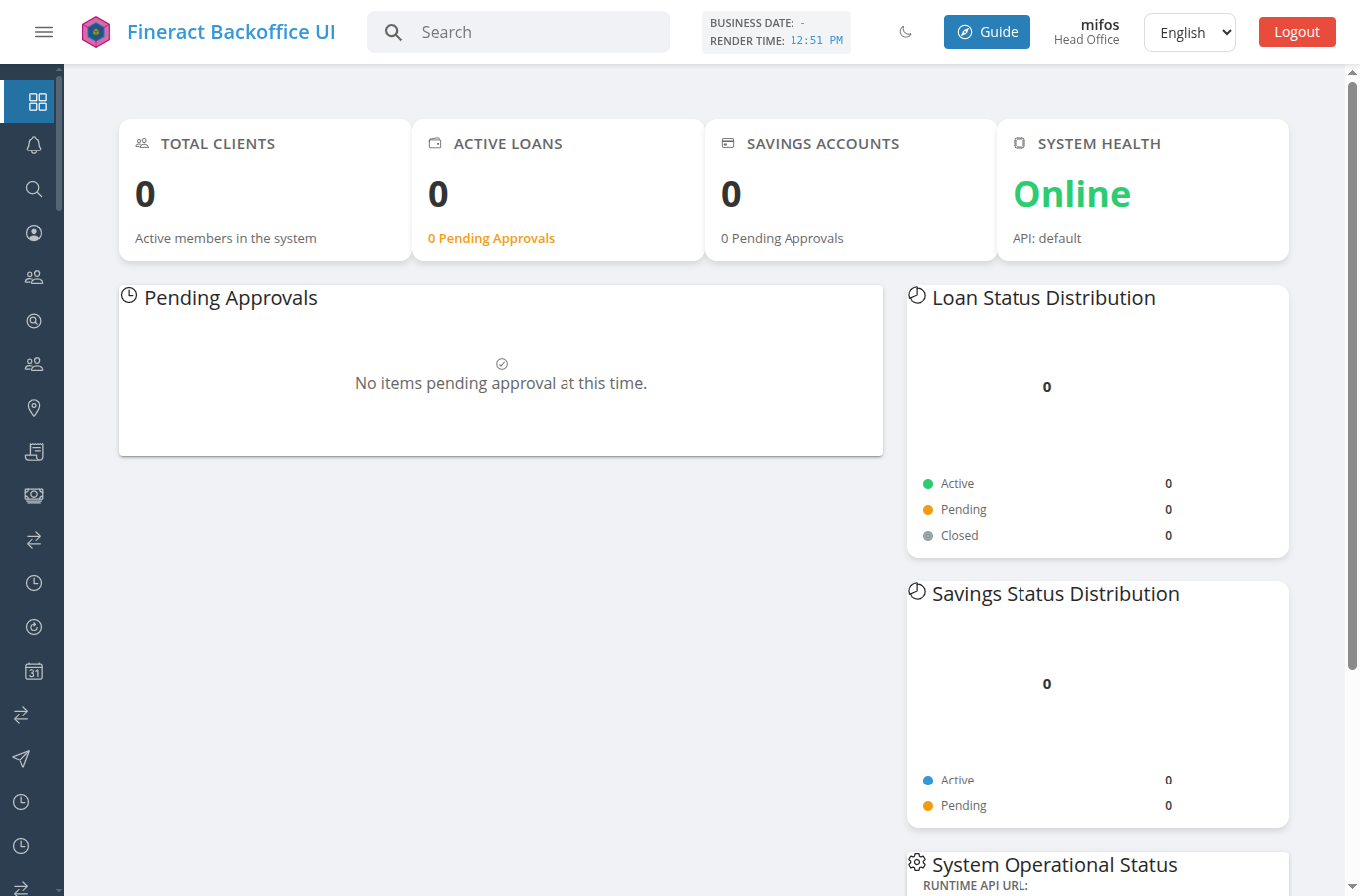
This is only the header plus one screen. The same palette values are used throughout, so the real count is higher.
The structural half of the problem
DOCS/CUSTOMIZATION.md documents a WCAG-AA contrast floor that is enforced on secondary-color / primary-strong overrides — a deployer supplying a failing value is refused and the refusal is logged.
But the six values above are hardcoded in the shipped default theme, outside BRANDABLE_TOKENS. Two consequences follow:
- The project's own contrast enforcement does not apply to the project's own defaults. It only guards what a deployer overrides — the shipped baseline is exempt from the rule it enforces on everyone else.
- A deployer cannot fix these even if they want to. Because the values are not on the brandable allow-list read path, setting
branding.tokens leaves several places in the shipped chrome on the old colour regardless. Their override appears to "work" while the header title, Logout button and dashboard widget text stay unchanged.
Suggested fix
Move these values into BRANDABLE_TOKENS' default set and pick AA-passing defaults, rather than patching the six CSS sites individually. That closes the accessibility failures and the branding-coverage gap in one change, and brings the defaults under the same contrast check that already guards overrides.
Darkening each colour is enough on its own terms — e.g. #3498db → #1f6fa5 clears 4.5:1 on white, #e74c3c → #c0392b clears it for the Logout button — but doing it as a CSS patch leaves problem 2 in place.
How the numbers were produced
For each element: resolved getComputedStyle().color, walked ancestors for the first background with non-zero alpha, applied the WCAG relative-luminance formula, and chose the 3:1 vs 4.5:1 threshold from the element's own computed font-size/font-weight (only "Online" at 36px/700 qualifies as large text).
Environment
Reproduced against a clean checkout of main (a24a06ba) served with ng serve, light theme, 1366×900, Chrome.
What happens
Six distinct elements on the header and dashboard alone fail WCAG AA contrast in the shipped default (light) theme. Measured live by computing each element's resolved foreground against its first opaque ancestor background:
.app-title(header title)#3498db#ffffff.system-info .value#3498db#2c3e50.tour-btn("Guide")#ffffff#2980b9.logout-btn("Logout")#ffffff#e74c3c.widget-trend.highlight("0 Pending Approvals")#f39c12#ffffff.widget-value.healthy("Online", 36px bold)#2ecc71#ffffffThis is only the header plus one screen. The same palette values are used throughout, so the real count is higher.
The structural half of the problem
DOCS/CUSTOMIZATION.mddocuments a WCAG-AA contrast floor that is enforced onsecondary-color/primary-strongoverrides — a deployer supplying a failing value is refused and the refusal is logged.But the six values above are hardcoded in the shipped default theme, outside
BRANDABLE_TOKENS. Two consequences follow:branding.tokensleaves several places in the shipped chrome on the old colour regardless. Their override appears to "work" while the header title, Logout button and dashboard widget text stay unchanged.Suggested fix
Move these values into
BRANDABLE_TOKENS' default set and pick AA-passing defaults, rather than patching the six CSS sites individually. That closes the accessibility failures and the branding-coverage gap in one change, and brings the defaults under the same contrast check that already guards overrides.Darkening each colour is enough on its own terms — e.g.
#3498db→#1f6fa5clears 4.5:1 on white,#e74c3c→#c0392bclears it for the Logout button — but doing it as a CSS patch leaves problem 2 in place.How the numbers were produced
For each element: resolved
getComputedStyle().color, walked ancestors for the first background with non-zero alpha, applied the WCAG relative-luminance formula, and chose the 3:1 vs 4.5:1 threshold from the element's own computedfont-size/font-weight(only "Online" at 36px/700 qualifies as large text).Environment
Reproduced against a clean checkout of
main(a24a06ba) served withng serve, light theme, 1366×900, Chrome.